What matters when choosing
For mortgage comparisons on a small desk, decide whether your main task is entering figures into software, checking arithmetic independently or calculating loan scenarios directly on a device.
Wired numeric keypad
Choose it when: You repeatedly enter figures into a spreadsheet or browser calculator using a laptop or compact keyboard.
Keep in mind: It needs a compatible connection and cannot calculate a repayment on its own.
Compact desk calculator
Choose it when: You want a separate display for checking individual figures beside paperwork.
Keep in mind: You must transfer figures manually into any spreadsheet or online comparison.
Financial calculator
Choose it when: You regularly use dedicated interest or amortisation calculations.
Keep in mind: Its financial modes take practice and do not replace a lender’s confirmed figures.
| Concern |
What to check |
Who this matters to |
| Repeated number entry |
For a wired keypad, check the connector against an available computer port and confirm operating-system support. Kensington says some K79820WW shortcut keys work only with Windows. |
If I keep changing loan amounts, rates and terms in a spreadsheet, I want dedicated number keys without a larger main keyboard. Around 40% of consumers would put repeated computer entry first. |
| Standalone arithmetic |
Measure the available desk space and check the calculator’s display and digit capacity. Casio lists the MS-120FM at 148.5 × 101 × 27.6 mm with a 12-digit display. |
When I check deposits and fees beside paperwork, I want to see the result without switching computer windows. For about 40% of consumers, standalone arithmetic would be the primary need. |
| Loan modelling |
Check the exact model for the financial modes you will use and how entered values can be reviewed. Casio lists amortisation and compound-interest functions for the FC-100V-2. |
For repeated loan-balance and interest comparisons, I want financial modes rather than setting up each calculation from scratch. Dedicated modelling would come first for around 20% of consumers. |
Joybuy products for standalone arithmetic
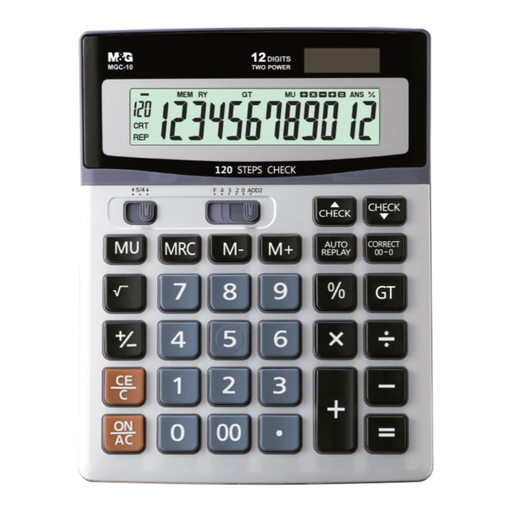
This desk calculator is an option for checking individual figures beside paperwork. If your main task is entering values into a laptop or using dedicated amortisation modes, choose a device suited to that task instead.
 No image available
M&G 12-Digit Check & Correct Calculator, 120 Steps
For checking individual figures beside paperwork rather than entering them into a computer.
The model name specifies 12 digits and 120 steps. Check its dimensions against your available desk space, and confirm the functions you need if you intend to calculate loan payments directly on the device.
View on Joybuy
Common questions
Can a numeric keypad calculate my mortgage payment by itself?
No. A numeric keypad enters figures into a connected computer, so you need a spreadsheet or repayment calculator to do the calculation. MoneyHelper says its calculator produces estimates; your lender confirms the exact monthly repayment and payment date.
Which figures should I change when comparing mortgage payments?
Compare the amount borrowed, repayment term and rate you actually pay or have been offered. Consider a higher-rate scenario as well: the Financial Conduct Authority says lenders check affordability now and in the future, including the effect of possible rate rises.
Will a wired numeric keypad work with my laptop?
Check both the port and operating system for the exact keypad. Kensington specifies USB-A and Windows, macOS and Chrome OS support for its K79820WW, but says some shortcuts are Windows-only; Targus specifies a USB-A/USB-C cable and support for those operating systems for its AKP13GL.
What should I do with an old keypad or calculator?
Use an electrical-equipment recycling route rather than putting the device in household rubbish. GOV.UK’s distributor takeback guidance describes an opportunity to recycle old electrical equipment free of charge when buying new electrical equipment; ask the retailer about its route or check local electrical-recycling options.


