Laptop users without a numpad
If you change deposit, rate and term figures repeatedly in a browser-based mortgage tool, a separate keypad lets you keep a laptop or compact keyboard that otherwise suits you.


Choose a separate numeric keypad if your current keyboard works well but lacks a number pad; choose a keyboard with an integrated numpad if you also want to replace your main keyboard. A desktop calculator is useful for manual arithmetic checks, but use a mortgage repayment tool and the lender’s payment information to compare mortgage options.
If you change deposit, rate and term figures repeatedly in a browser-based mortgage tool, a separate keypad lets you keep a laptop or compact keyboard that otherwise suits you.
If you move between mortgage tools, lender documents, spreadsheets and ordinary typing at one desk, a replacement keyboard with an integrated numpad may suit your workflow better than a separate pad.
If you want to check deposit percentages or totals away from a screen, a desktop calculator can help with the arithmetic. Use a mortgage repayment tool and lender information for the mortgage comparison itself.
Choose it when: Your main keyboard is satisfactory but has no numpad.
Bear in mind: It adds a device and needs a compatible connection; Kensington’s K79820WW uses USB-A.
Choose it when: You also want to replace your main keyboard or use one keyboard across devices.
Bear in mind: Check its layout and space requirements; a wireless model also needs power management.
Choose it when: Your priority is checking simple arithmetic away from a screen.
Bear in mind: Basic arithmetic does not replace a mortgage repayment tool or the lender’s payment information.
| Concern | What to check | Who this matters to |
|---|---|---|
| Repeated number entry | Check the numeric layout, Num Lock indication and connector against your computer. | If I keep changing the deposit, rate and term in a browser tool, I want direct number entry without replacing a keyboard that works for me; around 50% of consumers put repeated entry first. |
| One desk keyboard | Check for an integrated numpad, a suitable layout and connection type; consider whether device switching matters to you. | When my main keyboard also needs replacing, I want one device for typing notes and entering figures; roughly 33% of consumers prioritise an integrated keyboard. |
| Manual arithmetic | Check that the display and arithmetic functions suit the calculations you plan to make. | I want to check deposit percentages or totals away from the browser, while using a mortgage tool for repayment estimates; about 17% of consumers put manual arithmetic checks first. |
A basic calculator handles arithmetic, while a mortgage repayment estimate also depends on inputs such as mortgage type, deposit, term and interest rate.
Use the calculator for manual checks and enter consistent assumptions into a suitable mortgage repayment tool when comparing scenarios.
Kensington’s K79820WW keypad uses USB-A, so it will not plug directly into a laptop with only USB-C ports.
Check the keypad’s connector and operating-system compatibility, along with your computer’s ports or any adapter you plan to use.
The Financial Conduct Authority explains that the annual percentage rate of charge, or APRC, incorporates relevant charges including fees. An introductory payment alone does not show the full comparison.
Compare the lender’s payment information, charges and APRC, including what happens after any introductory rate ends.
A separate pad and a replacement keyboard solve different problems. A working main keyboard need not be replaced solely to add numeric entry.
Decide whether you need just a numpad or also want a different typing layout or device-switching setup.
Relevant to a wired desk setup, whether you want a separate USB keypad or a complete keyboard with a numpad.
Relevant if you want a keyboard with an integrated numpad rather than a separate input device.
Relevant to manual arithmetic checks alongside a mortgage repayment tool.
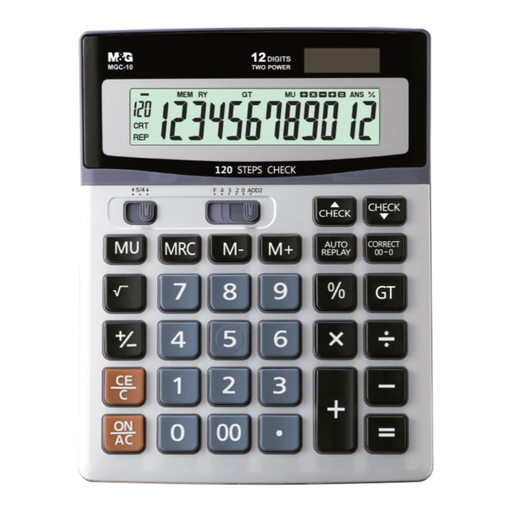
This desktop calculator is for checking simple figures alongside a mortgage repayment tool and lender information, rather than entering or modelling mortgage-payment scenarios.
 No image available
Use it for simple manual checks of deposit or fee arithmetic alongside a mortgage repayment tool and lender information.
No. A numeric keypad enters figures; a mortgage repayment tool performs the calculation. The Money and Pensions Service’s tool uses inputs including mortgage type, deposit, term and interest rate.
No. Citizens Advice describes calculator figures as a guide: the exact cost depends on the mortgage you choose. Check the lender’s information before making a decision.
No. Compare the lender’s payments and charges as well. The Financial Conduct Authority says APRC reflects the annual cost of a mortgage over its lifetime and incorporates relevant charges, including fees.
Check the exact keypad model, operating system and physical connection. Kensington lists Windows, macOS and ChromeOS compatibility for its K79820WW USB-A keypad, but some shortcut keys are Windows-only; a laptop without USB-A needs a separately checked compatible connection.