
24/7 Customer Support

Free returns

Same-day & Next-day Delivery

Quality Guaranteed
Download the APP
Categories
Fumbling for a light switch in a dark hallway, wishing your wardrobe would light up as you open it or simply looking for ways to make your home a little safer and more energy-efficient. These are common challenges that a motion sensor light can solve with elegant simplicity. These devices offer automated, hands-free illumination exactly when and where you need it.
As Joybuy's Product Recommendation Officer, my role is to help you navigate the options available. This guide is designed to provide clear, practical advice, cutting through the clutter to help you find a motion-activated light that genuinely suits your home and lifestyle. We will explore key features to consider and highlight a couple of standout options for different needs.
Choosing the right device comes down to understanding your specific requirements. Here are a few key factors to think about before making a decision.
How your light is powered dictates its placement and maintenance.
Your choice here depends on whether you want a simple, single-purpose device or a component of a larger, connected system.
Consider the size of the area you want to cover. A sensor for a small wardrobe needs a much shorter detection range than one for a long hallway. Many models also allow you to adjust the sensitivity, which can be useful for preventing pets from triggering the lights. Most modern sensors use Passive Infrared (PIR) technology, which detects body heat and include a photocell to ensure the light only activates in low-light conditions, further conserving energy.
After analysing the market for practical and reliable solutions, we've selected two distinct options that cater to the most common user needs.
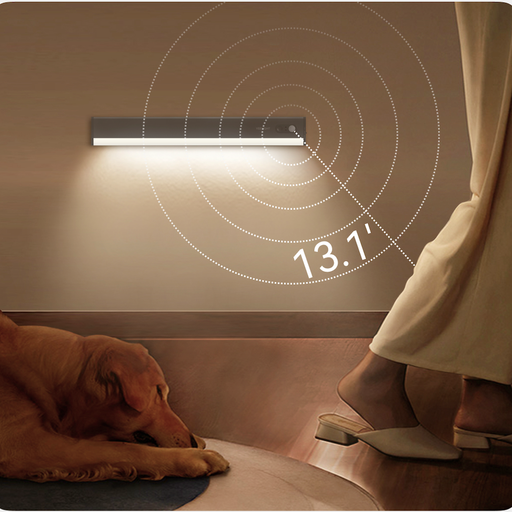
Why It Stands Out
The Yeelight A50 is a superb example of a standalone motion activated light. Its primary strength lies in its sleek design and effortless installation. At just a few millimetres thick, it can be placed discreetly inside wardrobes, under kitchen cabinets or along stairways without being obtrusive. The magnetic mounting system means you can attach it to any metal surface or use the included adhesive-backed metal plates for non-metal surfaces. The light itself can then be easily detached for recharging via a standard USB port.
Pros
Who is it for? This is an excellent choice for anyone seeking a quick, effective and stylish lighting solution for a specific area. It's perfect for renters or homeowners who want to add convenience to wardrobes, pantries and dark corners without any wiring or complex setup.
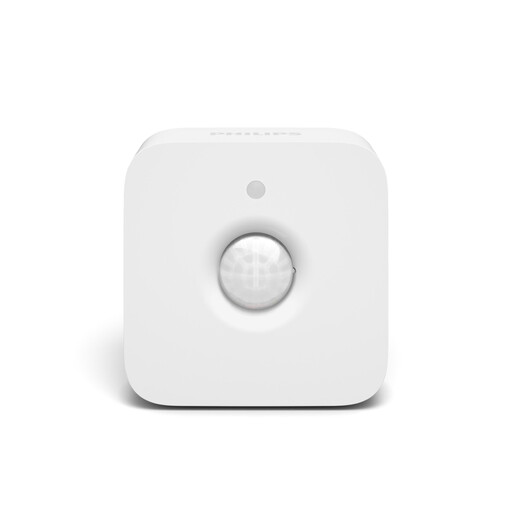
Why It Stands Out
This device is not a light, but a powerful smart lighting sensor designed to integrate into the Philips Hue ecosystem. Its purpose is to add intelligent automation to your existing Hue smart lights. Once connected to a Hue Bridge, you can customise its behaviour extensively via the app. For instance, you can set it to trigger a soft, dim nightlight after midnight but a bright, cool light during the evening. The integrated daylight sensor ensures it only activates your lights when needed, saving energy.
Pros
Who is it for? This sensor is for current Philips Hue users or those planning to invest in a comprehensive smart lighting system. If you want to move beyond simple on/off automation and create a truly responsive and intelligent home environment, this is the component that makes it possible.
Our recommendations cover a simple, standalone light and an advanced smart home sensor. However, the world of automated lighting is vast. You may be looking for a different length, a battery-powered strip or a different style of sensor.
For a broader range of solutions, from multi-packs of puck lights to alternative smart sensors, explore our full collection of sensor wireless lights.
Most indoor motion sensor lights use a Passive Infrared (PIR) sensor. This sensor detects the infrared energy (body heat) emitted by people and pets as they move within its detection zone. To conserve energy, they also contain a photocell that measures ambient light, ensuring the light only turns on when the area is dark.
This depends on the model. Many standalone units, like the Yeelight light, have a switch with 'On', 'Off' and 'Auto' modes. The 'On' setting allows it to function as a regular, constant light. The 'Auto' mode enables motion sensing. For smart sensors like the Philips Hue, you can use the app to program lights to stay on for a set duration or override the motion sensor temporarily.
For general navigation, place sensors in high-traffic areas like hallways, staircases and landings. Position them so they cover the path of travel. For task-specific lighting, place them inside wardrobes, pantries or under cabinets near the door. To avoid false triggers, try not to aim them directly at heat sources like radiators, ovens or windows that receive direct sunlight.