Desk-based productivity users
If you spend long sessions navigating documents, spreadsheets or creative tools, consider hand fit, click noise, scrolling behaviour and whether configurable shortcuts would help your work.


For search-filter testing, start with a mouse that connects to the test computer, then choose features for your main use: a full-size productivity model for desk work, a compact Bluetooth model for travel and multiple devices, or a gaming model when programmable controls matter. Check operating-system compatibility and hand fit before buying; extra buttons and sculpted shapes suit particular workflows, not every user.
If you spend long sessions navigating documents, spreadsheets or creative tools, consider hand fit, click noise, scrolling behaviour and whether configurable shortcuts would help your work.
If you carry a mouse with a laptop or move between compatible devices, a compact shape, suitable Bluetooth connection and convenient device switching may matter more than a full-size grip.
If you regularly use game commands or application shortcuts, look at sensitivity settings and the position of programmable buttons rather than choosing by button count alone.
For search-filter testing, confirm that the mouse works with the test computer. For regular use, decide whether desk comfort, movement between devices or configurable controls is your primary need.
| Concern | What to check | Who this matters to |
|---|---|---|
| Comfort during desk work | Check handedness, dimensions and grip shape; consider click noise and wheel behaviour for your workspace. | If I use a mouse through long desk sessions, I want a shape that fits my hand and controls that suit repeated scrolling. Around 40% of consumers put this desk-use need first. |
| Connection and portability | Check the host device’s Bluetooth support, operating-system compatibility and any receiver you plan to use. | When I carry a mouse between devices, I need a connection each device can use without making the mouse awkward to pack. Around 30% of consumers prioritise this portable, multi-device need. |
| Gaming and command controls | Check button placement, available sensitivity settings and software support for the commands you intend to configure. | For games or shortcut-heavy applications, I want controls I can reach and configure for my own commands. Around 30% of consumers make that their primary need. |
Connection requirements vary by model. Microsoft specifies Windows 10 or 11 and Bluetooth 4.0 or later for its documented Bluetooth Mouse; that requirement does not describe every Bluetooth mouse.
Check the exact mouse’s connection modes against the computer, tablet and operating system you intend to use.
A computer without suitable Bluetooth support may need a compatible adapter for a Bluetooth connection.
Sensitivity settings are only part of the decision. Logitech lists adjustable sensitivity and programmable buttons for the G502 HERO, but their relevance depends on the games or applications you use.
Choose a button layout you can use, then check how the settings you need are configured on your system.
A thumb rest or sculpted shape does not establish that a mouse fits your hand, grip or preferred button positions. Razer describes the Pro Click V2 as ergonomic, but fit remains an individual choice.
Check handedness, dimensions, weight and the location of side controls, particularly if you cannot try the shape before ordering.
GOV.UK describes electrical-waste arrangements intended to support recovery, reuse and recycling of equipment and components.
When replacing a mouse, check whether a retailer, manufacturer or local authority offers a suitable electrical-waste collection route.
Compare individual models rather than assuming that every mouse from a brand has the same shape, connection or controls.
Logitech has named models for desk productivity, portable multi-device use and gaming, including the MX Master 3S, MX Anywhere 3S and G502 HERO.
Razer has ergonomic work-and-play and gaming-focused lines, including Pro Click V2, Viper, DeathAdder, Basilisk and Naga.
Microsoft provides a documented Bluetooth Mouse option for a compatible Windows setup.
These mice cover desk work, wireless use, vertical-grip preferences and gaming-oriented controls. Choose within those uses by checking the connection, shape and controls of the particular model.
 No image available
Consider this model for desk-based work where scrolling and quieter clicks matter. Logitech specifies quiet clicks and an 8,000 DPI sensor for the MX Master 3S; check whether its sculpted shape fits your grip.
If you want customised buttons, check that Logi Options+ works with your intended computer.
 No image available
Consider it for quiet office use if its wireless connection modes suit your devices. The product name specifies 2.4G+BT connectivity, adjustable DPI and a 1xAA battery arrangement.
If switching between computers is important, check how this mouse changes devices in your setup.
 No image available
Consider the vertical shape if you prefer that grip for desk use, but check its dimensions and handedness suitability. Its product name specifies six buttons, dual-mode wireless connection and an adjustable sensor up to 1600 DPI.
Check compatibility for your computer; the stated requirements include Windows 10 or 11 and macOS 13.6 or later.
 No image available
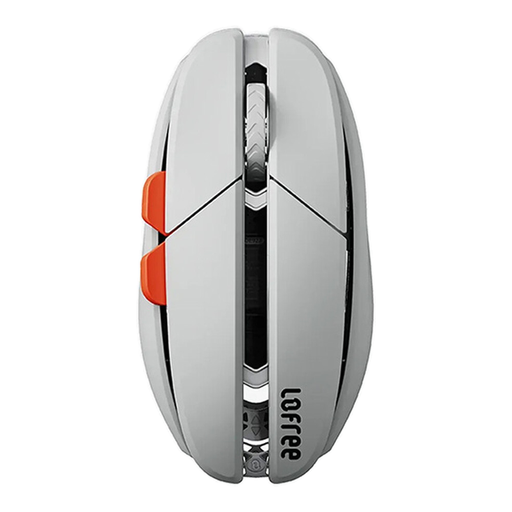
Consider this model if you want a choice of connection methods and adjustable sensitivity. Its product name specifies Bluetooth, 2.4G and wired modes, a PAW3950 sensor, and a magnesium-alloy frame with a PC shell.
If particular shortcut buttons matter, check their layout before ordering. Also check access to the configuration app and note the stated exclusion for Boot Camp dual-system mode on Mac devices.
 No image available
Consider it for gaming if a wired, right-handed mouse suits your grip and computer setup. Check that its button layout meets your needs rather than choosing on sensor settings alone.
If you want to customise its controls, check Razer Synapse compatibility with your operating system.
Choose Bluetooth if the mouse and your computer are compatible and keeping a USB port free matters; consider a receiver-based mouse when it comes with a compatible receiver and suits your setup. Check the exact hardware and operating-system requirements: Microsoft specifies Windows 10 or 11 with Bluetooth 4.0 or later for its documented Bluetooth Mouse.
Not always for basic pointing, but the settings you want may require software. Razer says its Pro Click V2 can be used without Razer Synapse, while Synapse adds customisation; check software support if button remapping, macros or profiles matter to you.
Only count on glass tracking when the exact model specifies it and your surface meets its conditions. Logitech states that the MX Master 3S can track on glass at least 4 mm thick; that claim does not apply to every mouse or glass surface.
Check for an available electrical-waste collection route through a retailer, manufacturer or local authority. GOV.UK describes waste electrical and electronic equipment arrangements intended to support recovery, reuse and recycling.