Deal with screen glare before choosing a mouse: changing the mouse will not remove reflections from a bright window. The Health and Safety Executive advises arranging the desk and screen to avoid glare and adjusting curtains or blinds where needed. Once the display is usable, choose by the remaining constraint: controls for long-page navigation, a shape that suits your hand, or tracking and portability for the surface you use.
Who needs to consider what?
Designers affected by screen glare
If daylight reflects off the display, decide whether screen position and incoming light need attention before spending on mouse features. The Health and Safety Executive recommends arranging the desk and screen to avoid glare and bright reflections.
Designers working for long stretches
Hand fit, grip and available mouse space may matter more than a headline sensor figure. A vertical mouse and a thumb-operated trackball involve different pointing movements, so consider which shape you would be comfortable using.
People using changing desks or devices
If your pointing surface varies, or you move between computers, check the exact mouse’s surface-tracking conditions, connection options and controls rather than assuming those features come together.
What matters when choosing?
Make the screen readable first, then identify the mouse feature that would change your work most: hand fit, tracking on your desk, or navigation controls.
| Concern |
What to check |
Who this matters to |
| Screen glare |
Check whether screen position and curtains or blinds can reduce reflections before choosing mouse features. |
When daylight makes text and contrast hard to judge, I need to see the page clearly before changing my pointer setup. Around 29% of consumers put this workstation issue first. |
| Hand and forearm comfort |
Check hand-size guidance and handedness; consider whether a vertical grip or thumb-operated trackball suits your pointing preference. |
For extended design sessions, I want a shape I can use comfortably without assuming that one grip fits every hand. Comfort is the primary concern for around 29% of consumers. |
| Desk surface and portability |
If the desk is glass, check the exact model’s tracking conditions; also consider mouse size and connection options when moving between desks. |
On a glass or changing work surface, I need dependable pointer control without carrying an unsuitable setup from place to place. Around 21% of consumers prioritise surface fit and portability. |
| Navigation controls |
Check scroll modes, reachable buttons, software compatibility and device switching against the tools you use. |
While editing long landing pages, I want scrolling and shortcuts that fit my workflow rather than controls I cannot use. Workflow controls come first for around 21% of consumers. |
Buying pitfalls
-
Expecting a mouse to fix screen glare
A different sensor or grip will not remove daylight reflected on the display. The Health and Safety Executive treats screen position, desk arrangement and lighting as workstation considerations.
Adjust the display’s position relative to the window and control intrusive light first. Then decide whether pointer control, comfort or navigation still needs improving.
-
Assuming an upright grip fits everyone
Fit guidance differs even among alternatives to a conventional mouse: Logitech positions Lift for small-to-medium hands and the MX Ergo S trackball for medium-to-large hands.
Check the exact model’s hand-size guidance and handedness options. If you cannot try the shape, review the seller’s return process before ordering.
-
Reading glass tracking as a promise for every desk
Logitech specifies a minimum glass thickness of 4 mm for MX Master 3S tracking on glass. That condition does not establish how another mouse will behave on your surface.
Check the exact model’s glass-tracking claim and any conditions before planning to use it without a mouse mat.
A mouse mat may still be needed if your surface does not meet the model’s stated conditions.
-
Choosing extra controls without checking your setup
Customised buttons and switching features are useful only when they work with your devices and software. Connection options and receiver contents also vary by model.
Check your operating system, available Bluetooth or USB connections, and any software or receiver requirements for the controls you intend to use.
Brands to consider
Logitech
Its relevant lines include full-size productivity mice, compact mice, vertical designs and trackballs. Compare the individual shapes rather than treating them as interchangeable comfort options.
- Logitech specifies 8,000 DPI tracking for MX Master 3S, including glass at least 4 mm thick. Lift has a 57° vertical shape positioned for small-to-medium hands.
- The MX Ergo S trackball is positioned for medium-to-large hands and uses thumb control; neither its fit nor Lift’s fit should be assumed for every user.
Razer
The Pro Click V2 is a right-handed productivity-mouse option for people considering scrolling controls and switching between devices.
- Razer lists a dual-mode scroll wheel and connectivity for up to five devices on the Pro Click V2.
- Its extended thumb rest does not establish that the shape will fit every hand, and mouse features cannot correct display glare.
Lenovo
Its relevant accessories include a vertical-grip mouse and a Bluetooth mouse for switching between devices.
- Lenovo describes a palm rest and vertical grip on the Go Wireless Vertical Mouse; the Yoga Bluetooth Silent Mouse supports switching between three devices.
- Choose between these shapes and connection styles by your hand fit and setup, not by assuming a brand-wide ergonomic advantage.
Joybuy mouse options
These options cover a full-size mouse for navigation, a vertical shape, a portable wireless setup and wired mice. Choose for the constraint that remains after addressing screen glare; check the actual desk surface and hand fit before relying on either.
 No image available
Logitech MX Master 3S Black
Consider this full-size productivity mouse if long-page navigation or programmable controls are your priority after fixing the screen setup.
Its listed features include an 8,000 DPI sensor, seven programmable buttons and MagSpeed scrolling. Glass tracking is specified for glass at least 4 mm thick; check the fit of its sculpted shape and software compatibility for button customisation.
View on Joybuy
 No image available
V7 MW500BT Bluetooth Vertical Mouse
Consider its upright grip if you prefer a vertical mouse for desk-based design work.
The listed configuration has six buttons, adjustable sensitivity up to 1600 DPI, and Bluetooth and 2.4 GHz wireless modes. Check hand-size and handedness fit, and confirm tracking on your desk surface if it is glass.
View on Joybuy
 No image available
HOFOTEK M311 2.4G+BT Mouse, White-Grey
Consider this wireless option if you move between devices and want adjustable pointer sensitivity.
The listed features include Bluetooth 5.1 and 2.4 GHz connectivity, 800–4000 DPI settings and a 1×AA battery configuration. Check its size against your grip and confirm suitability for a glass desk before relying on that surface.
View on Joybuy
 No image available
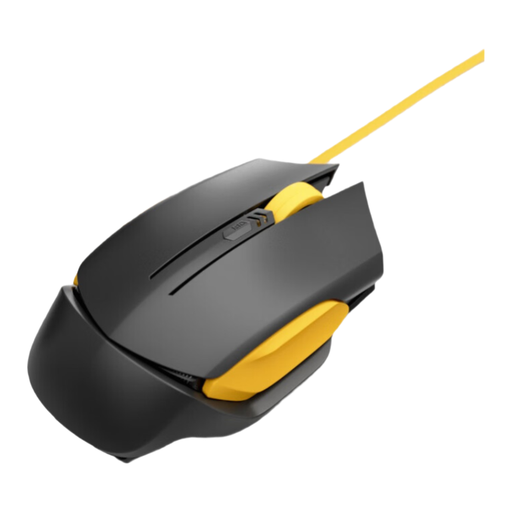
ochama Wired Optical Mouse, Black and Yellow
Consider this for a stationary wired setup where adjustable cursor sensitivity matters.
The listed configuration has four DPI levels and a 1000 Hz polling rate. Check its dimensions and hand fit for prolonged use, and verify tracking on your particular desk surface if needed.
View on Joybuy
 No image available
Rexsun V2 Wired Mouse, Black
Consider this USB mouse if your design setup stays at one computer and you want basic sensitivity adjustment.
It lists four buttons, silent clicks and 1000, 1200 and 1600 DPI settings, with Windows and Mac compatibility stated in its product name. A wired connection may not suit a cable-free desk; check surface tracking and hand fit separately.
View on Joybuy
Frequently asked questions
Will a different mouse solve glare from the window?
No. A mouse may change pointer control or hand fit, but it cannot remove reflections from the display. The Health and Safety Executive advises arranging the desk and screen to avoid glare, including adjusting curtains or blinds where necessary.
Do I need a mouse that tracks on glass?
Only if glass is the surface on which you will use the mouse. Logitech specifies glass tracking for MX Master 3S on glass at least 4 mm thick and also describes MX Anywhere 3S as tracking on glass. Check the conditions for the exact model you choose.
Should I choose a vertical mouse for landing-page design?
A vertical mouse is worth considering if you prefer an upright grip and the particular model fits your hand. Logitech positions Lift for small-to-medium hands, while Lenovo describes a vertical grip on its Go Wireless Vertical Mouse; check handedness and whether you are comfortable adapting to the shape.
Does workplace guidance require a particular ergonomic mouse?
The Health and Safety Executive’s display-screen-equipment guidance calls for assessment of the workstation rather than prescribing a particular mouse model. Where workers use display screen equipment daily as part of normal work for continuous periods of an hour or more, the HSE says employers must carry out a workstation assessment.


