Choose a vertical mouse if an upright grip and suitable hand fit matter most, a stationary trackball for a tight desk, a conventional productivity mouse for frequent document navigation, or a simple wired mouse for battery-free use. Check handedness, connection and desk layout too: the Health and Safety Executive advises considering the whole display-screen workstation, not just the mouse.
Who this is for
Writers focused on long-session comfort
If drafting and revision mean extended time at your desk, mouse shape and hand fit deserve attention alongside the rest of your setup. The Health and Safety Executive notes that poorly designed display-screen workstations or incorrect use can contribute to discomfort in the hands, wrists, arms and elsewhere.
Writers navigating lengthy documents
If you repeatedly move between chapters, PDFs, references and comments, consider whether scrolling behaviour, click noise and configurable controls would help your workflow. Logitech lists such features on its productivity mice and trackballs; their value depends on how you work.
Writers with limited desk space or a simple setup
A compact desk may favour a pointer that stays in place, while a fixed workstation may make a basic wired mouse appealing. Logitech describes its ERGO M575S trackball for small or busy setups; Kensington offers a battery-free wired option.
What matters when choosing
For dissertation work at a home desk, start with the pointing style that addresses your main constraint, then check fit, connection and the space beside your keyboard.
Vertical mouse
Consider it: When you prefer a more upright grip during writing and editing.
Trade-off: Hand-size range and handedness must match; a vertical shape is not a remedy for pain.
Productivity mouse
Consider it: When frequent scrolling and shortcuts matter more to you than an upright grip.
Trade-off: Configurable functions may take software setup and may go unused.
Thumb-operated trackball
Consider it: When papers or equipment leave little room to move a mouse.
Trade-off: Thumb-led cursor control takes a different technique and may not suit your preference.
Simple wired mouse
Consider it: When you want a familiar pointer at a fixed desk without charging or pairing.
Trade-off: The cable needs a clear route, and a basic button layout offers fewer shortcuts.
| Concern |
What to check |
Who this matters to |
| Hand comfort during long sessions |
Check the stated hand-size range and handedness; assess the whole desk setup as well as the mouse. |
If I spend hours drafting and selecting text, I want a grip that fits my hand without treating a new mouse as the answer to every discomfort. Around 31% of consumers put long-session fit first. |
| Moving through long documents |
Try the scroll wheel for both precise reading and longer jumps; check whether you would use configurable controls. |
When I move repeatedly between chapters, PDFs and references, convenient navigation matters more to me than extra features I would never set up. Document navigation is the first concern for roughly 31% of consumers. |
| Desk room and surface |
Check the usable area beside the keyboard and whether your chosen pointer suits the desk surface. |
With books and papers beside my keyboard, I need to know whether there is room to move a mouse or whether thumb control would suit me. For around 23% of consumers, usable pointing space comes first. |
| Battery-free simplicity |
Check the available USB port and whether the cable reaches comfortably across your desk. |
At a fixed desk, I would rather connect a mouse and work without charging or pairing it. A straightforward wired setup is the main priority for about 15% of consumers. |
Buying pitfalls
-
Assuming a vertical mouse will resolve wrist pain
A vertical grip still has to fit your hand. The Health and Safety Executive advises looking at the equipment, furniture, working conditions and task together, so changing the mouse alone may leave other contributors to discomfort unchanged.
Check hand size and handedness, and review your wider desk arrangement and work routine if discomfort persists.
-
Overlooking desk space and surface
A conventional mouse needs room to move, whereas a trackball stays in place. Surface claims can also have limits: Logitech specifies glass at least 4 mm thick for MX Master 3S track-on-glass use.
Measure the space beside your keyboard and check the surface conditions stated for any mouse you plan to use there.
-
Choosing controls you will not configure
Programmable buttons and sensitivity settings are useful only if they suit your document workflow and you are willing to set them up.
Decide which shortcuts you would actually use and check the required software against your computer before choosing extra controls.
-
Putting an old mouse or its batteries in household rubbish
GOV.UK advises that end-of-life electrical products and batteries should not go in household rubbish.
Use an appropriate battery collection point for removable batteries and an electrical-waste collection or applicable retailer take-back route for the mouse.
Brands to consider for these mouse types
Logitech
Logitech offers distinct vertical, document-navigation and stationary-trackball designs to compare for this task.
- Logitech specifies Lift for small to medium hands and offers a left-handed version; MX Master 3S has quiet clicks and scrolling features; ERGO M575S stays in place during pointer movement.
- These designs serve different hands and desk layouts. Manufacturer comfort claims do not establish how any one mouse will feel for you.
Kensington
Kensington provides a basic wired mouse and a more specialised vertical shape for different desk preferences.
- Mouse-in-a-Box Wired has a 1.8 m USB cable and battery-free operation. Kensington specifies a 46.7° slope for Pro Fit Ergo Vertical.
- Kensington describes the wired model for average-sized hands and the vertical model for average to larger hands; its posture and comfort descriptions are manufacturer claims.
Evoluent
Evoluent separates its vertical-mouse models by hand size, with some left-handed options.
- Evoluent gives approximately 178 mm from middle-finger tip to wrist crease as a sizing boundary between regular VerticalMouse 4 models and the Small version.
- Evoluent says it no longer ships directly to UK retail customers; check a reseller’s delivery, warranty and return arrangements before ordering.
Joybuy product choices
These mice cover several ways to work at a home desk: a document-navigation mouse, a vertical shape, quieter conventional wireless options and a simple wired model. Choose by the need and fit checks above rather than treating their order as a comfort ranking.
 No image available
Logitech MX Master 3S Black Mouse
Consider this conventional mouse if moving through long chapters and references is your main task.
Check whether its shape fits your hand and whether you would use optional control customisation.
View on Joybuy
 No image available
V7 MW500BT Vertical Mouse, 2.4GHz/Bluetooth
Consider its upright shape if that grip is your preference for writing and editing.
The product name specifies six buttons and an adjustable sensor rated up to 1600 DPI. Check hand fit and handedness before choosing it.
View on Joybuy
 No image available
HOFOTEK M311 2.4G+BT Office Mouse, White-Grey
Consider this conventional mouse if you want a wireless option for document work in a shared room.
The product name specifies adjustable DPI settings and one AA battery. Its silent-click description is not a measured noise rating; check the shape for your hand.
View on Joybuy
 No image available
Philips 3000 Series SPK7378B/00 Wireless Mouse, Black
Consider this familiar mouse shape for general pointing and scrolling while you write.
Its product name specifies 2.4GHz wireless use with a USB receiver, a 1600 DPI optical sensor and an EU-version variant. Check that the receiver and shape suit your setup.
View on Joybuy
 No image available
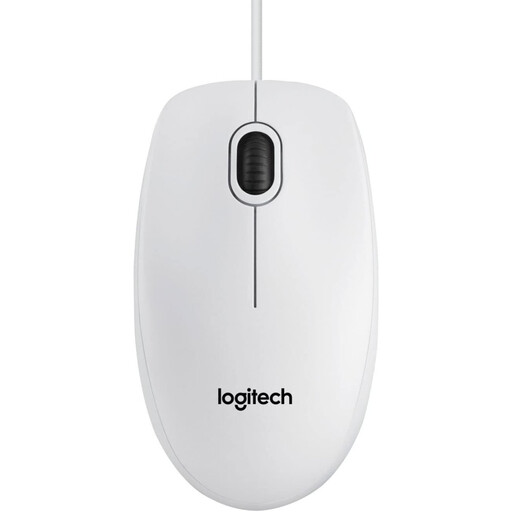
Logitech B100 USB Wired Mouse, White
Consider this wired mouse if you want straightforward pointing at a fixed desk without managing a battery.
Check that you have a suitable USB port and room to route its cable. If a particular B100 submodel matters to you, confirm the variant before ordering.
View on Joybuy
Common questions
Should I buy an ergonomic mouse if my hand or wrist hurts?
Do not rely on a mouse purchase alone to address discomfort. The Health and Safety Executive advises considering the whole workstation, the work being done and individual requirements; check your desk arrangement and work routine alongside mouse fit.
How do I check whether a vertical mouse will fit my hand?
Compare your hand measurements and handedness with the stated fit for the particular model. Logitech describes Lift for small to medium hands, Kensington positions Pro Fit Ergo Vertical for average to larger hands, and Evoluent uses an approximately 178 mm hand-length boundary when distinguishing regular from Small VerticalMouse 4 models.
Can an old mouse and its batteries go in household rubbish?
No: GOV.UK advises keeping end-of-life electrical products and batteries out of household rubbish. Use an appropriate collection point for removable batteries and an electrical-waste collection or applicable retailer take-back route for the mouse.


