Deal with screen glare and measure colour contrast before choosing a mouse: better pointer control cannot make colours easier to judge on a reflective screen or establish that an interface meets a contrast requirement. For detailed design and testing tools, consider adjustable tracking; for long pointer sessions, prioritise a shape that fits your hand; and if you use your left hand or share a workstation, check the controls and handedness before comparing other features.
Who this is for
Accessibility testers working near a bright window
If you inspect text, interface states or colour combinations, separate the screen-lighting problem from the mouse decision. The Health and Safety Executive advises arranging the desk and screen to avoid glare and bright reflections; the World Wide Web Consortium’s contrast guidance concerns the rendered text and its background.
People navigating detailed interfaces
If your work involves design files, browser tools or accessibility checkers, adjustable cursor movement may matter more than a headline maximum sensitivity. Logitech specifies adjustable tracking for the MX Master 3S.
People choosing by hand fit or handedness
If a conventional right-handed shape does not suit you, compare models by hand-size guidance, button access and orientation. Logitech, Kensington and Targus describe different vertical, left-handed and convertible designs.
What to check when choosing
Set up the screen for colour checking first, then choose the mouse according to the pointer task and the hand that will use it.
| Concern | What to check | Who this matters to |
|---|
| Contrast checks near a window |
Position the screen to avoid bright reflections, then measure contrast using the relevant text or interface values. |
If I check colours beside a bright window, I need to know whether glare is affecting what I see without mistaking appearance for a contrast measurement. Around 27% of consumers put reliable, glare-aware colour checking first. |
| Fine cursor control |
Look for adjustable sensitivity that suits your display and testing tools; check surface requirements if you work on glass. |
When I select small controls in dense design or testing panels, I want cursor movement I can tune to the task. Detailed pointer control is the main concern for around 27% of consumers. |
| Hand comfort |
Compare the stated hand-size range, shape and button reach rather than choosing by vertical angle alone. |
For long sessions of pointer work, I need a shape I can use comfortably, even if it takes time to get used to. Around 26% of consumers chiefly prioritise hand and wrist comfort. |
| Handedness and fit |
Confirm the intended hand, access to the controls and compatibility with your computer. |
If a right-handed shell puts the controls out of reach, usable orientation matters before extra productivity features. Handedness and fit come first for around 20% of consumers. |
Buying pitfalls
-
Buying a mouse to fix screen glare
A mouse may make testing tools easier to navigate, but it cannot remove a reflection that interferes with viewing the display.
Follow the Health and Safety Executive’s advice to arrange the desk and screen to avoid glare; choose the mouse separately for control and fit.
-
Using one contrast threshold for every item
Normal and large text have different contrast checks, so an appearance-based judgement beside a window is not enough.
Check the actual foreground and background colours, text size and applicable element type. World Wide Web Consortium guidance gives 4.5:1 for normal text, while Department for Work and Pensions guidance gives 3:1 for large text.
-
Choosing a vertical mouse by angle alone
A vertical shape does not establish that its size or controls will suit your hand. The Logitech Lift and Kensington Pro Fit Ergo Vertical are described for different hand-size ranges.
Check the individual model’s hand-size guidance, intended hand, button reach and computer compatibility.
-
Assuming a mouse will track on any glass desk
Glass tracking is model-specific. Logitech states a minimum glass thickness of 4 mm for the MX Master 3S.
Check the exact mouse and desk surface against that condition, or plan to use a mouse mat.
Brands to consider for these mouse designs
Logitech
Its MX Master 3S is a reference point for adjustable tracking, while Lift offers a vertical shape for small to medium hands, including a left-handed option.
- Logitech specifies 8,000 DPI tracking for the MX Master 3S, with glass tracking subject to a minimum glass thickness of 4 mm.
- Neither tracking nor a vertical shape removes display glare or measures colour contrast; check the fit of the particular model.
Kensington
Its Pro Fit models offer distinct vertical and left-handed ergonomic shapes rather than one fit for every user.
- Kensington specifies a 46.7-degree slope for the Pro Fit Ergo Vertical and makes a separate Pro Fit Left-Handed Ergo model.
- Choose by the individual model’s intended hand and fit; a neutral-grip design does not guarantee personal comfort.
Targus
The ErgoFlip is relevant when a workstation needs a mouse that can change between right- and left-handed use.
- Targus says the ErgoFlip converts between hand orientations by twisting its top.
- A convertible shell still needs to fit its users, and it does not address bright-window reflections.
Joybuy mouse options
These options cover adjustable tracking, a vertical grip, an ambidextrous wired shape and a wireless office mouse. Choose for the way you navigate testing tools and use your hand, not as a substitute for controlling glare or measuring contrast.
 No image available
Logitech MX Master 3S Ergonomic Black mouse
Consider this model if adjustable pointer tracking matters when navigating detailed testing tools. Logitech specifies 8,000 DPI tracking and says glass tracking requires glass at least 4 mm thick. Check its shape against your hand before buying.
View on Joybuy
 No image available
V7 MW500BT Bluetooth vertical mouse
Consider its vertical shape if an upright grip is your priority during long pointer sessions. The product name specifies Bluetooth and 2.4 GHz connection modes, six buttons and adjustable tracking up to 1600 DPI. Check hand fit and button reach for yourself.
View on Joybuy
 No image available
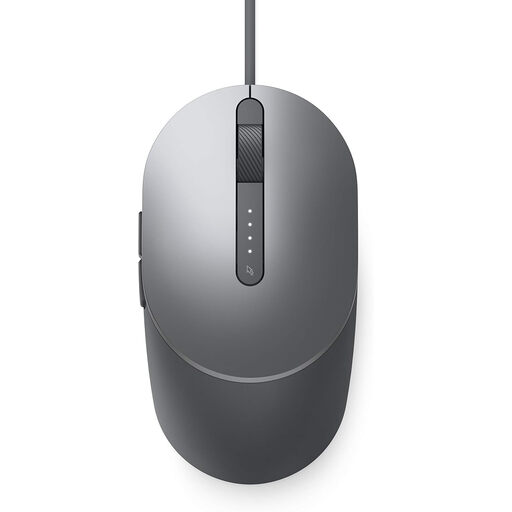
Dell MS3220 grey wired laser mouse
Consider this wired model if you prefer a cable connection for computer-based testing work. Its name identifies it as a laser mouse; check the control layout and physical fit if left-handed use matters to you.
View on Joybuy
 No image available
HOFOTEK M311 white-grey wireless office mouse
Consider this option if you want wireless connection choices and adjustable cursor sensitivity for office or testing tools. Its name specifies 2.4G and Bluetooth, multiple DPI levels and one AA battery. Check the physical fit and the connection requirements of your devices.
View on Joybuy
Questions and answers
Can a mouse make colours accessible or solve window glare?
No: a mouse helps you operate testing tools, but it cannot remove reflections or establish that colours meet a contrast requirement. The Health and Safety Executive advises arranging the desk and screen to avoid glare; measure contrast in the rendered interface rather than judging it by appearance alone.
Which contrast figures should I check for text?
Check the figure that applies to the text you are assessing. World Wide Web Consortium guidance gives 4.5:1 for normal text, while Department for Work and Pensions guidance gives 3:1 for large text; confirm the text size and applicable requirement before interpreting a checker result.
Do I need a glass-tracking mouse for a glass desk?
Choose by the exact model’s stated surface condition rather than the desk material alone. Logitech specifies glass tracking for the MX Master 3S on glass at least 4 mm thick; if your surface does not meet that condition, consider using a mouse mat.
Should I choose a left-handed, convertible or vertical mouse?
Start with the hand that will use it and whether the shape fits. Kensington offers a dedicated left-handed Pro Fit Ergo model, while Targus says its ErgoFlip switches between left- and right-handed use; vertical models also differ in their intended hand-size range, so check the individual model’s controls and fit.


