For menu-heavy detective games, choose a mouse that fits your hand and gives you predictable scrolling and enough accessible controls for the shortcuts you will use. A wired mouse avoids charging but leaves a cable on the desk; wireless is worth considering when cable-free use matters to you. Treat RGB lighting as an optional preference, not a substitute for fit or useful controls.
Who might need which features?
Menu-and-map shortcut users
If you repeatedly open evidence, maps, notebooks, inventories or dialogue menus, consider how many commands you can usefully assign to mouse controls. Logitech G lists customisable controls for its G502 X LIGHTSPEED, while Razer describes selectable scroll modes for the Basilisk V3 35K.
Long-session comfort seekers
If you play through extended cases, prioritise a shape and button arrangement you can reach comfortably. The Health and Safety Executive advises keeping a mouse within easy reach so it can be used with a straight wrist; a listed weight alone cannot tell you whether a mouse fits your hand.
Low-light desk ambience buyers
If adjustable lighting is part of the appeal of a dark-room setup, check where the light is located and whether you can change it. Razer lists configurable lighting on the Basilisk V3 Pro 35K, but lighting should remain a separate decision from fit and control layout.
What should you check before buying?
For detective games played in a dark room, identify the one need that matters most to you, then check the other features against it. Wired and wireless mice address different desk preferences; lighting can be considered after the controls and fit.
| Concern |
What to check |
Who this matters to |
| Shortcuts and scrolling |
Count the commands you want on the mouse. Check remapping software, scroll behaviour and whether your games accept the intended bindings. |
If I regularly move between case files, maps and inventory, I want controls I can find without accidental presses. Around 40% of consumers put navigation and shortcut control first. |
| Hand fit |
Compare dimensions, shape and button reach with your grip. Keep the mouse within easy reach and your wrist straight, as the Health and Safety Executive advises. |
During a long case, I need the mouse to feel manageable at my desk, regardless of its listed weight. Hand fit is the primary concern for around 30% of consumers. |
| Wired or wireless use |
Decide whether a desk cable or a charging routine is less troublesome. For wireless models, check the connection and charging options. |
If a cable interferes with my desk arrangement, I would rather manage charging than keep the cable. Cable-free use comes first for around 20% of consumers. |
| Adjustable lighting |
Check whether lighting is on the mouse or an accessory, and whether it can be adjusted or switched off. |
If I enjoy a softly lit desk while playing, I want control over the effect without letting it decide the mouse's fit. Around 10% of consumers prioritise lighting ambience. |
Buying mistakes to avoid
-
Expecting RGB to solve dark-room comfort
Adjustable lighting changes the look of a setup; it does not tell you whether the mouse fits your hand or has controls you can use easily.
Check fit, scroll behaviour and the jobs you have for extra buttons before choosing a lighting effect.
-
Choosing more buttons than you can use by touch
Logitech G lists 13 customisable controls on the G502 X LIGHTSPEED, but a dense layout may take practice to distinguish in a dark room.
Write down the commands you intend to bind. If you need only a few, compare simpler layouts as well as larger ones.
-
Assuming a light mouse will fit every hand
SteelSeries lists the Aerox 5 Wireless at 74 g, but weight does not establish whether its shape and buttons suit your grip.
Check dimensions, handedness and button reach. At your desk, keep the mouse close enough to use with a straight wrist.
-
Reading an ‘up to’ battery figure as everyday runtime
SteelSeries lists up to 180 hours for the Aerox 5 Wireless. That is a stated maximum, not a promise of the same runtime with every lighting and usage setting.
Check the charging method and battery-life conditions. If you would rather avoid charging altogether, consider a wired mouse.
Relevant brands to consider
These product lines illustrate different control and lighting choices; compare the particular model rather than assuming every mouse from a brand has the same features or fit.
Logitech G
The wireless G502 X LIGHTSPEED is relevant if you have several recurring commands to assign.
- Logitech G lists 13 fully customisable controls and LIGHTFORCE hybrid switches for this model.
- A feature-dense layout may be less appealing if you prefer to identify just a few buttons by touch.
Razer
The Basilisk line offers a wired scrolling-focused option and a separate wireless model with configurable lighting.
- Razer lists tactile, free-spin and Smart-Reel scrolling for the Basilisk V3 35K, and multi-zone RGB for the Basilisk V3 Pro 35K.
- Scroll and lighting features do not establish hand fit or whether a particular game accepts your preferred button bindings.
SteelSeries
The Aerox 5 Wireless is relevant if you want to weigh mouse weight against access to several buttons.
- SteelSeries lists the Aerox 5 Wireless at 74 g with nine buttons and up to 180 hours of battery life.
- Its stated battery figure is a maximum, and its listed weight cannot determine whether the shape fits your hand.
Joybuy mouse options for this setup
These mice offer wired or wireless ways to build a dark-room detective-game setup, with differing control and lighting choices. Check the exact controls, fit and game bindings that matter to you before choosing.
 No image available
AJAZZ AJ159 APEX Wireless Gaming Mouse with Magnetic Charging Base
Consider this model if you want to arrange mouse shortcuts while keeping a wireless option. Its title lists 2.4G and wired connection modes, a 56 g weight and a PAW3950 sensor; check the button layout, hand fit and whether your game accepts the bindings you plan to use. The described RGB lighting is on the charging dock, not confirmed on the mouse.
View on Joybuy
 No image available
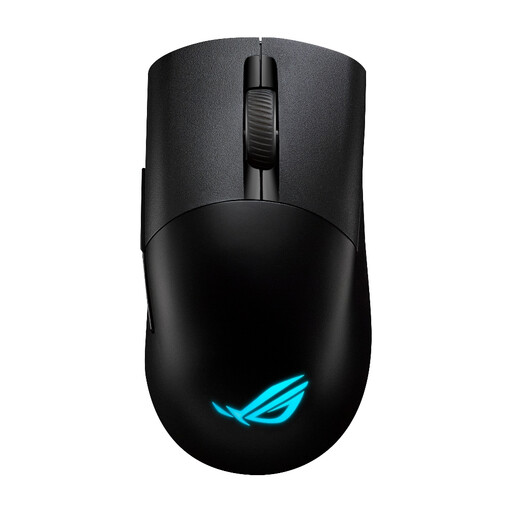
ASUS ROG Keris Wireless AimPoint Gaming Mouse — Black
Consider this wireless model if you want to set up a few recurring shortcuts. Check its control software, button reach and compatibility with your games before relying on those shortcuts; confirm the exact weight and sensor specification for this variant if either affects your decision.
View on Joybuy
 No image available
AJAZZ AJ200 AI MC Wireless Gaming Mouse with Charging Dock
Consider this model if cable-free use and shortcut customisation both matter to you. Its title lists Bluetooth, 2.4G and USB-C modes and a PAW3311 sensor; check the exact button arrangement, weight, hand fit and game bindings before choosing. The described RGB lighting is on the charging dock, not confirmed on the mouse.
View on Joybuy
 No image available
Rapoo VT7 MAX Wireless Gaming Mouse — White
Consider this model if you want room for several mouse shortcuts without a desk cable. Its title lists 10 programmable buttons, macro support and a 53 g weight; check their placement, the mouse dimensions and whether your games accept your chosen bindings. The advertised battery maximum depends on low-power mode, the latest driver and a 1000 Hz setting.
View on Joybuy
 No image available
ONIKUMA CW905 Wired Gaming Mouse
Consider this mouse if you prefer a cable and want adjustable lighting for your desk. Its listing describes programmable buttons and seven RGB backlight modes; check the shape, button reach and whether your games accept the bindings you intend to use.
View on Joybuy
Frequently asked questions
Do I need a high-DPI mouse for detective games?
A high maximum DPI need not drive this choice. Set sensitivity to a level you can control, then compare hand fit, scrolling and the commands you would actually assign to mouse buttons.
Should I choose wired or wireless for a dark-room setup?
Choose wired if you do not mind a cable and want to avoid charging; choose wireless if cable-free use matters more. Razer lists the Basilisk V3 35K as wired, while the Logitech G502 X LIGHTSPEED and SteelSeries Aerox 5 Wireless are wireless models. Check the charging arrangements for any wireless mouse you consider.
Can I cancel a UK online mouse order if the fit is wrong?
For most online orders from traders, GOV.UK says you can cancel up to 14 days after delivery without giving a reason. Check the applicable exceptions and the retailer's cancellation instructions before ordering. A change-of-mind cancellation is separate from remedies for goods that are faulty, damaged or misdescribed.
How should I position a mouse for a long gaming session?
Keep the mouse within easy reach so you can use it with a straight wrist. That follows the Health and Safety Executive's workplace display-screen guidance and gives you a practical way to assess your home desk arrangement.


