Frequent recipe-index navigators
If you move repeatedly between recipe lists, ingredient tables, browser pages and image folders, scrolling control and adjustable pointer movement may matter more than device switching.


If one computer drives both screens, choose a mouse for the work you do most: scrolling through recipes, selecting fields and moving the pointer comfortably across the desktop. Multi-device switching matters when you use separate computers; a vertical mouse or trackball is worth considering when hand fit or limited desk space matters more than familiar mouse movement. Check software compatibility before relying on custom controls or cross-computer features.
If you move repeatedly between recipe lists, ingredient tables, browser pages and image folders, scrolling control and adjustable pointer movement may matter more than device switching.
If recipe entry is a sustained desk task, assess hand fit and how much room you have to move a mouse. A vertical mouse, stationary trackball or centred control changes the way you work, so choose the form that suits your hand and workspace.
If each screen belongs to a different computer, look at device-switching controls or compatible cross-computer software. Those features serve a different purpose from moving a pointer between two monitors attached to one computer.
Establish whether your screens share one computer, then decide which part of recipe indexing most shapes your mouse choice: navigation, sustained comfort or switching between devices.
| Concern | What to check | Who this matters to |
|---|---|---|
| Moving through recipes and reference pages | Look for scrolling that can switch between fast travel and precise stopping, plus adjustable pointer sensitivity. | If I regularly move between long recipe lists and individual spreadsheet fields, I need to travel quickly without overshooting a row. Around 42% of consumers put navigation first. |
| Comfort during long sessions | Check hand-size guidance, handedness and the space the mouse needs beside or in front of the keyboard. | When recipe entry keeps me at the desk for extended periods, I want a shape and movement style that feel manageable throughout the task. For around 33% of consumers, comfort is the primary concern. |
| Using separate computers | Check pairing and switching methods; for cross-computer control, confirm device, operating-system and software requirements. | If the two screens belong to different computers, I need a practical way to move between them rather than a feature meant only for a larger desktop. Separate-device working comes first for around 25% of consumers. |
Two monitors attached to one computer share a desktop; switching between paired devices addresses a different setup.
Check which computer each screen uses before making device switching or cross-computer software a requirement.
A high sensitivity setting may make small recipe fields harder to select if pointer movement feels too fast.
Look for adjustable sensitivity and check whether the configuration software works with your operating system. If glass tracking matters, note that Logitech specifies glass at least 4 mm thick for the MX Master 3S claim.
Vertical mice, trackballs and centred controls have different grips, movements and space requirements. Shape alone does not establish personal comfort.
Check hand-size and handedness guidance, desk clearance and the retailer’s return terms. If this is an employed workstation and discomfort persists, raise it as part of a wider display-screen-equipment workstation assessment.
A model page can remain visible after a particular listing is discontinued; Kensington marks the cited Expert Mouse Wireless Trackball listing as no longer available.
Confirm the exact model, current availability and applicable warranty and return terms before ordering.
Its MX Master, M720, Lift and ERGO M575 lines illustrate different ways to prioritise scrolling, device switching, grip or stationary control.
The HP 430 Multi-Device Wireless Mouse is a conventional-shape option for people who want to switch between devices and assign button functions.
Its Expert Mouse Wireless Trackball illustrates an ambidextrous, stationary-control option with a scroll ring.
RollerMouse Red places roller-bar cursor control in front of the keyboard rather than beside it.
These mice offer different starting points for recipe-index navigation, hand fit and straightforward use with one computer. Match each model’s controls and connection to your own two-screen setup.
 No image available
Consider this for repeated movement through long recipe pages if its shape suits your hand. Check software compatibility before relying on customised controls or cross-computer use.
If you plan to work on glass, confirm that your surface meets Logitech’s stated condition of at least 4 mm thickness.
 No image available
Consider this if hand fit is a priority during long recipe-entry sessions. Its wrist rest is detachable, so check how both arrangements fit your desk and hand.
Confirm operating-system support before relying on button customisation.
 No image available
If wide recipe tables or switching between devices are important, check that this model’s scrolling and switching controls suit your workflow.
Confirm its exact body shape before choosing it for hand comfort. Cross-computer control is described as requiring a driver and a shared Wi-Fi or Ethernet network.
 No image available
Consider the vertical shape if that grip fits your hand during sustained index work; check hand fit before buying.
The named variant has six buttons and adjustable settings up to 1600 DPI. If fast travel through long lists matters, check whether its scrolling behaviour meets that need.
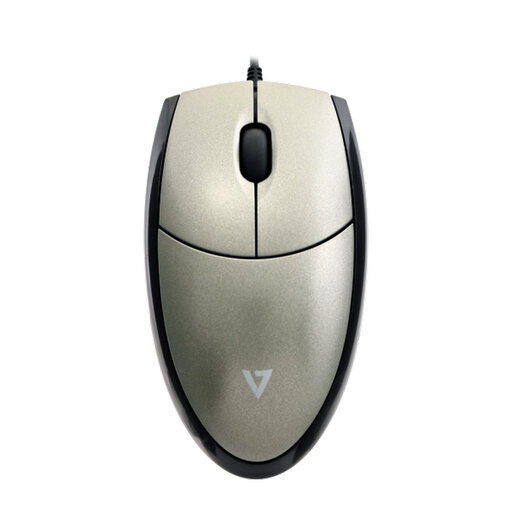 No image available
For two displays attached to one computer, this is a wired mouse to consider if ordinary pointer and scroll-wheel control meets your needs.
The named variant has a 1000 DPI sensor, three buttons, a tactile scroll wheel and a 1.6 m cable. Check operating-system compatibility if you use anything other than the listed Windows 10 or Windows 11.
No, not when both screens are attached to one computer: a mouse can move across that computer’s desktop without switching devices. If the screens belong to separate computers, check pairing controls or cross-computer software; Logitech says its Flow feature requires compatible devices and Logi Options+.
Scrolling control, adjustable pointer sensitivity and buttons you can assign to repeated actions are useful checks for long recipe lists and detailed fields. If your ingredient tables extend sideways, consider whether the particular mouse offers horizontal scrolling and whether its software supports your computer.
A vertical mouse is an option to assess for fit, not a guaranteed remedy for discomfort. Check handedness and hand-size guidance—Logitech positions Lift for small to medium hands—and consider the wider workstation rather than relying on mouse shape alone.
For employees who regularly use display-screen equipment as a significant part of their normal work, the UK Health and Safety Executive says employers must assess workstations and reduce risks. A mouse choice belongs within that wider workstation assessment, not in place of it.