Frequent record and spreadsheet navigators
If you move repeatedly between member lists, forms and long documents, look for pointer control and scrolling modes that fit both individual entries and longer pages.


For long membership lists and spreadsheets, start with a conventional mouse whose scrolling controls suit both individual rows and longer pages. Consider a vertical mouse if hand fit during extended desk work matters more, or a trackball if paperwork leaves little room to move a mouse. A sensor designed for glass addresses the surface under the mouse, not reflections on the screen; screen position and lighting need separate attention.
If you move repeatedly between member lists, forms and long documents, look for pointer control and scrolling modes that fit both individual entries and longer pages.
For extended record work, assess grip and hand size alongside desk and screen placement. The Health and Safety Executive advises considering the whole workstation, including equipment, furniture and working conditions.
When forms and folders occupy the desk, a stationary trackball is worth considering because the device does not need a clear area in which to move.
Choose it when: Familiar pointer control and switching between precise and rapid scrolling are priorities for lists and spreadsheets.
Bear in mind: Check hand fit and the space available to move the mouse; glass tracking applies only where the model's stated surface conditions are met.
Choose it when: You prefer an upright grip for long desk sessions and can find a shape that fits your hand.
Bear in mind: An unfamiliar grip takes adjustment, and a mouse change does not replace a review of the workstation.
Choose it when: Paperwork limits the area available for moving a conventional mouse.
Bear in mind: Cursor control feels different, and software compatibility matters if you plan to customise controls.
| Concern | What to check | Who this matters to |
|---|---|---|
| Scrolling and navigation | Look for a precise wheel mode for individual entries and a faster mode for long lists. Check whether any configurable controls work with your records software. | If I move constantly between individual records and lengthy lists, I want scrolling that suits both tasks. Around 36% of consumers would put navigation first. |
| Fit during long sessions | Check hand-size guidance, handedness and whether the grip works at your desk; review the wider workstation if discomfort is a concern. | When record work fills much of my day, a shape that fits my hand matters more to me than extra controls. Hand fit would be the main concern for around 29% of consumers. |
| Window and desk surface | Separate screen reflections from pointer-tracking problems. If the mouse must run on glass, check the model's surface conditions. | If daylight reflects off my screen, changing the mouse will not remove the reflection; if the desk surface affects tracking, its sensor matters. Around 21% of consumers would make the window or surface their primary concern. |
| Space and connection | Allow room beside paperwork, or consider stationary control. Confirm Bluetooth support, available ports and operating-system compatibility. | With forms spread beside my keyboard, I need a pointer device that fits the remaining space and connects to my computer. That would come first for around 14% of consumers. |
A sensor designed to track on glass addresses the surface beneath the mouse, not reflections on the display.
Identify which problem you have before choosing: adjust screen position and lighting for reflections, and check sensor surface requirements if pointer tracking is the issue. Logitech specifies glass at least 4 mm thick for the MX Master 3S.
Vertical and conventional models come in different shapes and handedness options. Logitech describes Lift as suited to small-to-medium hands and offers a separate left-handed version.
Check the manufacturer's size guidance, the exact variant and the applicable return terms before buying.
A trackball's connection and its customisation software can have different compatibility requirements. Kensington says Windows ARM-based computers are currently unsupported for its Orbit Wireless Trackball software.
Check your operating system and any software needed for the controls you intend to use.
For regular display-screen work, the Health and Safety Executive advises considering equipment, furniture and working conditions together.
Review screen placement, lighting and desk arrangement as well as the mouse, using the applicable workplace assessment process where relevant.
Its relevant lines span conventional mice, vertical mice and stationary trackballs.
The Orbit Wireless Trackball is relevant where stationary, ambidextrous control is the priority.
The HP 920 Ergonomic Wireless Mouse is a vertical option with a detachable wrist rest.
Surface Arc Mouse is aimed at people who carry a Bluetooth mouse between locations.
These mice cover conventional desk navigation and one vertical-grip option. Compare their stated controls and connections with the space, hand fit and scrolling demands of your records workstation.
 No image available
Consider this model if moving between individual records and long lists is central to your work.
Logitech describes line-by-line and free-spin scrolling. Its stated glass-tracking capability requires glass at least 4 mm thick; check hand fit separately.
 No image available
Consider an upright grip if that shape suits your hand during desk-based record work.
The product name specifies 2.4 GHz and Bluetooth modes, six buttons and an adjustable 1600 DPI sensor. Check dimensions and wheel behaviour if fit or lengthy lists are decisive.
 No image available
This is a wired option for everyday desk navigation where quieter clicks matter.
Its product name specifies four buttons, silent clicks, USB connection and 1000/1200/1600 DPI settings. Check that a cable and the required USB port suit your desk.
 No image available
Consider this model if wireless connection choices and quieter clicks matter at the desk.
The product name specifies 2.4G+BT connectivity, adjustable DPI and one AA battery. Check its wheel controls and hand fit if you work through long lists.
 No image available
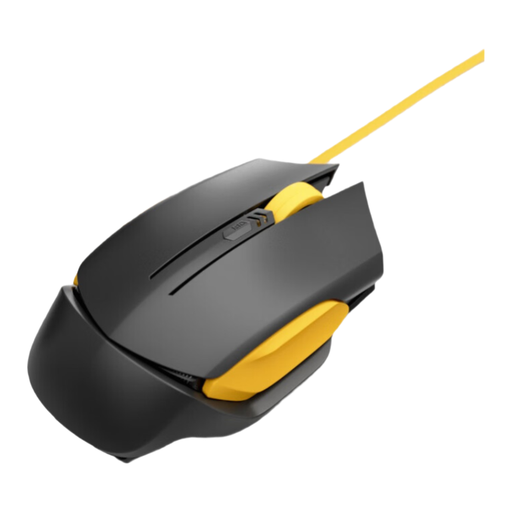
This is a wired choice for basic pointer use at a fixed desk.
The product name specifies an optical sensor, four DPI levels, a 1000 Hz polling rate and a tangle-free cable. Check wheel controls and hand fit if sustained record navigation is the priority.
No. Glass tracking concerns the surface beneath the mouse, whereas glare is a reflection on the display. Adjust screen position or lighting for reflections; if the mouse must work on glass, check the sensor's stated conditions.
Not necessarily: choose by the task and the fit of the device. A vertical grip is worth considering for extended desk sessions if it suits your hand; a conventional mouse may better match familiar list navigation, while a trackball needs less room to move.
Check hand fit, connection and operating-system compatibility alongside screen placement and desk arrangement. The Health and Safety Executive advises assessing the whole workstation, including equipment, furniture, working conditions and individual requirements.
No. Bluetooth avoids occupying a USB port, while a receiver may suit a computer without the Bluetooth connection you need. Confirm the mouse's connection options against your computer and available ports.