For workshop bookings in a student room, check that the mouse can connect to your laptop or tablet before choosing a shape. A compact mouse with quiet-click features may suit a shared room and small desk, while a wired USB mouse suits a fixed setup with a compatible port. If booking calendars and spreadsheets keep you at the desk for long sessions, give hand fit and scrolling comfort more weight than minimum size.
Who is this for?
Students managing bookings in a shared room
Repeated clicks while updating workshop availability or attendee lists can disturb someone nearby. A quiet-click claim is worth checking on the particular mouse, rather than assuming every wireless model is quiet.
Students with a small desk and several devices
A compact mouse can be easier to store alongside a laptop and study materials. If bookings move between a laptop and tablet, check whether both devices support the mouse’s connection method and whether it can switch between them.
Students working through long booking sessions
Frequent scrolling through calendars or spreadsheets makes hand fit more important. Posturite’s mouse guidance emphasises a shape that fits the user and supports the task, rather than treating an ergonomic label as a guarantee of comfort.
What matters when choosing?
Start with the device you use for bookings, then decide whether shared-room noise, hand fit or storage space is your main reason for choosing one mouse over another.
| Concern |
What to check |
Who this matters to |
| Connection compatibility |
Check your device’s Bluetooth support or the port needed for a wired mouse or wireless receiver. |
If I cannot connect the mouse to the laptop or tablet I use for bookings, its other features will not help. Around 33% of consumers put connection compatibility first. |
| Click noise |
Look for a quiet-click statement for the exact model; it does not establish that every mouse sound is quiet. |
In a shared room, I want to update attendee lists without repetitive clicks distracting someone nearby. For around 27% of consumers, quieter clicking is the primary need. |
| Hand fit |
Compare shape and size for your grip, especially if you scroll through calendars for extended periods. |
When booking work keeps me scrolling and clicking for a long session, I care more about a comfortable fit than the smallest body. Hand fit comes first for around 20% of consumers. |
| Storage and portability |
Check the mouse’s dimensions and whether a cable will occupy space on your desk. |
If I need to clear my desk after studying or carry the mouse between rooms, I want one that is easy to put away. Around 20% of consumers prioritise compact storage and portability. |
Buying pitfalls
-
Assuming every wireless mouse connects the same way
A Bluetooth mouse needs a compatible device and pairing; a mouse with a USB receiver needs a suitable port. That distinction matters when a laptop has few available ports.
Check the exact connection method, receiver connector and operating-system compatibility against the device used for bookings.
-
Choosing the smallest mouse solely to save desk space
A compact shape can be convenient to store, but it may not fit your hand well during extended booking sessions. Posturite advises considering how a mouse fits the user and the work.
Compare shape and hand fit alongside size, particularly if you spend long periods scrolling through spreadsheets.
-
Treating a high DPI figure as a productivity measure
DPI describes pointer sensitivity, not whether a mouse will feel comfortable or connect reliably while you manage bookings.
Prioritise connection, fit and scrolling control; consider adjustable sensitivity if you need to change how quickly the pointer moves on your display.
-
Putting an old mouse or battery in household rubbish
GOV.UK guidance says electrical products and batteries marked with the crossed-out wheelie-bin symbol should not go in household rubbish.
Use an appropriate electrical-waste collection route for the mouse and a suitable battery collection point for removable batteries.
Brands to consider
Logitech
Its mouse range offers distinct connection and size options relevant to a small student-room setup.
- Logitech describes the compact Pebble Mouse 2 M350s as able to switch between three compatible devices and claims a 90% reduction in click noise.
- Its M100 is a wired USB option, while the M750 and M750 L provide options for different hand sizes.
- Check the exact model and hand fit: a quiet-click claim or a choice of sizes does not establish that every Logitech mouse will suit your room or grip.
HP
The HP 280 Silent Wireless Mouse is relevant if you are considering a conventional wireless connection through a USB receiver.
- HP describes a 2.4 GHz wireless connection through a dongle.
- Check that the receiver fits an available port on the laptop you use for bookings; wireless does not necessarily mean Bluetooth.
Razer
The Pro Click V2 is a larger, right-handed ergonomic option to consider when shape and grip matter more than minimum size.
- Razer describes an extended thumb rest and multi-device connectivity for the Pro Click V2.
- Its right-handed shape will not suit every user. Check hand fit and connection compatibility rather than treating the ergonomic label as a comfort guarantee.
Joybuy mouse choices
These choices cover compact wireless, receiver-based, vertical and wired mice for workshop-booking work. Match each mouse’s connection and shape to your device and desk; the product order is not a ranking of comfort or quietness.
 Image unavailable
HOFOTEK M311 2.4G+BT Silent Mouse, white-grey
Consider this model if you want a compact mouse for shared-room booking updates and use more than one compatible device. Its listing describes quiet clicks and device switching; check Bluetooth compatibility or the receiver connection you intend to use.
The product name specifies adjustable DPI and one AA battery. Quietness and individual hand comfort should not be assumed from those features.
View on Joybuy
 Image unavailable
ET Wireless Gaming Mouse with USB Receiver and LED
This is a receiver-based option if your booking laptop has a compatible port. The listing describes quiet-click buttons and forward/back navigation buttons; check the receiver connector and operating-system compatibility before choosing it for a shared room.
The product name specifies five adjustable DPI settings. That setting alone does not establish an advantage for booking administration.
View on Joybuy
 Image unavailable
V7 MW500BT Bluetooth Vertical Mouse, 2.4GHz
Consider a vertical shape if hand fit is your priority during longer booking or spreadsheet sessions. Whether this shape feels comfortable is individual, and its click noise should be checked if you share the room.
The product name specifies six buttons and an adjustable sensor rated up to 1600 DPI. Check which connection mode suits your device.
View on Joybuy
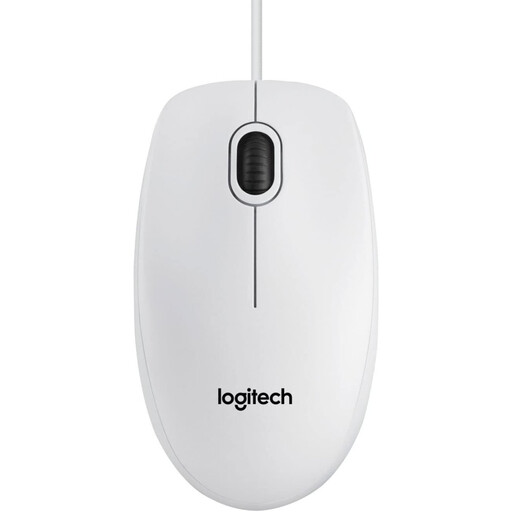 Image unavailable
Logitech B100 USB Wired Mouse, white
A wired mouse is worth considering for a fixed booking desk when your computer has a compatible USB port and you would rather avoid wireless pairing. Allow space for its cable; check click noise separately if quiet use matters.
View on Joybuy
 Image unavailable
lofree Wavy Chips EP115 Bluetooth/2.4G Mouse, Milk Tea
This dual-mode option is relevant if you alternate between compatible devices while working through bookings. Its listing describes a thumb wheel and side buttons; check whether its shape and click sound suit your desk and shared-room use.
The product name specifies five DPI levels and an 800mAh battery. Check compatibility if you use Boot Camp dual-system mode on a Mac.
View on Joybuy
Common questions
Should I use Bluetooth or a USB receiver for booking work?
Choose Bluetooth if your laptop or tablet supports it and you want to keep a USB port free; choose a receiver-based mouse if you have the required port and prefer that connection. Check the receiver connector before buying. Logitech’s Bluetooth setup guidance also notes that a Bluetooth mouse must be paired through the computer’s settings.
Do I need an ergonomic mouse to manage workshop bookings?
Not necessarily: for short or intermittent sessions, choose a mouse that fits your hand and works with your device. For longer sessions, compare shapes and your desk setup rather than relying on an ergonomic label; Posturite emphasises fit and the tasks you perform.
How should I dispose of an old mouse or its batteries in the UK?
Use an appropriate electrical-waste collection route for the mouse and a suitable collection point for removable batteries. GOV.UK guidance says items marked with the crossed-out wheelie-bin symbol should not go in household rubbish; it also describes retailer take-back when you buy a like-for-like replacement.
Does workplace screen-use guidance tell me which mouse to buy for private study?
No particular mouse model follows from that guidance. The Health and Safety Executive’s display-screen-equipment guidance addresses workplace duties for employers and workers; when choosing a mouse for private study, you can still consider hand fit and where the mouse sits on your desk.


