For writing and revising customer instructions, choose a mouse around the task that slows you down: a conventional productivity mouse offers configurable controls for repeated actions, a vertical mouse offers a more upright hand position, and a trackball lets you move the pointer without moving the device across the desk. Check hand fit, handedness and connection options before choosing; whichever shape you prefer, the mouse still needs to sit within easy reach as part of a comfortable workstation.
Who this is for
Long-session document writers
If you spend extended sessions drafting and proofreading customer instructions, consider where the mouse sits alongside your keyboard and screen. The Health and Safety Executive advises keeping it in line with your elbow.
Shortcut-heavy instruction editors
If you move between long documents, browser pages and support tools, configurable controls may be useful for actions you repeat often. Check whether you can set up those actions in the software you use.
Home-office users needing a specific fit
Hand size, left-handed use, noise in a shared room or the ports on a laptop may narrow your choice before extra buttons matter. Check the exact variant and connection method, not just the mouse shape.
What to check when buying
Start with the position and fit you can use at your desk, then decide whether shortcuts, quiet controls or a particular connection matter to your writing workflow.
| Concern |
What to check |
Who this matters to |
| Comfortable positioning |
Check hand-size and handedness guidance, and whether the mouse can sit close to the keyboard without reaching. |
During long drafting sessions, I need a shape that fits my hand and a position I can maintain without stretching across the desk. Roughly 46% of consumers put comfortable positioning first. |
| Document navigation |
Check scroll controls and button placement; confirm that any shortcut software works with your computer and writing tools. |
When revising instructions, I move through pages and repeat navigation actions, so controls I will actually use matter more to me than an unfamiliar feature list. Around 36% of consumers prioritise editing efficiency. |
| Workspace fit |
Confirm the working-hand option, Bluetooth or USB-receiver requirements, available ports and whether quiet clicks matter in your room. |
If I share a workspace or use a laptop with limited ports, the mouse has to suit that setup before its extra controls are useful. About 18% of consumers make fit and setup their primary concern. |
Buying pitfalls
-
Treating an ergonomic mouse as a workstation fix
A different mouse shape does not address a keyboard, screen or mouse placed awkwardly. The Health and Safety Executive advises assessing the whole workstation where display screen equipment assessment applies.
Keep the screen and keyboard central, and place the mouse in line with your elbow and within easy reach before judging which shape suits you.
-
Assuming every vertical mouse fits either hand
Fit guidance differs by model: Logitech describes Lift as suitable for small to medium hands and offers a left-handed version, while Kensington specifies its Pro Fit Ergo Vertical for average to larger hands.
Check the exact model and handed version before ordering, particularly if you normally use your left hand.
-
Choosing extra buttons without a use for them
Configurable controls are useful only if they match actions you repeat. Some functions also depend on companion software: Logitech says MX Master 4 shortcut features require Logi Options+.
Identify a few actions you want to assign, then check the software and controls before choosing a more configurable mouse.
Allow time to set up and learn the shortcuts you plan to use.
Brands to consider for this task
Logitech
Its range includes conventional productivity mice, vertical models and thumb-operated trackballs relevant to document work.
- Logitech specifies Lift for small to medium hands and offers a left-handed option; it describes MX Ergo S as a thumb-controlled trackball for medium to large hands.
- MX Master 4 shortcut functions require Logi Options+. Logitech's reported productivity gain comes from its own study, so it should not be assumed for a particular writing workflow.
Kensington
Its ergonomic mouse range includes models with distinct hand-size guidance and a dedicated left-handed option.
- Kensington specifies Pro Fit Ergo Vertical for average to larger hands and makes Pro Fit Left-Handed Ergo specifically for left-handed use.
- Check the exact model's connection and operating-system requirements, including any Windows ARM restriction that applies to it.
Razer
Its Pro Click V2 Vertical is an option for writers considering an upright mouse with configurable controls.
- Razer describes a six-button vertical design with shortcuts configurable through Razer Synapse 4.
- If your work is mainly straightforward drafting, check whether you would use those controls and whether the software suits your computer.
Joybuy mice for home-office instruction writing
These mice offer different ways to handle document work: upright designs, a shaped wireless mouse with navigation buttons, a quiet office mouse and a straightforward wired option. Check fit and connection requirements against your own desk and computer.
 No image available
V7 MW500BT Bluetooth vertical mouse
Consider this model if you prefer an upright grip while working through customer instructions. Check that its shape suits your hand and working side.
The product name specifies Bluetooth and 2.4GHz connection options, six buttons and a 1600 DPI adjustable sensor.
View on Joybuy
 No image available
HP 920 Ergonomic Wireless Mouse, black, with detachable wrist rest
This model is worth considering if you want to try a detachable wrist rest while editing. Check hand fit and handedness before choosing it.
A detachable wrist rest is specified in the product name. If button customisation matters, confirm that HP Accessory Center suits your computer and workflow.
View on Joybuy
 No image available
ET 2.4G wireless mouse with USB receiver, black
If you want a wireless mouse for moving through documents, check whether its grip feels suitable and whether your computer has a port for the USB receiver.
The product name specifies six buttons and five adjustable DPI levels.
View on Joybuy
 No image available
HOFOTEK M311 silent office mouse, white-grey
This model may suit a shared room if quieter clicks are a priority. Check its shape for your hand rather than treating the silent description as a fit guide.
The product name specifies 2.4G and Bluetooth connection options, adjustable DPI levels and one AA battery.
View on Joybuy
 No image available
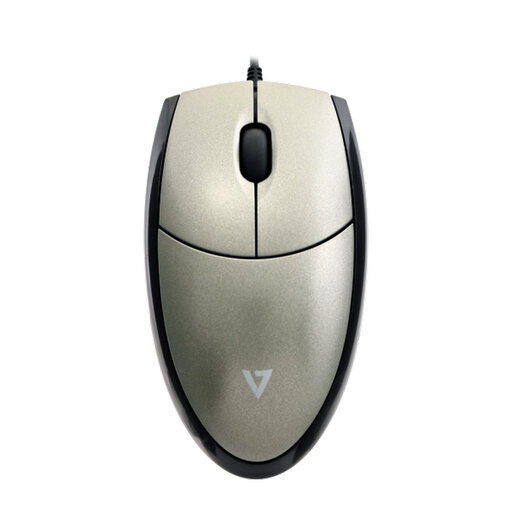
V7 MV3000 full-sized USB optical mouse
Choose this straightforward wired layout if you prefer a fixed USB connection for drafting and document navigation. Check that the cable reaches comfortably from your computer to your mouse position.
The product name specifies three buttons, a tactile scroll wheel, a 1000 DPI sensor and a 1.6 m cable. Confirm operating-system support if you do not use Windows 10 or 11.
View on Joybuy
Common questions
Does a home-office employer need to assess my workstation?
The Health and Safety Executive says employers must assess a workstation when a worker uses display screen equipment daily as part of normal work for continuous periods of an hour or more. The assessment covers the workstation and work, not just the choice of mouse.
Will a vertical mouse resolve wrist pain?
A vertical mouse cannot promise to resolve wrist pain. If symptoms persist or worsen, seek appropriate medical advice and discuss possible workstation adjustments with your employer rather than relying on a mouse change alone.
Where should the mouse sit during long writing sessions?
Keep the mouse in line with your elbow and within easy reach. The Health and Safety Executive advises keeping the keyboard and screen central to avoid twisting, while University Hospitals Sussex NHS Foundation Trust advises positioning the mouse so you do not overstretch.
What should I check before buying a wireless mouse for a laptop?
Check whether the exact mouse uses Bluetooth, a USB receiver or both, then confirm its operating-system requirements and your available ports. For prolonged laptop work, the Health and Safety Executive advises using a separate keyboard and mouse so the display can be raised.


