Choose a full-size productivity mouse if landing-page work means long stretches of scrolling and repeated use of controls you can configure. A vertical mouse is worth considering when an upright hand position is your priority and the shape fits your hand; a compact mouse makes more sense when desk space and carrying it between study spaces matter most. For a shared student room, also check click noise and whether your laptop supports the mouse’s connection method.
Who each mouse suits
Desk-based landing-page designers
Students who repeatedly adjust layouts, check browser previews and move through long design files may value controllable tracking, scrolling and shortcuts. Logitech and HP describe these features on particular productivity models; check whether their controls work with your own software.
Comfort-first, long-session users
Students who want a more upright hand position should check the shape against their hand size and desk arrangement. The Health and Safety Executive also advises keeping a mouse within easy reach and using it with a straight wrist.
Small-desk and mobile students
Students working beside notebooks on a crowded desk, or carrying a laptop between study spaces, may prefer a compact mouse. Quiet-click options are also worth checking when others share the room.
What matters when choosing
Full-size productivity mouse
Consider it when: Long design sessions make scrolling and configurable controls more important to you than a small footprint.
Trade-off: A larger shape takes more room, and extra controls help only if you can use them in your workflow.
Vertical mouse
Consider it when: An upright hand position is your main reason for changing mouse shape and the model fits your hand.
Trade-off: Shape alone cannot make up for a mouse placed too far from the keyboard.
Compact mouse
Consider it when: Your mouse needs to fit beside study materials or travel with your laptop.
Trade-off: A smaller grip may offer less palm support than a full-size shape.
| Concern |
What to check |
Who this matters to |
| Control and shortcuts |
Check button placement, sensitivity adjustment and whether your software supports the shortcuts you want. |
If I repeatedly switch between design tools and long browser pages, I want controls I can put to use. Around 36% of consumers put precise control and shortcuts first. |
| Quiet use and desk space |
Check model-specific click-noise claims and whether the mouse fits beside your keyboard and study materials. |
On a crowded desk in a shared room, I want the mouse to take up less space without drawing attention to every click. Quiet, small-desk use comes first for around 29% of consumers. |
| Long-session comfort |
Check hand-size guidance and whether you can place the mouse within easy reach, as the Health and Safety Executive advises. |
During extended desk work, I care most about a shape that fits my hand and a position that lets me avoid reaching. Around 21% of consumers prioritise long-session comfort. |
| Portability and connection |
Check Bluetooth support, required ports and whether a receiver is included with the exact model. |
When I move between my room and other study spaces, I want a mouse that is easy to carry and connect to my laptop. Portability and connection are the primary need for around 14% of consumers. |
Buying pitfalls
-
Expecting a vertical mouse to fix an awkward desk setup
A different grip may suit you, but reaching for the mouse or bending your wrist can still make desk work uncomfortable. The Health and Safety Executive advises keeping the mouse close and supporting the forearm.
Check mouse placement and wrist position alongside hand fit before choosing a new shape.
-
Assuming Bluetooth means a receiver is included
Connection and included accessories vary by model. Logitech says the compatible Logi Bolt receiver is not included with MX Anywhere 3S.
Check your laptop’s Bluetooth support and ports, then confirm the connection method and accessories on the exact product you plan to buy.
If your chosen connection requires a receiver or adapter you do not have, you may need to obtain one separately.
-
Using maximum DPI as a shortcut for choosing
A high sensitivity setting does not establish whether a mouse fits your hand or feels controllable in design software. Logitech’s glass-tracking claim for MX Master 3S also specifies glass at least 4 mm thick.
Consider grip and button placement, then check that adjustable sensitivity and any stated surface conditions suit your desk.
-
Putting an old mouse or battery in household rubbish
GOV.UK advises against putting waste electrical products and batteries in household rubbish.
Use an appropriate electrical-waste or battery collection point when the mouse reaches the end of its life.
Relevant brands to consider
Logitech
Its MX Master 3S, Lift and MX Anywhere 3S lines illustrate full-size productivity, vertical and compact mouse shapes respectively.
- Logitech describes model-specific quiet-click, tracking and connection features that may help distinguish these shapes.
- Check the exact model: Logitech positions Lift for small to medium hands, says the MX Anywhere 3S receiver is not included, and conditions MX Master 3S glass tracking on glass at least 4 mm thick.
HP
The HP 920 Ergonomic Wireless Mouse is a vertical option for students considering an upright grip with navigation controls.
- HP specifies a detachable wrist rest, five programmable buttons and connection to up to three devices for the 920.
- Check whether its shape, support and controls suit your hand and available desk space rather than assuming a vertical design will suit everyone.
Microsoft
Surface Arc Mouse illustrates a travel-focused alternative to a conventional full-size mouse.
- Microsoft describes a Bluetooth mouse that snaps flat for carrying and supports vertical and horizontal scrolling.
- Check whether its flatter shape and control layout suit the length of your design sessions.
Joybuy mouse choices
These models offer different approaches to desk-based control, an upright grip and working with limited space. Compare the exact mouse’s fit, controls and connection with the way you design landing pages.
 No image available
Logitech MX Master 3S Ergonomic Mouse, Black
Consider this full-size route if you spend long sessions working at one desk. Check the exact variant’s scrolling controls, connection method and grip fit against your design workflow.
View on Joybuy
 No image available
HP 920 Ergonomic Wireless Mouse, Black, with Detachable Wrist Rest
Consider its vertical shape if an upright hand position is your priority. HP specifies a detachable wrist rest and five programmable buttons for the 920; check hand fit and room for the mouse and rest on your desk.
View on Joybuy
 No image available
HOFOTEK M311 2.4G+BT Silent Mouse, White-Grey, 1×AA
Its silent-mouse description makes it worth checking for a shared study room. The named variant offers 2.4G and Bluetooth connection and uses one AA battery; confirm that your laptop supports your preferred connection.
View on Joybuy
 No image available
lofree Wavy Chips EP115 Mouse, Milk Tea
Consider this model if you want connection choice and adjustable pointer sensitivity for desk work. Its named configuration has Bluetooth and 2.4G modes, five DPI levels and an 800mAh battery; check its size and whether its controls suit your software.
View on Joybuy
 No image available
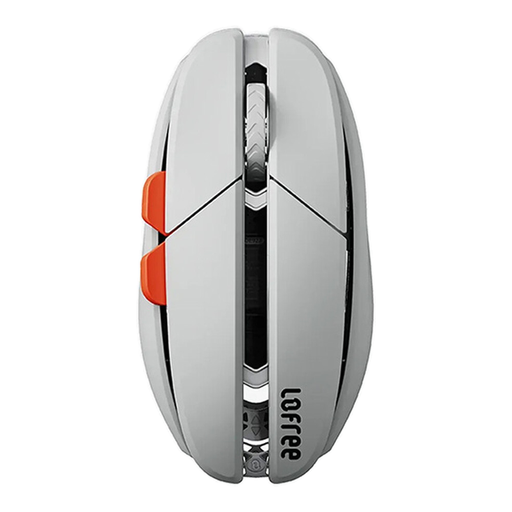
lofree Hypace OE923 Mouse, Light Grey
Consider this model if switching connection methods matters more to you than a particular mouse shape. Its named configuration offers Bluetooth, 2.4G wireless and wired modes, with a magnesium-alloy frame and PAW3950 sensor; check hand fit and the controls you need for design work.
View on Joybuy
Frequently asked questions
Do I need a high-DPI mouse for landing-page design?
No particular maximum DPI is required for landing-page design. Adjustable sensitivity may be useful if you want to tailor pointer movement to your display and working style, but check whether you can control the pointer comfortably rather than choosing by the largest number.
Will a vertical mouse solve wrist discomfort?
A vertical mouse alone may not resolve discomfort during long design sessions. Check that its shape fits your hand; the Health and Safety Executive also advises placing the mouse within easy reach and using it with a straight wrist. Seek appropriate professional advice for persistent pain or numbness.
Should I use Bluetooth or a USB receiver?
Bluetooth can preserve a laptop’s USB ports if the laptop and mouse are compatible; a receiver is an option when you need that connection method and have the required port or adapter. Check what comes with the exact mouse: Logitech says the compatible Logi Bolt receiver is not included with MX Anywhere 3S.
What should I do with an old wireless mouse?
Take an old mouse to an appropriate electrical-waste collection point rather than putting it in household rubbish. GOV.UK also advises keeping waste batteries out of household rubbish; check local collection arrangements for a removable battery.


