For long draft reports, start with a full-size mouse if scrolling and shortcut controls matter most; consider a vertical mouse if grip comfort is your priority and its shape fits your hand. A compact mouse makes more sense when desk space or moving between workspaces matters more than palm support. Whichever shape you choose, check its connection requirements and whether you can keep it within easy reach.
Who each mouse suits
Long-document reviewers
If you repeatedly move between sections, comments and applications, consider how the scroll wheel and reachable buttons work with your usual grip. Logitech lists document-navigation controls on its MX Master line, though extra controls may be unnecessary for occasional reviews.
Comfort-priority desk workers
If grip or wrist position drives your choice, compare mouse shapes against your hand size and handedness. Logitech positions Lift for small to medium hands and offers a left-handed version; University Hospitals Sussex NHS Foundation Trust also advises keeping the mouse within easy reach.
Flexible-workspace users
If you move a laptop between rooms or use several compatible devices, compact size and connection options may take priority over a larger body. Logitech says MX Anywhere 3S can connect to up to three devices via Bluetooth.
What matters when choosing
Full-size productivity mouse
Choose it when: Frequent scrolling and reachable shortcuts matter more than a small footprint.
Bear in mind: A larger shaped mouse takes more desk space and does not offer a vertical grip.
Vertical mouse
Choose it when: You prefer a more upright hand position and the exact model fits your hand.
Bear in mind: The grip and button layout may take getting used to; the mouse still needs a suitable place on your desk.
Compact mouse
Choose it when: Limited desk space or changing work locations drives the decision.
Bear in mind: Check whether its smaller body supports your hand comfortably through a long review session.
| Concern | What to check | Who this matters to |
|---|
| Long-document navigation |
Try the scroll wheel and button positions; check whether optional shortcut software works with your computer. |
When I move between distant sections and comments, I want scrolling I can control without repeatedly reaching for menus. Around 40% of consumers put document navigation first. |
| Hand and forearm comfort |
Check hand-size and handedness guidance, then make sure the mouse can sit close to your keyboard. |
If I spend extended periods at the desk, the shape needs to suit my grip without making me reach forward. Hand and forearm comfort comes first for around 30% of consumers. |
| Quiet, flexible working |
Confirm the exact model’s click design and its Bluetooth or receiver requirements; assess the compact shape for your usual session length. |
In a shared room or at a desk used with several devices, I want less distracting clicks or an easier fit for that workspace. Around 30% of consumers prioritise quiet operation and flexibility. |
Common buying mistakes
-
Expecting a vertical mouse to fix the whole workstation
A different grip does not address a mouse placed so far away that you must stretch to use it. University Hospitals Sussex NHS Foundation Trust advises keeping the mouse within easy reach.
Place it near the keyboard first, then assess whether the vertical shape and its buttons suit your hand.
-
Choosing compactness without considering a long session
A smaller mouse may fit a limited desk or travelling setup, but its shape may offer less palm support than a larger one.
If you mainly review reports at one desk, compare how a compact and a full-size mouse fit your hand before deciding.
-
Assuming wireless means compatible
Connection methods and computer requirements vary between models and variants.
Check your operating system, Bluetooth capability and available USB ports, and confirm whether the exact variant uses or includes a receiver.
-
Equating quiet clicks with a silent workspace
A quiet-click feature concerns the clicks, not every sound from the wheel, desk or surrounding room.
If noise matters during calls or shared-room work, consider the whole workstation as well as the mouse’s stated click design.
Brands to consider for these mouse types
Logitech
Its MX Master, Lift and MX Anywhere lines illustrate full-size productivity, vertical and compact multi-device choices respectively.
- Logitech documents navigation controls on MX Master models, a 57° shape on Lift and Bluetooth connection to up to three devices on MX Anywhere 3S.
- A stated shape or comfort benefit does not establish personal fit; check the exact variant, hand size and workstation layout.
Razer
The Pro Click V2 line offers a shaped productivity option and a more upright Vertical Edition.
- Razer specifies an extended thumb rest for Pro Click V2 and a 71.7° design for Pro Click V2 Vertical Edition.
- Those design specifications do not establish that either grip will suit every hand or report-review workflow.
Microsoft
Surface Mobile Mouse is a compact, ambidextrous option for a compatible Windows computer.
- Microsoft specifies Windows 10 or 11 and Bluetooth 4.0 or later for Surface Mobile Mouse.
- Check whether its size and controls suit prolonged document navigation rather than assuming a compact design will feel right at the desk.
Joybuy mice for report review
These choices cover shaped wireless mice, vertical options and straightforward wired mice for reviewing reports at a desk. Compare the controls you need with hand fit and your computer’s connection requirements.
 No image available
Logitech MX Master 3S Black
Consider this shaped mouse if controls for navigating long reports are a priority; check that its grip suits your hand.
Confirm the exact variant’s connection method and customisation requirements for your computer.
View on Joybuy
 No image available
HP 920 Ergonomic Wireless Mouse, Black, with Detachable Wrist Rest
Consider its vertical shape if grip comfort guides your desk setup, but assess how the mouse and wrist rest fit your hand.
The detachable wrist rest distinguishes this variant. Check whether HP Accessory Center suits your computer if you want to customise buttons.
View on Joybuy
 No image available
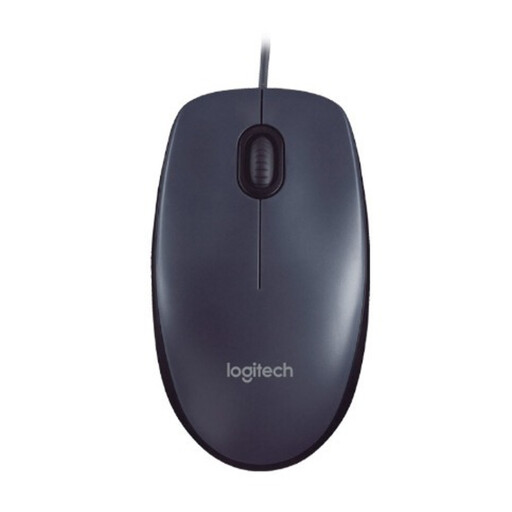
Logitech M91P Wired Mouse
Consider a wired mouse if you work mainly at one desk and prefer that connection method for document review.
Check computer compatibility and confirm the weight if it matters to your handling preference.
View on Joybuy
 No image available
V7 MW500BT Bluetooth Vertical Mouse
Its vertical shape is worth considering if you prefer an upright grip while moving through draft sections; assess hand fit before choosing.
The product name specifies Bluetooth and 2.4 GHz connection, six buttons and an adjustable sensor up to 1600 DPI. Check the exact connection requirements for your computer, and do not assume quiet-click operation.
View on Joybuy
 No image available
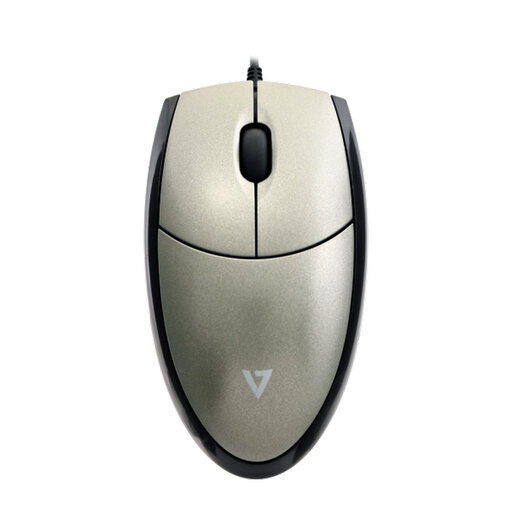
V7 MV3000 Full-Size USB Optical Mouse
This is a straightforward wired option if you need a mouse for basic scrolling at a stationary report-review desk.
The product name specifies a 1000 DPI sensor, three buttons, a tactile scroll wheel and a 1.6 m cable. Check compatibility if your computer does not run Windows 10 or 11.
View on Joybuy
Questions about home-office mice
Should I choose a vertical mouse just because I review long documents?
No: a vertical shape is worth considering when grip comfort is a primary concern, but fit matters more than the length of the report alone. Logitech positions Lift for small to medium hands and offers a left-handed version; check button reach and keep the mouse close to your keyboard.
Is a separate mouse useful when reviewing reports on a laptop?
A separate mouse can be part of a more comfortable setup for prolonged laptop work. Oxford University Hospitals NHS Foundation Trust advises using a separate keyboard and mouse so your arms can stay relaxed rather than reaching forward; consider screen position and desk layout alongside the mouse.
Does display-screen-equipment guidance cover working from home?
It can cover some home workers, but it does not prescribe a particular mouse for a private purchase. The Health and Safety Executive says the Display Screen Equipment Regulations can apply to permanent or long-term home working and that employers should carry out an individual assessment where they apply. Ask your employer how your working arrangement is assessed.
What should I check before pairing a Bluetooth mouse?
Check the exact mouse model’s operating-system and Bluetooth requirements against your computer before buying. For example, Microsoft specifies a Windows 10 or Windows 11 PC with Bluetooth 4.0 or later for Surface Mobile Mouse; requirements for another mouse may differ.


