For frequent movement between plant images, records and labels, start with a conventional productivity mouse whose scrolling and controls suit your workflow. Consider a vertical mouse if a more upright hand position is your priority, or a stationary trackball if desk space or moving the mouse is the bigger constraint. Whichever shape you choose, check hand fit, handedness and connection compatibility; the Health and Safety Executive advises considering the whole workstation rather than one device alone.
Who this is for
Image and record classifiers
You move between plant images, observation records, tags and long lists. Pointer control and scrolling matter throughout the task; shortcut buttons are worth considering if your software supports the commands you use repeatedly.
People working through long sessions
You want a mouse shape that suits your hand and workstation over extended periods. Logitech’s Lift and ERGO M575S illustrate different approaches to hand position and mouse movement, but neither removes the need to assess the wider desk setup.
People with compact or shared desks
You may need room for other work, a connection that leaves a USB port free, or quieter clicks near someone else. Check those features on the exact model: a stationary trackball, Bluetooth connection and quiet-click design are separate choices.
What matters when choosing
Choose the control method that fits your main constraint, then check whether its shape, connection and controls work with your desk and classification software.
Conventional productivity mouse
Choose it when: You regularly scroll through records, select labels and want a familiar mouse shape with useful controls.
Bear in mind: A sculpted horizontal shape is not the more upright grip of a vertical mouse; check hand fit and software support for shortcuts.
Vertical mouse
Choose it when: A more upright hand orientation matters enough to try a different grip during long desk sessions.
Bear in mind: Fit and handedness vary by model. Logitech positions Lift for small to medium hands and offers a left-handed version.
Trackball
Choose it when: You want the device to stay in place on a busy desk instead of moving a mouse across it.
Bear in mind: Thumb-operated and finger-operated models feel different; allow for a change in control method when judging detailed selections.
Adaptive mouse
Choose it when: A fixed conventional shape or handedness is a barrier and you need a configurable arrangement.
Bear in mind: Microsoft’s Adaptive Mouse Tail and Thumb Support are separate accessories; check which components your intended configuration requires.
| Concern |
What to check |
Who this matters to |
| Navigation and shortcuts |
Check adjustable pointer speed, scroll behaviour and whether shortcut configuration works with your operating system and classification software. |
When I move repeatedly between images, labels and long record lists, I want control that keeps those actions manageable. Roughly 31% of consumers put navigation and shortcuts first. |
| Hand and arm comfort |
Check hand-size guidance and handedness for the exact shape, alongside mouse placement and the wider workstation. |
During long sessions, I care most about whether the grip and amount of mouse movement suit me. Comfort is the primary concern for roughly 31% of consumers. |
| Desk space and connection |
Check whether a stationary trackball suits the available space and whether the intended Bluetooth or receiver connection works with your computer. |
With little room to move a mouse or few spare ports, I need a device that fits my desk and connection setup. Around 23% of consumers prioritise space and connection. |
| Click noise |
Look for a quiet-click claim for the exact model rather than assuming all wireless or ergonomic mice are quiet. |
When I share a working area, repeated clicks are what I most want to keep down. Quiet operation comes first for roughly 15% of consumers. |
Buying pitfalls
-
Treating the mouse as the whole workstation solution
A different mouse will not address every issue arising from desk, chair or screen position and the way the work is organised.
The Health and Safety Executive advises assessing the whole workstation. For employed home workers, check whether display-screen-equipment rules apply and address the risks identified in an individual assessment where one is required.
-
Choosing a vertical shape without checking fit
Vertical mice are not interchangeable: Logitech positions Lift for small to medium hands and offers a separate left-handed version.
Check the exact model’s hand-size and handedness guidance, and review the retailer’s return terms before ordering.
-
Assuming similar mice connect and sound alike
Connection options and quiet-click features belong to specific models. Kensington lists Bluetooth 4.0 LE and a USB nano receiver for its Expert Mouse Wireless Trackball; that does not describe every trackball.
Match the chosen variant to your computer’s ports, Bluetooth support and operating system, and check quiet-click claims separately.
-
Using sensor sensitivity as a shortcut for accuracy
A high sensitivity figure alone does not establish how comfortably you can select small targets in plant records.
Check whether you can adjust pointer speed and whether the scroll control suits your lists, then set sensitivity for your display and preferred control.
Brands to consider
Logitech
Relevant product lines include conventional productivity mice, vertical mice and thumb-operated trackballs.
- Logitech lists quiet clicks for MX Master 3S, a 57° shape for Lift and stationary thumb control for ERGO M575S.
- Check fit and handedness by model: Logitech positions Lift for small to medium hands and offers a left-handed version.
Kensington
Its Expert Mouse Wireless Trackball is a finger-operated, ambidextrous option for a stationary desk setup.
- Kensington lists Bluetooth 4.0 LE or a USB nano receiver as connection options.
- Check which connection and optional software functions work with your computer before choosing it for repeated classification tasks.
Razer
The Pro Click V2 Vertical is an option for someone considering a right-handed vertical mouse.
- Razer describes the model as a six-button vertical mouse with base support.
- Its right-handed shape does not address left-handed fit.
Microsoft
The Adaptive Mouse offers a configurable route when a fixed mouse shape is a barrier.
- Microsoft describes a compact mouse that can be configured with Tail and Thumb Support; the thumb support can switch sides.
- The accessories are separate products, so check the components needed for your arrangement.
Joybuy products for this task
These mice offer conventional and vertical options for navigating plant images and records at a home desk. Compare their stated features with your preferred grip, computer connection and need for scrolling or shortcuts.
 Image unavailable
Logitech MX Master 3S Black Mouse
Consider this conventional mouse if scrolling through records and controlling the pointer are central to your classification work.
Logitech lists quiet clicks for MX Master 3S and specifies glass tracking only on glass at least 4 mm thick. Check that its shape suits your hand.
View on Joybuy
 Image unavailable
RAPOO MT760L-LG Mouse
Consider this model if you want a conventional mouse for moving between records and repeated on-screen actions.
Before relying on device-switching or programmable controls, check the software and connection requirements for your computers and the exact variant.
View on Joybuy
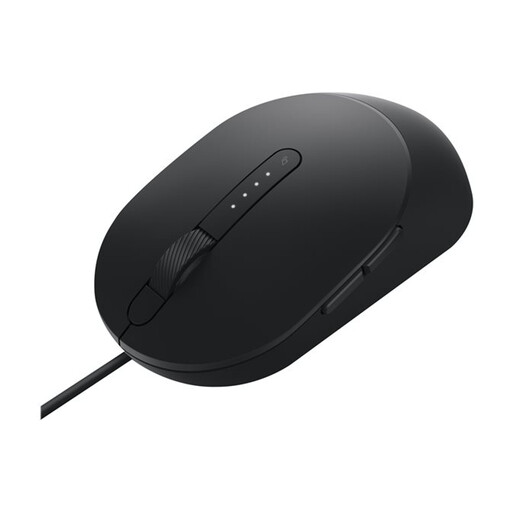 Image unavailable
Dell MS3220 Laser Mouse
This conventional mouse is worth considering if you prefer a familiar shape while selecting and reviewing plant records.
Check its connection, hand fit and scroll controls against your workstation before ordering.
View on Joybuy
 Image unavailable
V7 MW500BT Bluetooth Vertical Mouse
Consider its vertical shape if a more upright grip is your priority during desk-based classification.
The product name specifies 2.4GHz dual-mode connectivity, six buttons and an adjustable 1600 DPI sensor. Check hand fit, handedness and compatibility with your computer.
View on Joybuy
 Image unavailable
HOFOTEK M311 Silent Office Mouse, White-Grey
Consider this conventional mouse if click noise is a priority in a shared home workspace.
The product name specifies adjustable multi-level DPI and one AA battery. Check its scroll controls and any shortcut-button requirements if you regularly work through long records.
View on Joybuy
Common questions
Do display-screen-equipment rules matter when I work from home?
They can matter for employed home workers whose display-screen use falls within the applicable rules. The Health and Safety Executive says an individual workstation assessment is required where those rules apply, including consideration of home and office setups for people who work in both places.
Can an ergonomic mouse resolve home-office discomfort on its own?
No mouse should be treated as the whole workstation response. The Health and Safety Executive advises considering the equipment, furniture and working conditions together, then addressing risks identified in the assessment.
Will an optical mouse work on a glass desk?
Do not assume every optical mouse will track on glass. Logitech specifies glass tracking for MX Master 3S only where the glass is at least 4 mm thick; check the claim and surface requirements for any other model separately.
Is a vertical mouse automatically the right choice if my wrist is uncomfortable?
No: a more upright grip is one reason to consider a vertical mouse, but the exact shape still needs to fit your hand and handedness. Consider the wider workstation as well, and raise persistent or worsening discomfort through an appropriate workplace assessment rather than relying on a purchase alone.


