For classifying plant observations on a small desk, choose a slim mouse when working space is the main constraint, or a compact mouse with adjustable pointer control when you repeatedly select small on-screen targets and navigate long records. For longer sessions, hand fit and a workable mouse position may matter more than the smallest footprint. Check your computer’s connection options and the mouse’s suitability for your desk surface; a higher maximum DPI alone does not establish better control.
Who needs which features?
Small-desk plant-record classifier
If notebooks, samples and a laptop share your work surface, consider a mouse you can reposition without crowding the area. A compact shape and quieter clicks may be useful when space is tight or you work near others.
Detail-focused observation reviewer
If you select small controls, inspect images and work through long observation tables, look for pointer settings you can control and a scroll wheel suited to both individual records and longer lists.
Frequent desktop classifier seeking comfort
If classification takes up lengthy sessions, check the shape against your hand and where the mouse sits beside your keyboard. The Health and Safety Executive advises considering mouse position as part of the wider workstation setup.
What matters when choosing?
Decide whether desk space, on-screen control or hand fit is the constraint you are least willing to compromise on; then check that the mouse connects to your computer.
Slim compact mouse
Consider when: You need room for plant notes and a laptop, and your classification sessions are relatively short.
Trade-off: A low-profile shape may offer less hand support; check how it feels over a typical session.
Compact mouse with adjustable control
Consider when: Fine selections and movement through long observation lists are frequent parts of the task.
Trade-off: Extra sensitivity settings do not establish accuracy on their own; the setting and work surface still matter.
Vertical mouse
Consider when: You work for extended periods and can find a shape that fits your hand and position beside the keyboard.
Trade-off: Do not assume a vertical shape has the smallest footprint or replaces changes needed elsewhere in the workstation.
| Concern |
What to check |
Who this matters to |
| Footprint and noise |
Compare the mouse’s dimensions with the clear area beside your keyboard; check which buttons have quiet clicks. |
If my notes and plant materials already fill the desk, I need a mouse that is easy to move without disturbing people nearby. Around 33% of consumers put space and noise first. |
| Pointer control and scrolling |
Look for adjustable sensitivity and a scroll wheel that suits both individual entries and longer lists. |
When I move between image details and observation records, I want to control small pointer movements without losing my place. Fine control and navigation come first for around 27% of consumers. |
| Hand fit and longer use |
Check hand-size guidance and whether the mouse can sit close to the keyboard, in line with your elbow. |
For lengthy classification sessions, I need a shape that fits my hand without making me reach across the work surface. Around 20% of consumers prioritise comfort and fit. |
| Connection and ports |
Confirm Bluetooth support or the required receiver and port; check whether a receiver comes with the exact model. |
If I switch computers or have few free laptop ports, I need a connection that works with my setup. Connectivity is the primary concern for around 20% of consumers. |
Buying pitfalls
-
Choosing by maximum DPI alone
A high maximum sensitivity setting does not demonstrate more accurate plant-record classification, and a setting that moves the pointer too quickly can be difficult to control.
Check whether sensitivity is adjustable, then assess pointer control at your normal display resolution and on your work surface.
-
Assuming compact means comfortable
A slim mouse can free desk space without necessarily fitting your hand or allowing a comfortable working position. The Health and Safety Executive advises keeping the mouse in line with your elbow.
Compare the mouse’s dimensions with your available space, check any hand-size guidance and consider where your arm will rest during a typical session.
-
Overlooking the receiver
A 2.4 GHz wireless mouse may need a compatible USB receiver and port, while Bluetooth depends on support from your computer. Some receivers are optional rather than included.
Check the connection method, required port and contents of the exact package before ordering.
-
Putting unwanted electrical items in household rubbish
GOV.UK advises that batteries and electrical products should not go into household rubbish when they no longer work or are no longer wanted.
Use an appropriate battery or electrical-waste collection route when the mouse or its batteries reach the end of their use.
Relevant brands to consider
Logitech
Logitech’s UK range includes the slim Pebble Mouse 2 M350s, compact MX Anywhere 3S, hand-size variants of the Signature M650 and the Lift vertical mouse.
- The models offer different approaches to compactness, scrolling, connections and hand shape.
- Check the exact model’s hand fit and receiver requirements rather than assuming those features apply across the range.
HP
HP’s 250 Dual Mode Mouse is an option to examine when you need a choice between Bluetooth and a 2.4 GHz USB-A receiver.
- HP specifies Bluetooth 5.0+ and a USB-A receiver connection for this model.
- Its full-size shape needs checking against the available mouse area on a small desk.
Razer
Razer positions the Orochi V2 as a portable gaming mouse with Bluetooth and 2.4 GHz wireless options.
- Razer specifies a weight below 60 g excluding the battery for the Orochi V2.
- Consider whether its gaming-oriented controls serve your classification work, and account for its AA or AAA battery requirement.
Lenovo
Lenovo’s 300 Wireless Compact Mouse is a compact receiver-based option for a computer with a suitable USB port.
- Lenovo specifies a Nano USB receiver and 1,000 DPI for this model.
- Check availability with your intended retailer before treating it as a purchasing option.
Joybuy products for these needs
These mice offer different ways to approach plant-record work: compare the compact models against your available desk area, and consider the alternative shapes and connection options if longer sessions or device compatibility matter more.
 No image available
HOFOTEK M311 2.4G+BT Mouse, White-Grey
Consider this model if quieter clicks and a choice of wireless connections matter at a shared desk. Its title specifies adjustable DPI and one AA battery; check its dimensions, hand fit and suitability for your desk surface before choosing it for a tight work area.
View on Joybuy
 No image available
V7 MW100-1E Wireless Mouse, Black
Consider this receiver-based mouse if your computer has a suitable USB port and you want an ambidextrous shape. Its title specifies a 2.4 GHz Nano receiver, four buttons and a 1,600-DPI optical sensor; check operating-system compatibility for your computer.
View on Joybuy
 No image available
RAPOO MT760L-LG Mouse
Consider this model if hand position is a priority during longer classification sessions. Check its dimensions and fit against your hand and the space beside your keyboard; confirm the connection and package contents you need before ordering.
View on Joybuy
 No image available
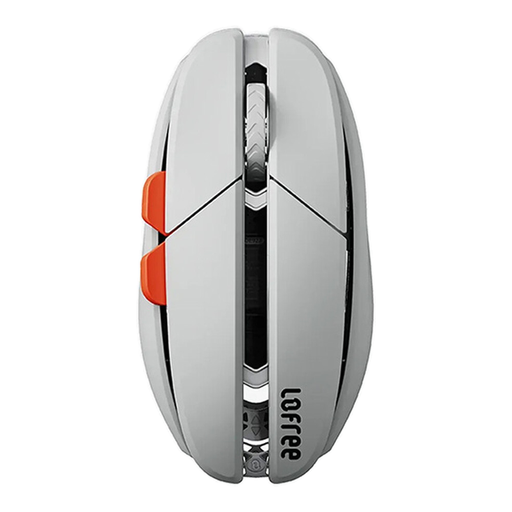
lofree Hypace OE923 Mouse, Light Gray
Consider this model if you want to compare several connection methods for work across devices. Its title specifies Bluetooth, 2.4G and wired modes, plus a magnesium-alloy frame and PC shell. Check its footprint and suitability for your desk surface rather than judging small-desk fit from its materials.
View on Joybuy
 No image available
lofree Wavy Chips EP115 Mouse, Milk Tea
Consider this model if switching between Bluetooth and 2.4G matters more than choosing the smallest possible shape. Its title specifies five DPI levels and an 800 mAh battery. Compare its dimensions and hand fit with your available working space before buying.
View on Joybuy
Frequently asked questions
Is Bluetooth or a USB receiver more useful on a small desk?
Bluetooth is useful if your computer supports it and you want to leave a USB port free; a receiver connection is an alternative when compatible Bluetooth is unavailable or you prefer that method. Check the exact port and package contents: Logitech says the MX Anywhere 3S works with an optional Logi Bolt receiver that is not included, while HP specifies a USB-A receiver option for its 250 Dual Mode Mouse.
Will a higher DPI make it easier to classify plant observations?
Not automatically. A higher maximum DPI gives you a wider sensitivity range, but a usable setting, suitable desk surface and comfortable pointer control matter when selecting small on-screen targets. Treat DPI as something to adjust for your display and task, not as a measure of classification accuracy.
Should I change mice if long classification sessions are uncomfortable?
Consider hand fit and the whole workstation rather than assuming a different mouse alone will resolve discomfort. The Health and Safety Executive advises placing the mouse in line with your elbow; where workers use display screen equipment daily as part of normal work for continuous periods of an hour or more, it says employers must assess the workstation. A vertical mouse is worth considering only if its shape fits you and works in your available space.
How should I dispose of an unwanted wireless mouse or its batteries?
Use an appropriate electrical-waste or battery collection route rather than putting them in household rubbish. GOV.UK advises separate recycling for electrical products and batteries when they no longer work or are no longer wanted.


