Choose a wired USB mouse for one computer if you want to avoid pairing and batteries; consider a quiet Bluetooth mouse if you switch devices or work near others. For long indexing sessions, assess whether a conventional or vertical grip fits your hand, while frequent trips through recipe pages and tables make scroll control worth checking. Confirm the connection, hand fit and any software compatibility your workflow requires.
Who is this for?
Long-session recipe cataloguers
If you spend extended periods opening recipes, entering details and assigning tags, assess grip fit and where the mouse sits on your desk. University Hospitals Sussex NHS Foundation Trust advises keeping a mouse within easy reach rather than overstretching.
Fast-scroll spreadsheet organisers
If you move repeatedly between long recipe pages and an index, the scroll wheel may matter more to you than extra buttons. Logitech describes fast scrolling on its MX Master 3S; consider whether that kind of control fits the lists you actually use.
Flexible-device home cooks
If you collect recipes on more than one device or work near other people, check device switching and click noise. Lenovo describes dual-device Bluetooth switching on its 600 Bluetooth Silent Mouse; confirm that each device you use supports your chosen connection.
What matters when choosing?
Start with the way you work: hand fit during longer sessions, control through long pages, then the connection and noise requirements of your desk or shared space.
| Concern | What to check | Who this matters to |
|---|
| Hand comfort |
Check grip shape, hand-size guidance and handedness. Keep the mouse within easy reach. |
During long tagging sessions, I want a grip that fits my hand without reaching awkwardly; around 45% of consumers would put hand comfort first. |
| Page navigation |
Check the wheel’s scrolling modes and whether any pointer adjustments you need work with your operating system. |
When I move through long recipe pages and tables, stopping at the right entry matters as much as moving quickly; roughly 33% of consumers would prioritise navigation. |
| Connection and noise |
Match wired USB or Bluetooth to your devices; for wireless models, check switching and battery requirements. |
If I work at one desk or move between devices, I want a connection that suits my setup, with quieter clicks if others are nearby; about 22% of consumers would prioritise connection and shared-space needs. |
Buying pitfalls
-
Assuming every vertical mouse will fit
A vertical shape still needs to match your hand and dominant hand. Logitech describes its Lift as intended for small to medium hands and offers left- and right-handed versions.
Check the exact variant and the maker’s hand-size guidance, and try the grip where possible.
-
Expecting a new mouse to fix workstation discomfort
Mouse shape is only one part of an extended indexing session. The Health and Safety Executive’s display-screen guidance addresses workstation assessment and risk reduction, while University Hospitals Sussex NHS Foundation Trust advises positioning the mouse within easy reach.
Avoid overstretching, vary tasks and take appropriate breaks. Seek medical advice if symptoms persist or worsen.
-
Choosing wireless without checking the connection
Wireless models do not all connect in the same way. Lenovo describes its 600 Bluetooth Silent Mouse as a dual-device Bluetooth model, whereas HP specifies a USB-A wired connection for the HP 125.
Check the connection your devices accept, how switching works and whether the wireless model uses a replaceable battery or charging.
An AA-powered mouse also needs a replacement battery when the current one runs out.
-
Choosing controls you will not use
Configurable buttons or pointer settings matter only if they help with repeat actions in your browser, spreadsheet or indexing tool. Logitech describes optional sensitivity adjustment for the MX Master 3S.
Identify the actions you would configure, then check that the required software supports your operating system.
Brands to consider for different mouse needs
Logitech
The MX Master 3S and Lift illustrate different choices: scrolling controls for long lists or a vertical grip for hand-position preferences.
- Logitech describes MagSpeed scrolling on the MX Master 3S and a 57° vertical angle on the Lift.
- Check Lift hand fit and handedness, and confirm operating-system support before relying on optional mouse settings.
HP
The HP 125 is an example of a conventional wired mouse for a computer with a suitable USB-A port.
- HP describes the 125 as ambidextrous with plug-and-play USB-A connectivity.
- Its cable and port requirement make it a different setup from Bluetooth device switching.
Lenovo
The 600 Bluetooth Silent Mouse is relevant when device switching and lower click noise matter.
- Lenovo describes dual-device Bluetooth 5.0 switching, silent buttons and an included AA battery.
- Assess whether its low-profile shape is comfortable for your longer desk sessions.
Razer
The Pro Click V2 is relevant if you want to configure controls for repeated indexing actions.
- Razer describes programmable shortcuts and tactile and free-spin scrolling modes.
- Check software compatibility and whether those controls fit your actual workflow.
Joybuy mouse options
These mice cover vertical-grip, wired, Multi-Touch and quieter wireless approaches to recipe-index work. Choose by the connection and controls your devices support, then assess grip fit for the length of your sessions.
 No image available
HP 920 Ergonomic Wireless Mouse (Black) with Detachable Wrist Rest
Consider this vertical-grip option if hand position matters during longer tagging sessions. Check how its shape fits your hand and which scrolling modes it offers before choosing it for long recipe pages.
View on Joybuy
 No image available
V7 MW500BT Bluetooth Vertical Mouse, 2.4 GHz, 6 Buttons, 1600 DPI
This is another vertical-grip option for extended recipe entry, with Bluetooth and 2.4 GHz connection choices. Its named configuration has six buttons and an adjustable sensor rated to 1600 DPI; check hand fit, handedness and wheel behaviour for your workflow.
View on Joybuy
 No image available
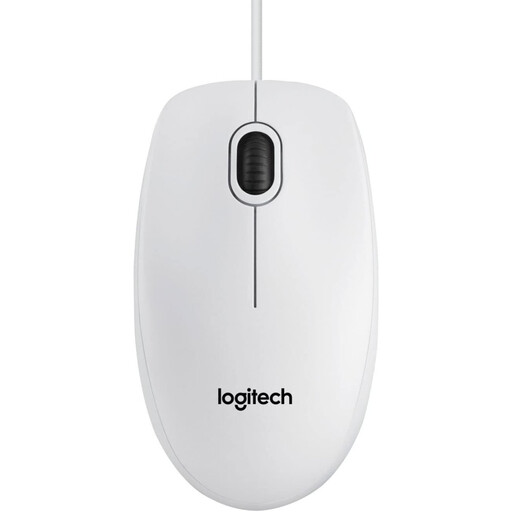
Logitech B100 USB Wired Mouse (White)
For indexing on one computer with a compatible USB connection, its wired setup avoids pairing and batteries. If you regularly navigate long recipe lists, check whether its wheel has the scrolling control you want.
View on Joybuy
 No image available
Apple Magic Mouse (White, Multi-Touch)
Its Multi-Touch surface offers a different way to navigate recipe pages. Check compatibility with your particular device and whether its shape feels comfortable for extended indexing.
View on Joybuy
 No image available
HOFOTEK M311 2.4G+BT Silent Mouse (White-Grey, 1xAA)
Consider its quieter clicks for recipe work near other people and its two wireless connection types for a flexible setup. The named version uses one AA battery; check its scroll-wheel operation and hand fit before choosing it for long sessions.
View on Joybuy
Frequently asked questions
Should I use a wired or wireless mouse for recipe indexing?
Choose wired for one computer with a compatible port if avoiding pairing and batteries matters most; choose wireless if cable-free placement or moving between devices matters more. Check the exact connection and battery arrangement before buying, as wireless models differ.
Will a vertical mouse solve wrist or hand discomfort?
A vertical mouse is worth assessing for grip fit, but it is not a complete answer to discomfort. Mouse placement, work routine and breaks still matter; seek medical advice if symptoms persist or worsen.
Does workplace display-screen guidance prescribe an ergonomic mouse?
The Health and Safety Executive’s display-screen guidance focuses on employers assessing workstations and reducing risks, rather than prescribing a particular mouse model. Consider the position of your mouse and the rest of your setup as well as its shape.
What if a mouse is faulty or its shape does not suit me?
Treat a fault differently from a change of mind about comfort. Coventry City Council Trading Standards advises that a refund is usually available for faulty goods within 30 days; if a working mouse simply does not suit your grip, check the retailer’s change-of-mind terms separately.


