Quiet shared-desk stock reviewers
If you repeatedly click and scroll through stock records near colleagues, quiet controls may matter as much as ordinary navigation.


Choose a mouse for shared-desk stock checks by starting with how you move through records and whether repeated clicks will disturb colleagues. If you change work devices, check both pairing and the switching method. For long daily sessions, consider hand fit and the whole workstation rather than treating mouse shape as a complete solution.
If you repeatedly click and scroll through stock records near colleagues, quiet controls may matter as much as ordinary navigation.
If stock checks move between a desk PC and another assigned device, look at the connection method and how deliberately you can switch between devices.
If checking stock is a prolonged, regular display-screen task, assess hand fit and workstation setup alongside the mouse’s controls. The Health and Safety Executive advises considering the wider workstation for display-screen work.
Start with the movement your stock records demand, then consider desk noise and how the mouse will connect and fit during regular use.
| Concern | What to check | Who this matters to |
|---|---|---|
| Controllable scrolling | Check whether the wheel supports precise movement through individual records or faster movement through long lists; for wide spreadsheets, check horizontal scrolling. | When I move between individual entries and long stock lists, I need to stay in control without losing my place. Around 38% of consumers put record navigation first. |
| Noise around colleagues | Look for stated quiet-click controls, then consider whether the scrolling sound and button feel suit the desk. | Repeated clicking close to colleagues makes control noise my main concern. For around 37% of consumers, quieter use takes priority. |
| Connection and fit | Confirm the connection method, device-switching controls and operating-system support; check hand-size guidance for prolonged use. | If I change work devices or spend long stretches reviewing stock, I need a connection and shape that suit my routine. Device and workstation fit comes first for around 25% of consumers. |
Click noise and switching are separate features. A quiet mouse may offer more than one connection method without a stated way to move between paired devices.
Check the number of pairable devices and the switching control. Logitech specifies a three-device Easy-Switch button for the Pebble Mouse 2 M350s; Dell specifies Bluetooth and an RF receiver for the MS355, but these connection options alone do not establish a switching function.
A shape selected for one person may not suit everyone who uses a shared desk. Logitech offers size and handedness variants of the Signature M650 and specifies the Lift for small-to-medium hands.
Use the particular model’s hand-size and handedness guidance. If several people share the desk, consider whether each regular user needs a separately fitted mouse.
The Health and Safety Executive treats display-screen work as a wider workstation matter; mouse shape alone does not address desk position, display placement or work routine.
For regular display-screen work, review the mouse alongside the workstation and follow the applicable workplace assessment process.
Logitech has compact, size-specific and vertical mouse models relevant to different shared-desk priorities.
The Dell MS355 is a compact office-mouse option for a desk where quiet conventional controls are the priority.
The HP 685 Comfort Dual-Mode Mouse is relevant when stock checks involve wide spreadsheets, shortcuts or several work devices.
These mice offer different starting points for shared-desk stock checks, from a wired workstation setup to wireless models worth considering when quiet controls or changing devices matter. Compare each model’s stated features with the stock system and people who will use it.
 No image available
Consider this model if you work through wide stock records and move between devices; check that its wheel and switching controls suit your system. Confirm click noise before choosing it for a noise-sensitive shared desk.
 No image available
For a shared desk using a USB receiver, consider its stated silent-click design and check whether the wheel suits your stock lists. The product name specifies a 2.4GHz connection, USB receiver and 1600 DPI.
 No image available
A wired option to consider for one fixed workstation where quiet clicks matter; check its shape against the hands of regular users. Its stated features include four buttons and adjustable 1000/1200/1600 DPI settings.
 No image available
Consider this quiet-control model if you change work devices; confirm how switching works and whether its wheel suits your records. The product name specifies adjustable DPI and a 1xAA battery configuration.
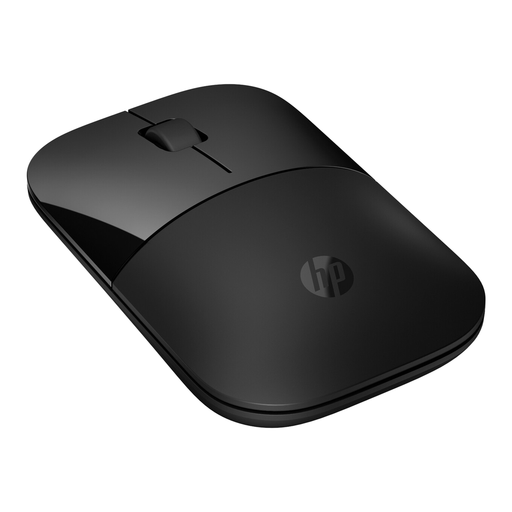 No image available
Consider this model where a quiet shared-desk mouse and a choice of connection methods matter. If you regularly switch devices or navigate wide stock records, confirm its switching and scrolling controls before choosing it.
No: choose the connection that works with the actual workstation and your switching needs. Bluetooth can leave a USB port free on a compatible computer; also check workplace device rules and whether the particular mouse supports the method you intend to use.
Use model-specific hand-size and handedness guidance, especially if you use the mouse for long sessions. Logitech offers the Signature M650 in small-to-medium, larger and left-handed variants, while it specifies the Lift for small-to-medium hands and offers a left-handed version.
A vertical mouse is not a substitute for reviewing the wider workstation. The Health and Safety Executive’s display-screen guidance covers workstation risks, so consider individual mouse fit alongside desk and display position and the way work is organised.
The Health and Safety Executive’s guidance does not prescribe a particular mouse model. For workers who regularly use display-screen equipment, its guidance focuses on assessing the workstation and reducing risks, including where people change desks.