Laptop-based room planners
If you compare furniture, measurements and floor-plan ideas on a laptop at a small desk or in different study spaces, consider a mouse that is easy to carry and can connect to the devices you use.


For browsing furniture listings and working at a small desk, start with a mouse that fits your hand and connects to your laptop without difficulty. A productivity mouse is more relevant if you regularly navigate long plans, switch devices or use shortcuts; a vertical mouse is a personal-fit option for longer desk sessions, not a substitute for a comfortable workstation.
If you compare furniture, measurements and floor-plan ideas on a laptop at a small desk or in different study spaces, consider a mouse that is easy to carry and can connect to the devices you use.
If your planning involves moving repeatedly between layouts, spreadsheets, browser tabs and retailer pages, scrolling and configurable controls may matter more than a basic button layout. Check whether any required customisation software works with your computer.
If you expect extended sessions at a desk, give hand fit and workstation setup attention before choosing a specialised shape. Chelsea and Westminster Hospital NHS Foundation Trust advises keeping wrists relaxed in a neutral position.
Choose the shape for where and how long you work, then check the connection against your laptop. Extra scrolling or shortcut controls are worth considering when they match the planning software and documents you actually use.
Consider it when: you move between a narrow desk and other study spaces. Logitech describes the MX Anywhere 3S as compact and able to connect to up to three devices by Bluetooth.
Trade-off: a smaller shape may not suit your grip during long desk sessions.
Consider it when: lengthy plans, spreadsheets and repeated shortcuts are central to your work. Logitech lists MagSpeed scrolling and customisation for the MX Master 4.
Trade-off: confirm operating-system and software compatibility before depending on customised controls.
Consider it when: most tasks are browsing, making lists and occasional layout work. Logitech offers distinct Signature M650 versions for small-to-medium hands, large hands and left-handed users with large hands.
Trade-off: choose the exact size and version rather than assuming every M650 has the same fit.
Consider it when: you already know a vertical grip suits you. Razer identifies the Pro Click V2 Vertical as a right-handed vertical mouse.
Trade-off: its shape will not suit every hand, and it does not replace changes of posture during long sessions.
| Concern | What to check | Who this matters to |
|---|---|---|
| Navigation through plans and documents | Check the exact model’s scroll behaviour and whether its controls can be configured on your operating system. | If I move constantly between detailed layouts, long listings and spreadsheets, I want scrolling and controls that suit those tasks. Around 33% of consumers put navigation and workflow first. |
| Space and portability | Compare the mouse’s dimensions and connection method; check any stated limits for the surfaces where you work. | When my desk is narrow and I also study elsewhere, a mouse that travels easily matters more than extra controls. For around 27% of consumers, space and portability are the primary need. |
| Shared-room use and connection | Check your laptop’s Bluetooth and ports, what comes with the mouse, and quiet-click claims for the exact model. | If I work beside someone else, I want to limit distracting clicks without ending up with a receiver I cannot connect. Compatibility and shared-room use come first for around 20% of consumers. |
| Hand fit during longer sessions | Choose the appropriate size and handedness, and consider whether the shape suits your grip and desk setup. | During a long planning session, I need a shape that fits my hand while leaving room to change position. Around 20% of consumers prioritise long-session fit. |
A mouse may use a USB receiver that does not fit your laptop’s ports. Bluetooth is an alternative only when both the mouse and laptop support it.
Check the exact connection options, receiver connector and laptop ports before ordering.
A laptop without the matching port may need an adaptor or hub for a receiver-based connection.
A compact shape can be easier to carry, but it may not suit your hand or grip through lengthy sessions.
Compare the manufacturer’s size and handedness guidance with your hand and expected working time; check the applicable return terms if fit remains uncertain.
A different grip does not remove the need to consider desk arrangement and time spent in one position. Chelsea and Westminster Hospital NHS Foundation Trust advises a relaxed, neutral wrist position, while Royal Orthopaedic Hospital NHS Foundation Trust advises changing position during computer work.
Consider handedness and fit, arrange the desk so your wrist can remain relaxed, and change posture or task regularly.
Quiet-click and surface-tracking claims can have model-specific conditions. For example, Logitech’s glass-tracking claim for the MX Master 3S specifies glass at least 4 mm thick.
Check the exact model and the conditions attached to the feature you intend to use.
Logitech’s cited range spans hand-size-specific Signature M650 versions, the compact MX Anywhere 3S and the MX Master 4 productivity mouse.
The HP 430 is a multi-device wireless option for consumers considering both Bluetooth and receiver connections.
Razer’s Pro Click V2 Vertical provides a distinct, right-handed vertical form factor.
These mice cover vertical-grip, shared-room and straightforward wireless options for navigating renovation plans and listings. Compare each connection and shape with your own laptop and working space.
 No image available
Consider this model if you prefer a vertical grip while moving between plans and listings.
The product name specifies Bluetooth and 2.4GHz wireless modes, six buttons and an adjustable sensor with a stated maximum of 1600 DPI. Confirm handedness, hand fit and the receiver connection before choosing it.
 No image available
Consider this mouse for shared-room planning if reduced click noise and switching between devices matter to you.
The product name specifies adjustable DPI and one AA battery. Treat its silent description as a product claim rather than a measured noise level, and check compatibility and the receiver connector for your device.
 No image available
This is an option for carrying a mouse between a small desk and other study locations while browsing plans and listings.
The product name specifies an ambidextrous design, four buttons, a 2.4GHz nano receiver and a 1600 DPI optical sensor. Check the receiver connector and operating-system compatibility for your laptop.
 No image available
Consider this receiver-based mouse if you work on room plans in a shared space and want to assess a quiet-click option.
The product name specifies a 2.4GHz connection, USB receiver and 1600 DPI optical tracking. Its quiet-click wording is a product claim; check the receiver connector, physical size and compatibility with your computer.
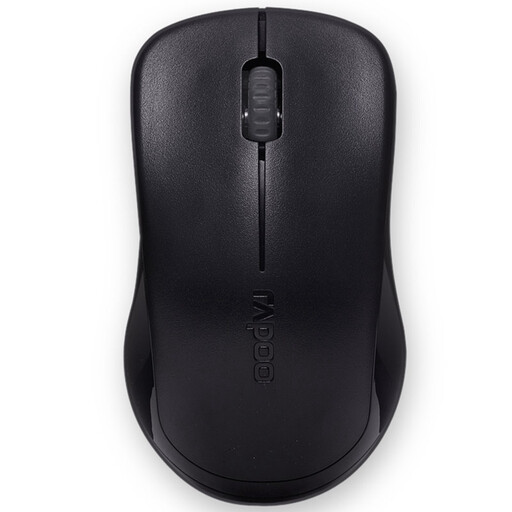 No image available
This mouse suits a straightforward approach to browsing furniture listings and planning documents, provided its shape and receiver suit you.
The product name specifies a 2.4GHz wireless connection. Check the receiver connector against your laptop’s ports and consider the right-handed shape described for this model before ordering.
Choose a connection your laptop supports without an unwanted adaptor. Logitech lists Bluetooth or a Logi Bolt receiver for the Signature M650, while HP lists Bluetooth or a USB-A nano dongle for the HP 430; check the exact receiver and your available ports.
Not by itself: hand fit, controllable scrolling and tracking on your intended surface also affect the choice. Read surface claims for the exact model; Logitech’s glass-tracking condition for the MX Master 3S specifies glass at least 4 mm thick.
A vertical mouse should be treated as a personal-fit choice, not a treatment. Chelsea and Westminster Hospital NHS Foundation Trust advises a relaxed, neutral wrist position, and Royal Orthopaedic Hospital NHS Foundation Trust advises changing position during computer work.
Check your local electrical recycling arrangements before disposing of it. GOV.UK guidance on waste electrical and electronic equipment describes recovery, reuse and recycling of electrical products and components as aims of the UK WEEE rules.