What matters when choosing?
Work out whether the screens share a computer before choosing connection features. Then consider how the mouse fits into your checking routine and desk setup.
| Concern |
What to check |
Who this matters to |
| Switching between hosts |
Check how many devices the exact mouse can save, how you switch, and whether each host can use its Bluetooth, receiver or wired connection. |
If my menu checks move between separate devices, I want to change hosts without setting up the mouse each time. Around 42% of consumers put switching between hosts first. |
| Navigation on one PC |
On Windows, match the display arrangement to the physical screens and test pointer movement; choose scrolling and buttons for the tasks you actually use. |
With the preview and tools on two monitors attached to one PC, I need the pointer to cross the screen boundary as expected. Roughly 33% of consumers prioritise navigation on one computer. |
| Long-session fit |
Check hand-size guidance and handedness, then consider whether the mouse can sit in line with your elbow at your desk. |
During repeated checking sessions, I care about how the mouse fits my hand and where I can place it. About 25% of consumers make long-session fit their primary concern. |
Joybuy product choices
These mice address different parts of the two-screen task: connection choices to investigate for separate hosts, and pointer use or mouse shape for a single workstation. Bluetooth and 2.4 GHz options alone do not confirm that a mouse stores and switches between host devices.
 No image available
HOFOTEK M311 2.4G+BT Silent Mouse, White-Grey
Consider its connection options if your menu checks use separate hosts, but confirm how the M311 switches between them before choosing it for that task.
The named variant lists 2.4G and Bluetooth connections and a 1xAA battery. Check compatibility with each device you plan to use.
View on Joybuy
 No image available
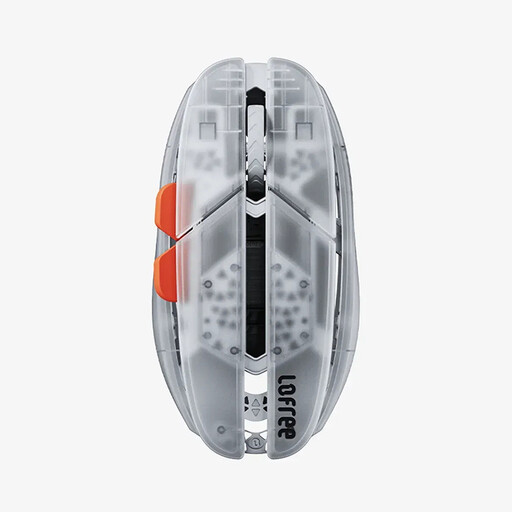
lofree Hypace OE923 Semi-Transparent Special Version
Its listed connection modes give you options to check against separate test devices; confirm the number of stored hosts and the switching method before relying on it for that workflow.
This variant lists Bluetooth, 2.4G and wired connections, a magnesium-alloy frame with a PC shell, and a PAW3950 laser sensor. Check compatibility with each host, particularly if you use Boot Camp dual-system mode on a Mac.
View on Joybuy
 No image available
HP 920 Ergonomic Wireless Mouse, Black, with Detachable Wrist Rest
If both screens share one computer and you want to assess wrist-rest placement at your desk, check whether this mouse and rest fit your hand and working position.
The named black variant has a detachable wrist rest. If your screens belong to separate hosts, confirm its stored-device and switching options before purchase.
View on Joybuy
 No image available
V7 MW500BT Bluetooth Vertical Mouse
If you prefer to assess an upright grip for checking sessions at one workstation, check whether the MW500BT fits your hand and desk layout.
Its named specifications include Bluetooth and 2.4 GHz connections, six buttons and an adjustable sensor up to 1600 DPI. Confirm stored-host switching separately if you use two computers.
View on Joybuy
 No image available
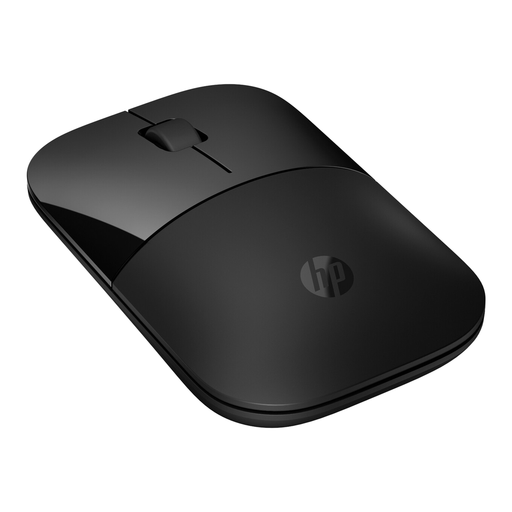
HP Z3700 Dual Black Mouse
For two displays connected to one computer, choose based on ordinary pointer use and fit; set the display arrangement in the operating system.
If you intend to move between separate hosts, confirm how many devices this exact mouse can store and how it switches between them.
View on Joybuy
Common questions
Do I need a multi-device mouse for two monitors?
No, not when both monitors are connected to one computer. On Windows, arrange the displays to match their physical positions and test pointer movement, as Microsoft Support advises. Device switching becomes relevant when the screens belong to separate hosts.
What should I check for two separate test devices?
Confirm the exact mouse's saved-device limit, switching control, connection method for each host and operating-system compatibility. For comparison, Logitech says the M720 pairs with up to three devices, while Dell specifies three-device connectivity for the MS7421W; those details do not establish the behaviour of other models.
Will a vertical mouse solve workstation discomfort on its own?
No: mouse shape is only one part of the workstation. Check whether the mouse fits your hand and can be placed in line with your elbow; the Health and Safety Executive's guidance also considers equipment, furniture, work conditions and the task.
Does a display screen equipment assessment matter for menu checking at work?
Yes, if you use display screen equipment daily as part of your normal work for continuous periods of an hour or more: the Health and Safety Executive says employers must carry out a workstation assessment for workers meeting those conditions. The assessment concerns the whole workstation, not just the mouse.


