For repeated editing, page navigation and shortcuts, start with a productivity mouse whose controls you can configure for your tools. If hand fit and posture matter more during long sessions, consider a vertical mouse without assuming its shape will suit you; on a compatible Mac or iPad, a gesture-led mouse offers a different way to navigate. Check software and device compatibility before relying on custom controls or multi-device switching.
Who these mice suit
Designers who rely on shortcuts
If you move repeatedly between a browser, design tool, CMS and long page layouts, configurable actions and scrolling controls may matter more to you than a minimalist shape. Logitech and Razer both describe configurable controls on their productivity mice.
People working at a desk for long sessions
If grip and wrist posture shape your choice, check the mouse against your hand size and desk arrangement. Logitech positions Lift for small to medium hands, while the Health and Safety Executive advises keeping a mouse in line with the elbow.
Mac users who prefer gestures
If you work mainly on a compatible Mac or iPad, you may prefer swiping and scrolling on a Multi-Touch surface to assigning shortcut buttons. Apple describes those gestures for Magic Mouse; check its current requirements against your device.
What matters when choosing
For landing-page design, decide which action you most want the mouse to make easier, then check fit and the software or devices needed to use that feature.
| Concern |
What to check |
Who this matters to |
| Shortcuts and navigation |
Check button placement and whether custom actions work with your operating system and design tools. |
If I switch between page sections, tools and browser views all day, I want useful actions close to hand rather than controls I will never configure. Roughly 37% of consumers put shortcuts and navigation first. |
| Long-session comfort |
Check hand-size guidance, handedness and whether the mouse can sit in line with your elbow. |
When I spend hours editing at a desk, a shape that fits my hand and workstation matters more than a headline sensor figure. Around 27% of consumers prioritise long-session comfort. |
| Mac and iPad gestures |
Confirm device and operating-system compatibility, then decide whether surface gestures suit your workflow. |
I may prefer swiping between pages and scrolling on the mouse itself when I work on Apple devices. Roughly 18% of consumers put that gesture workflow first. |
| Multi-device use |
Check supported connections, how switching works and whether a receiver or software is needed. |
Moving between computers makes a straightforward switching method more valuable to me than extra controls on just one device. Around 18% of consumers prioritise multi-device flexibility. |
Mistakes to avoid
-
Assuming every vertical mouse will fit
Logitech positions Lift for small to medium hands; its vertical shape alone does not establish a good fit for yours.
Check the maker's size and handedness guidance, and whether you can reach the buttons comfortably. Review the applicable return terms if you cannot assess the fit before purchase.
-
Choosing by DPI alone
A sensor figure does not tell you whether the shape, scrolling, button layout or software will suit repeated landing-page edits.
Assess tracking settings alongside the controls you will actually use. Logitech lists scrolling and customisation for MX Master 4, while Razer lists configurable shortcuts and multi-device connectivity for Pro Click V2.
-
Expecting the mouse to fix a poor desk setup
The Health and Safety Executive treats mouse position as part of display-screen workstation posture, not as a substitute for arranging the rest of the desk.
Keep the mouse in line with your elbow and the screen and keyboard central; vary your activity during extended sessions.
-
Counting on controls before checking software
Some configurable functions depend on companion software, and Apple's gesture-led option has device and operating-system requirements.
Confirm support for your operating system and the apps you use before making those functions central to your choice.
Brands worth considering
Logitech
Its MX Master 4 and Lift lines offer different approaches to desk work: configurable productivity controls or a vertical grip.
- Logitech lists an Actions Ring, MagSpeed wheel and Logi Options+ customisation for MX Master 4.
- Logitech positions Lift for small to medium hands and offers a left-handed variant; check fit rather than assuming either version will suit you.
Razer
Pro Click V2 is relevant if configurable controls and connections across several devices are priorities.
- Razer lists five-way multi-device connectivity and configurable shortcuts for Pro Click V2.
- Razer says Synapse is optional for basic use but adds customisation; check software support for the functions you want.
Apple
Magic Mouse is a compact, gesture-led option for people using compatible Mac or iPad devices.
- Apple lists Multi-Touch swiping and scrolling, automatic Mac pairing and USB-C charging.
- Check Apple's current device and operating-system requirements before choosing it for a particular setup.
Joybuy mice for landing-page design
These mice cover configurable controls, connections across devices and gesture-led navigation for different landing-page workflows. Choose by the feature you will use and check the relevant fit or software requirements.
 No image available
Logitech MX Master 3S Mouse, Black
Consider this for repeated page navigation and shortcut work. Check Logi Options+ support for your operating system before relying on button customisation.
View on Joybuy
 No image available
RAPOO MT760L-LG Mouse
Consider this if you want to work across computers. Cross-computer cursor switching requires the mouse driver and computers on the same Wi-Fi or Ethernet network; wireless charging requires a separate P3 module.
View on Joybuy
 No image available
AJAZZ AJ200 AI MC Mouse with Charging Dock
Consider this if you want connection options and controls for repeat actions. The title lists a PAW3311 sensor, up to 24000 DPI and Bluetooth, 2.4G and USB-C modes; those figures do not establish how the mouse will feel in design work.
Button remapping and macros require driver software, so check support for your operating system.
View on Joybuy
 No image available
Apple Magic Mouse, White Multi-Touch Surface
Consider this if you prefer swiping and scrolling gestures on an Apple device. Confirm the current requirements for your Mac or iPad before buying rather than assuming compatibility from the product name.
View on Joybuy
 No image available
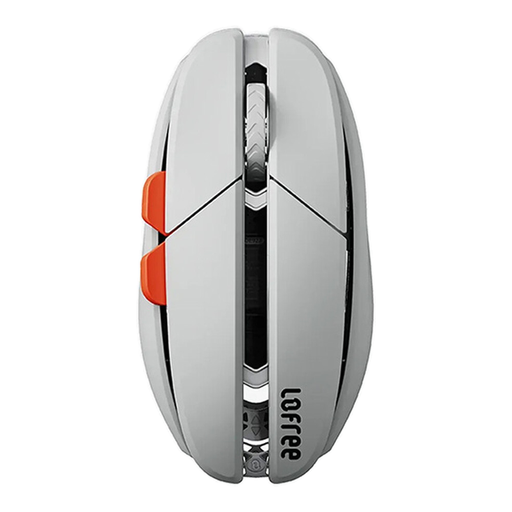
lofree Hypace OE923 Mouse, Light Gray
Consider this for a setup that needs connection options and adjustable controls. The title lists Bluetooth, 2.4G and wired modes, a PAW3950 sensor and a magnesium-alloy frame with a PC shell.
Check whether the web configuration app supports your system before relying on button settings. The listed Boot Camp dual-system mode on Mac devices is incompatible.
View on Joybuy
Questions about mouse choice
Do UK display-screen rules specify an ergonomic mouse?
The Health and Safety Executive's cited display-screen guidance does not specify a mouse model. It states that the DSE Regulations apply to workers who use display-screen equipment daily for continuous periods of an hour or more; assess mouse choice alongside the workstation rather than treating a model name as a compliance answer.
How should I position a mouse for long design sessions?
Keep the mouse in line with your elbow and the screen and keyboard central, as the Health and Safety Executive advises. Arrange the desk so you do not have to twist your back to use the mouse.
Do programmable mice need companion software?
Not necessarily for basic pointer use, but particular shortcut features may need software. Razer says Synapse adds customisation to Pro Click V2, while Logitech uses Logi Options+ for MX Master 4 Actions Ring customisation and plugins; check the requirements for the exact mouse and functions you intend to use.
Will a vertical mouse suit everyone working long hours?
No vertical shape guarantees a good fit for every hand or desk. Logitech positions Lift for small to medium hands, and the Health and Safety Executive advises considering mouse placement as part of workstation posture; check both before choosing it for extended use.


