Start with a compact mouse if the space beside your keyboard is tight and controlled cursor movement is your priority. Consider a vertical mouse instead if hand fit during long sessions matters more, or a gesture-led Magic Mouse if you work on a compatible Mac or iPad; check the shape, connection and device requirements before deciding.
Who these choices suit
Designers with little desk space
If your keyboard leaves a narrow area for adjusting homepage spacing, images and typography, compare the mouse’s body size with the room you have to move it. Logitech describes its MX Anywhere 3S as compact and offers adjustable tracking for this kind of choice.
Designers working long sessions
If you move regularly between design tools, a browser and code, consider hand size and grip before choosing an upright shape. The Health and Safety Executive also treats the mouse as one part of the wider workstation setup.
Mac-based portfolio builders
If you prefer swiping between pages and scrolling on a touch surface, Apple’s Magic Mouse is a gesture-led option. Check the requirements for the exact mouse variant and your Mac or iPad before ordering.
What matters when choosing
Compact conventional mouse
Choose it when: Your available mousing area is narrow and you want to tune pointer movement for small layout adjustments.
Consider: Check whether a smaller shell gives your preferred grip enough support through a long session.
Vertical mouse
Choose it when: An upright grip and suitable hand fit take priority over a low-profile shape.
Consider: Pointer control may take some adjustment, and the mouse cannot compensate for an unsuitable workstation setup.
Mac-focused gesture mouse
Choose it when: You use a compatible Mac or iPad and prefer surface gestures for scrolling and page navigation.
Consider: Confirm the exact device requirements, especially if you also work on another operating system.
| Concern |
What to check |
Who this matters to |
| Space and precision |
Compare body size with your clear mousing area; look for pointer-speed adjustment if small selections are difficult. |
When aligning images and type beside a crowded keyboard, I need enough control without large hand movements. Around 33% of consumers put space and precision first. |
| Long-session comfort |
Check hand-size guidance, handedness and button reach; consider the mouse alongside desk and keyboard position. |
During extended design and coding sessions, I want a shape that suits my hand rather than relying on an ergonomic label. Comfort comes first for around 27% of consumers. |
| Workflow controls |
Check device connections and whether your intended shortcuts need compatible software. |
If I switch computers or repeatedly move through long pages and editing tools, accessible controls matter more to me than the smallest shell. Around 20% of consumers prioritise workflow controls. |
| Apple gestures |
Confirm the exact Mac or iPad requirements and whether surface gestures suit your apps. |
On a Mac or iPad, I would rather scroll and navigate pages with gestures than use extra physical buttons. Gesture compatibility is the main concern for around 20% of consumers. |
Buying pitfalls
-
Assuming maximum DPI means more accurate design work
A faster pointer can reduce hand travel, but it can make fine alignment harder at a speed that does not suit your display and available space.
Start at a comfortable setting, try selecting small elements, and increase pointer speed only if you need less hand movement.
-
Choosing a vertical mouse by its ergonomic label alone
Hand size, handedness and button reach affect whether an upright shape suits you. The Health and Safety Executive advises considering the wider display-screen workstation and work routine, not just one device.
Check the manufacturer’s fit guidance and the seller’s return terms, then consider mouse position and breaks alongside the choice of mouse.
-
Expecting the same controls on every computer
Connection options, operating-system requirements and shortcut software vary by model. Logitech states that MX Anywhere 3S connects to up to three devices by Bluetooth, while Apple specifies Mac and iPad requirements for its current USB-C Magic Mouse.
Confirm your computer, available ports and Bluetooth support, and check whether your preferred shortcuts require manufacturer software.
Brands to consider for these mouse styles
Logitech
Its MX Anywhere 3S and Lift illustrate two different routes: a compact conventional mouse and a vertical mouse intended for small to medium hands.
- Logitech specifies 8K-DPI tracking and Bluetooth pairing with up to three devices for MX Anywhere 3S; it describes Lift as having a 57° angle and a left-handed option.
- Those specifications do not establish that either shape will suit your grip. Check the exact Lift variant and hand fit.
Razer
Pro Click V2 is a route to consider when shortcuts, scrolling controls and switching devices matter more than choosing the smallest mouse body.
- Razer states that Pro Click V2 offers shortcuts configurable through Synapse 4, two scroll-wheel modes and five-way multi-device connectivity.
- Compare its physical size and extended thumb rest with your clear desk area and preferred grip before ordering.
Apple
Magic Mouse is a low-profile, gesture-led option for users of compatible Apple devices.
- Apple lists its current USB-C Magic Mouse as 11.35 cm deep and 5.71 cm wide, with Multi-Touch gestures for scrolling and moving between web pages.
- Apple specifies Macs running macOS 15.1 or later and particular iPads for that version. Check the requirements of the exact variant you intend to buy.
Joybuy product choices
These mice offer compact conventional, wired and gesture-led options for a small portfolio-design workspace. Compare each mouse’s controls and connection with your available space and computer; a product’s place in this list does not settle hand fit.
 No image available
HOFOTEK M311 Silent Mouse (2.4G+BT, White-Grey, 1xAA)
Consider this wireless option if you want to adjust pointer speed while working in a limited mousing area.
The product name specifies 2.4G and Bluetooth connections, multi-level DPI adjustment and one AA battery. Confirm compatibility with your computer before choosing a connection mode.
View on Joybuy
 No image available
V7 MW100-1E Wireless Mouse (Black)
For a restricted desk area, compare this mouse’s dimensions with the space available beside your keyboard.
Its product name specifies a 1600 DPI optical sensor, four buttons and a 2.4GHz USB nano receiver. Check that your computer has a suitable USB port; the listed system requirements specify Windows 10 and Windows 11.
View on Joybuy
 No image available
Apple Magic Mouse (White Multi-Touch Surface)
Consider this gesture-led mouse if your portfolio workflow centres on a compatible Mac or iPad.
The product name identifies a Multi-Touch surface. Check the device and operating-system requirements for this exact variant before ordering rather than applying requirements from another Magic Mouse version.
View on Joybuy
 No image available
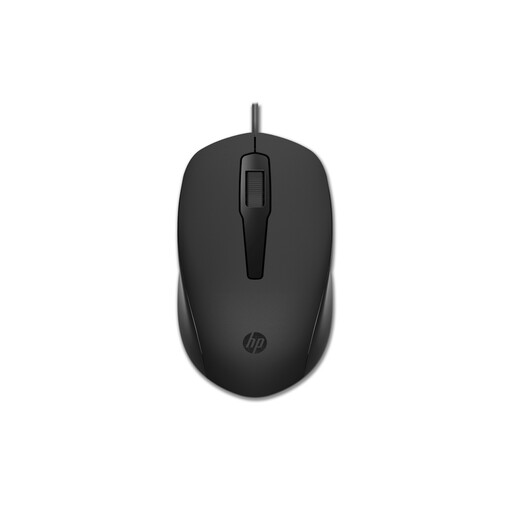
HP 150 WRD Mouse
If you prefer a wired mouse on a small desk, check that its cable can reach your computer without restricting movement.
Confirm the cable length, USB-A port availability and operating-system support for your setup before ordering.
View on Joybuy
 No image available
lofree Wavy Chips EP115 Mouse (Milk Tea)
This is an option if adjustable pointer speed and a choice of wireless connection modes matter to your editing workflow.
The product name specifies Bluetooth and 2.4G modes, five DPI levels and an 800mAh battery. Check its physical size for your desk, how device switching works and whether the connection method you intend to use needs a separate receiver.
View on Joybuy
Common questions
How much room should I leave for a mouse on a small desk?
Allow room to move the mouse, not just enough space for its body. Measure the clear area beside your keyboard, then try a comfortable pointer speed for selecting and aligning small homepage elements.
Should I choose a vertical mouse for long design sessions?
A vertical mouse is worth considering if its stated hand-size range and button placement suit you, but its shape alone cannot resolve an unsuitable workstation setup. The Health and Safety Executive advises considering display-screen equipment and the wider work environment when addressing discomfort.
Will programmable mouse buttons need extra software?
Advanced button assignments may need compatible manufacturer software. Logitech describes individual-button and app-specific configuration through Logi Options+, while Razer describes Pro Click V2 customisation through Synapse 4; check support for your operating system and intended shortcuts.
Will an Apple Magic Mouse work with every portfolio-design computer?
Do not assume it will. Apple specifies Macs running macOS 15.1 or later and particular iPads for its current USB-C Magic Mouse; check the requirements for the exact variant you intend to buy and the computer you use.


