For occasional delivery-schedule updates, start with a compact mouse that can connect to the device you actually use: Bluetooth leaves a USB port free, while a 2.4 GHz receiver needs a compatible port. If the room is shared, consider a quiet-click model; if the same mouse will also serve for long coursework sessions, give hand fit more weight than portability. Check your ports, Bluetooth capability, preferred hand and battery type before choosing.
Who this choice matters to
Small-desk laptop user
If delivery changes are brief browser tasks at a crowded desk, a compact mouse may leave more room beside your laptop and books. Bluetooth is worth considering when you need to keep a USB port free; confirm that your device supports it.
Shared-room quiet worker
If you update orders or study while someone else shares the room, look for a specific quiet-click claim and a connection that suits your device. Quiet clicks do not mean that scrolling or contact with the desk will be silent.
Long-session student administrator
If delivery updates are only one part of longer coursework and form-filling sessions, check the shape against your hand size and preferred hand. Logitech, for example, gives different hand-size guidance for variants in its Signature M550 and M650 ranges.
What to check before buying
For a mouse used to update delivery schedules, establish connection compatibility first, then decide how much desk space, click noise and longer-session fit matter to you.
| Concern | What to check | Who this matters to |
|---|
| Connection and desk space |
Check Bluetooth support or the available USB port and receiver connector; compare the mouse’s dimensions with your desk space. |
If I only have a narrow space beside my laptop, I want a mouse that connects without occupying a port I need for something else. Roughly 36% of consumers put connection and small-desk practicality first. |
| Quiet shared-room use |
Look for an explicit quiet-click claim; check the shape if the mouse will be shared between left- and right-handed users. |
When I work near a roommate at night, repeated clicks matter more to me than extra controls. Around 29% of consumers place quiet shared-room use first. |
| Fit for longer sessions |
Compare the maker’s hand-size guidance and check whether the shape suits your preferred hand. |
If coursework keeps me at the desk well beyond a quick delivery update, I need a shape I can use comfortably rather than the smallest one available. About 21% of consumers prioritise longer-session fit. |
| Everyday upkeep |
Confirm the battery type, whether a battery is included and how the mouse pairs with your device. |
I would rather have straightforward setup and know which replacement battery to keep nearby than choose by specialist controls. Roughly 14% of consumers make low-maintenance operation their primary concern. |
Buying pitfalls
-
Buying a receiver-only mouse for a USB-C-only device
A mouse can suit your desk yet have a receiver that does not fit your laptop. A 2.4 GHz connection does not, by itself, tell you which USB connector is supplied.
Check Bluetooth support, available ports and the receiver connector on every device you plan to use.
Using a USB-A receiver with a USB-C-only device may require an adapter.
-
Choosing the smallest shape for long daily sessions
A low-profile mouse saves space, but that does not establish whether it fits your hand for extended coursework. Hand-size and left-handed variants also differ within some product ranges.
If the mouse will be used for longer sessions, compare its dimensions and the maker’s fit guidance before choosing a compact or contoured shape.
-
Treating quoted battery life as a guarantee
Battery-life figures describe stated product conditions; actual replacement frequency depends on use. The quoted duration should not outweigh connection compatibility or fit.
Check whether the model uses replaceable AA or AAA cells or needs charging, and keep a compatible spare if an interruption would be inconvenient.
Models using disposable cells will need replacement batteries.
-
Expecting a mouse alone to resolve desk discomfort
The Health and Safety Executive’s workstation guidance considers equipment, furniture and working conditions together, rather than treating one peripheral as the whole setup.
Place the mouse with your keyboard, screen and available desk space in mind. If the room is also your employee workstation, ask your employer about its display-screen-equipment assessment process.
Relevant brands to consider
These ranges illustrate different shapes and connection choices; check the exact variant rather than assuming every mouse from a brand shares the same features.
Logitech
The compact Pebble 2 M350S and the more shaped Signature M550 and M650 ranges address different desk-space and fit priorities.
- Switching between up to three devices is described for the Pebble 2 M350S, which may matter if delivery updates move between devices.
- Logitech recommends different Signature M550 and M650 variants by hand size; its M650 range also has a left-handed M650 L variant. Check the exact version before buying.
HP
HP’s Z3700 is a slim connection-flexibility option, while the HP 405 Quiet and HP 250 offer alternatives for buyers considering a less compact shape.
- HP describes Bluetooth and USB-A receiver connections for the Z3700 Dual Mode and HP 250 Dual Mode models.
- Check the dimensions of the larger options against your desk, and treat HP’s quiet-click and battery-life descriptions as model-specific claims rather than guarantees for every HP mouse.
Microsoft
Microsoft Bluetooth Mouse is a compact option for a compatible Windows device when you do not need a USB receiver.
- Microsoft specifies one AA battery for its Bluetooth Mouse.
- Check the exact model’s Windows and Bluetooth requirements; a Bluetooth-only choice does not provide a receiver fallback.
Mouse choices for delivery updates
These mice offer compact receiver-based or dual-mode choices for a small desk, alongside shaped options to consider if the same mouse will also be used for longer sessions. Match the connection and physical shape to your own device and workspace.
 No image available
HOFOTEK M311 2.4G+BT Silent Office Mouse, white-grey
Consider this option for short schedule updates where you want a choice between Bluetooth and 2.4 GHz wireless; check that your device can use your preferred connection.
The product name specifies adjustable DPI and one AA battery. Its silent-click wording is a product claim, not a promise that every mouse sound will be inaudible.
View on Joybuy
 No image available
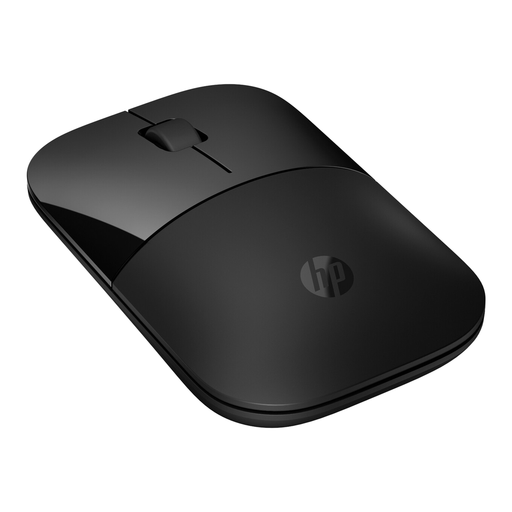
HP Z3700 Dual Black Mouse
This slim model is worth considering when desk space is limited but you want a choice of wireless connections for delivery updates.
Joybuy describes Bluetooth and 2.4 GHz USB-dongle connections for the Z3700 Dual Black. Check that your device has a suitable port if you intend to use the dongle, and assess the shape if hand fit is a priority.
View on Joybuy
 No image available
V7 MW100-1E 2.4 GHz wireless mouse, black
Consider a receiver-based mouse like this if your device has a compatible USB port and you do not need Bluetooth for schedule updates.
The product name specifies an ambidextrous design, four buttons and a 1600 DPI optical sensor. Check operating-system compatibility for the device you will use.
View on Joybuy
 No image available
V7 MW500BT Bluetooth vertical mouse
A vertical shape may be worth assessing if you will also use the mouse for longer coursework sessions; check its fit and the space available on your desk rather than assuming the shape will suit you.
The product name specifies Bluetooth and 2.4 GHz modes, six buttons and an adjustable 1600 DPI sensor. Confirm that the shape suits your preferred hand.
View on Joybuy
 No image available
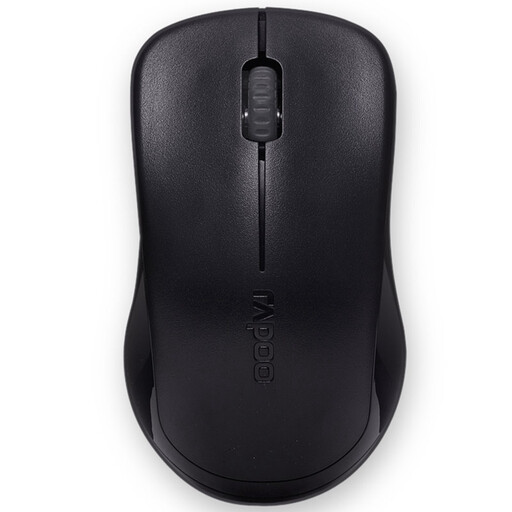
Rapoo 1620 2.4 GHz wireless optical mouse, black
This receiver-based option is relevant if your device can use its connection and you want an everyday mouse for browser navigation. Check the shape against your preferred hand before using it for longer sessions.
The product name identifies 2.4 GHz wireless operation; do not choose it if Bluetooth is necessary for your setup.
View on Joybuy
Frequently asked questions
Should I use Bluetooth or a USB receiver with my student laptop?
Choose Bluetooth if your device supports it and keeping a USB port free matters; choose a receiver if you have a compatible port and prefer that connection. A dual-mode mouse offers both routes, but check the receiver’s connector before buying.
Is a quiet-click mouse useful in a shared student room?
It is worth considering if repeated clicking could disturb someone nearby. Look for a model-specific quiet-click claim, while allowing for sound from scrolling, other buttons and contact with the desk.
What should I check about a wireless mouse’s battery?
Check the exact battery type and whether you need to keep a spare or recharge the mouse. Microsoft specifies one AA battery for its Bluetooth Mouse and advises switching it off when it is not in use to help save battery.
Does a student need to buy an ergonomic mouse under UK workplace rules?
The Health and Safety Executive’s display-screen-equipment guidance concerns employer duties for workers who use such equipment daily for continuous periods of an hour or more; it does not prescribe a particular mouse purchase for a student. If your room is also an employee workstation, ask your employer about its assessment process, which considers the whole workstation.
What should I do if a mouse bought from a UK trader is faulty?
Contact the trader and keep your order details and a clear description of the fault. GOV.UK explains that consumer rights protect purchases of goods, while section 23 of the Consumer Rights Act 2015 provides for repair or replacement where the consumer has that right; the appropriate remedy depends on the circumstances of the fault.


