What matters when choosing a transfer method?
Start with the whole folder size and where the files need to go. For a physical transfer, check both devices and the drive format; for remote sharing, check the cloud account and upload method.
| Concern |
What to check |
Who this matters to |
| Room for the whole transfer |
Measure the selected folders, then check usable space on the drive or in the cloud account and at the destination. |
If I am moving a photo library or several video folders, everything needs to fit before I start. Around 29% of consumers may put sufficient capacity first. |
| Repeated transfers and carrying |
Match the drive’s connection requirements to the computer and cable; consider its stated physical-protection limits separately. |
When I carry large active folders between locations, waiting for each copy and handling the drive matter more. Roughly 29% of consumers may prioritise this repeated-transfer need. |
| Device compatibility |
Check the ports and any data-capable adapter at both ends, then confirm the file system permits the required Windows or Mac use. |
I need the same drive to work with my source and destination devices without discovering a read-or-write problem halfway through. About 21% of consumers may make compatibility their main concern. |
| Remote access |
Check the recipient’s access, remaining account storage, largest individual file and upload method. |
If family or colleagues need files in another location, passing them a drive is impractical. For around 21% of consumers, remote access may be the deciding need. |
Joybuy products for physical transfer
These portable SSDs, a portable HDD and a flash drive are options for carrying files between devices. Choose the capacity and connections for your own transfer; remote sharing instead calls for a suitable online route.
 No image available
Samsung Portable SSD T7 4 TB, Grey
Consider this for carrying a large collection locally when a 4 TB drive fits the files you need to move.
The product name specifies a USB Type-C 3.2 Gen 2 connection. Check both computers’ ports and the drive format before a cross-platform transfer.
View on Joybuy
 No image available
Samsung MU-PE1T0S 1 TB, Black
This portable SSD is an option for regularly carrying folders that fit within its 1 TB capacity.
The product name specifies USB Type-C 3.2 Gen 2. Confirm the host connection, cable and file format needed for your devices.
View on Joybuy
 No image available
Western Digital My Passport Ultra 5 TB, Blue
Consider this portable HDD for a large local archive when its 5 TB capacity suits the complete transfer.
Check its connection and format against both computers before copying, particularly if the move involves Windows and Mac.
View on Joybuy
 No image available
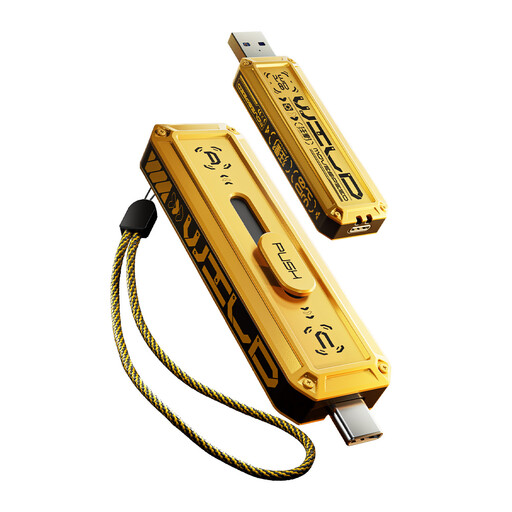
MOVESPEED YSUWD10-1TSY 1 TB Dual-Interface Flash Drive, Yellow
This hand-carried option may suit a transfer between devices with different USB connector shapes, provided the files fit its 1 TB capacity.
The product name specifies a dual interface, including Type-C, and a zinc-alloy housing. Confirm the other connector, expected transfer performance and file format for your devices.
View on Joybuy
 No image available
SanDisk Portable SSD 2 TB
This portable SSD offers a 2 TB capacity to consider for carrying a larger set of files locally.
Check its connector, the ports on both devices and the file format before choosing it for a particular transfer.
View on Joybuy
Questions about moving large files
How can I move selected files to a new Windows PC?
Copy them via external storage or use OneDrive if they fit your available cloud space. Microsoft Support describes both routes for moving files to a new Windows PC; choose external storage for a local hand-off or OneDrive when access through the same account is useful.
Do I need a drive when replacing a Mac?
Not necessarily: Apple Support says Migration Assistant can move documents, apps, user accounts and settings from another Mac, a Time Machine backup or a Windows PC. A portable drive remains an option when you only want to carry selected files.
Can I use one external drive with Windows and Mac?
Yes, if its format allows the read-and-write use you need on both systems. Apple Support lists ExFAT as a Windows-compatible format for volumes over 32 GB; copy any files you need elsewhere before reformatting a drive.
Will a cloud service handle a very large file?
Check the service’s file limit, your remaining storage and the upload method before relying on it. Dropbox Help states a maximum uploaded-file size of 2 TB, while warning that browser uploads above 375 GB may time out or be interrupted.
What should I check before moving work files?
Use the transfer method approved by your employer, particularly for files containing personal information. The Information Commissioner’s Office identifies encryption as an effective way to protect personal information stored on removable media if a device is lost or stolen.


