What to check before choosing
Provider-supplied router for fixed broadband
Consider when: the provider confirms service and an acceptable installation date at the exact property.
Trade-off: an engineer visit, different equipment or a different start date may be needed.
Third-party router
Consider when: you need particular networking controls or ports and the provider confirms how the router can connect.
Trade-off: setup and troubleshooting may become your responsibility, and some provider features may not be available.
4G or 5G home broadband
Consider when: a provider offers home broadband at the destination and the intended indoor reception suits your needs.
Trade-off: mobile coverage is predicted rather than assured indoors, and speeds can vary with signal and network load.
Mesh Wi-Fi
Consider when: a working connection reaches the main router but you need Wi-Fi in other rooms.
Trade-off: mesh does not provide the incoming broadband service; operating modes can also affect available features.
For a move in the UK, check the service and installation at the destination first, then decide whether you need different router hardware or better Wi-Fi distribution indoors.
| Concern |
What to check when buying |
Who this matters to |
| Fixed service at the new property |
Check the full address with the provider, then confirm orderability, connection type and installation details. |
If I want fixed broadband, I need to know it can actually be ordered at my new address before choosing a router. Around 31% of consumers put a confirmed fixed connection first. |
| Mobile home-broadband suitability |
Check the provider’s address-specific offer, indoor coverage prediction and hub, SIM and plan requirements. |
If fixed installation may not suit my move, I need a mobile service with suitable reception where I will use it. Around 25% of consumers put a usable mobile alternative first. |
| Connection ready around moving day |
Ask for the service start date, access requirements, equipment delivery arrangements and any relevant existing-contract charges. |
When I am planning the move, I need to know when service can start and whether installation needs access to the property. Around 19% of consumers put the connection date and installation plan first. |
| Router compatibility |
Confirm the provider’s connection method, the exact hub or termination equipment, and who will troubleshoot a separate router. |
If I want to use my own router, I need it to connect to the chosen service and know what support is available. Around 13% of consumers put router compatibility first. |
| Wi-Fi reach inside the home |
Establish the incoming service first, then check router and node positions, Ethernet needs and mesh operating modes. |
If Wi-Fi needs to reach rooms beyond the main router, I want to know whether mesh will suit the existing setup. Around 12% of consumers put room coverage first. |
Joybuy products for these scenarios
These Joybuy choices cover mesh Wi-Fi for an established broadband connection, plus mobile and separately configured router options where the service and connection are suitable.
 No image available
NETGEAR Orbi 370 RBE373 WiFi 7 Mesh System, 3-Pack
Consider this three-unit mesh system after confirming a working broadband service if you need to distribute Wi-Fi around the home.
The listing describes one router and two satellites, dual-band BE3600 Wi-Fi and 2.5Gbps Ethernet ports on the router and satellites. It requires a high-speed internet connection and an existing modem or gateway.
Joybuy
 No image available
TP-Link Archer NX500 5G AX3000 Dual-Band Gigabit Router
Consider this router for a suitable mobile home-broadband service, or check its wired-modem arrangement if you intend to use it with fixed broadband.
The listing describes a SIM slot for 5G or 4G internet, Wi-Fi 6, EasyMesh compatibility, a 2.5Gbps WAN/LAN port and Gigabit LAN ports. Mobile use requires a suitable SIM and service.
Joybuy
 No image available
TP-Link Deco BE22 BE3600 Whole Home Mesh Wi-Fi 7 System, 3-Pack
Consider this mesh system after confirming the incoming broadband service if you need to extend Wi-Fi around the home.
The listing describes a three-unit system with wired and wireless backhaul and expansion with other Deco models. Setup connects one unit to a modem; the mesh system is not the incoming broadband service.
Joybuy
 No image available
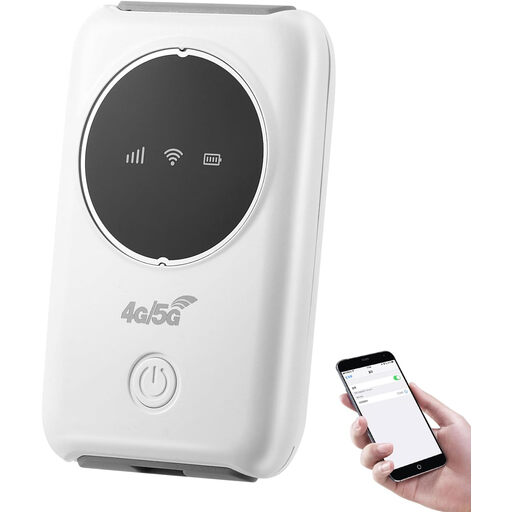
4G Mobile Wi-Fi Hotspot with SIM Slot, Supports 10 Devices
Consider this portable hotspot where a suitable 4G service is available and you need a battery-powered Wi-Fi option.
The listing describes a SIM-based hotspot for up to 10 devices and a rechargeable battery. Mobile broadband use requires a SIM and available 4G service.
Joybuy
 No image available
D-Link M95 BE9500 Wi-Fi 7 Smart Mesh Router
Consider this wired-WAN router if its connection suits your provider and you may want to expand compatible mesh Wi-Fi later.
The listing describes tri-band Wi-Fi 7, a 2.5-Gigabit WAN port, three 2.5-Gigabit LAN ports and the option to add compatible mesh devices. Confirm the provider’s connection arrangement before using it as a replacement router.
Joybuy
Frequently asked questions
Is an Ofcom postcode result enough to order equipment?
No. Ofcom distinguishes predicted area speeds from actual property availability and speeds. Check the full address and confirm the order, connection type and installation with the intended provider before buying equipment that depends on them.
What should I ask about installation in a rented flat?
Ask the provider whether work or building access is needed. For the apartment full-fibre installation it describes, Openreach says permission from the landlord, freeholder or managing agent is needed; this is a conditional installation issue, not a requirement for every router purchase.
Can I use mesh with the provider’s router?
TP-Link documents using Deco in access-point mode behind an existing router, with the main Deco unit connected by Ethernet. Its guide says some management features are unavailable in that mode, so check the instructions for the exact mesh model you choose.
What if the new property cannot get a decent fixed connection?
Check whether mobile home broadband or another genuinely available service suits the address. Ofcom says a qualifying property may request a broadband Universal Service Obligation connection through BT, or KCOM in the Hull area, subject to eligibility and affordability conditions; it is not an automatic immediate connection.
Will my old provider automatically arrange the move?
Do not assume that moving home is handled in the same way as switching provider at one address. Ofcom’s moving-home guidance says to arrange cancellation and a suitable start date if changing provider; ask the providers how your particular move and any existing-contract charges will be handled.


