People working between home and the workplace
If large project folders move back and forth regularly, check write speed as well as read speed, the connection at each computer, and how you will remove the drive safely.


For occasional transfers between Type-A and Type-C devices, consider a dual-connector USB stick; for repeated large folders or video projects, a portable SSD is worth considering if the computers and cable support its interface. A portable hard drive suits less time-sensitive transfers where capacity leads the decision, while cloud sharing avoids carrying a drive when the connection, service limits and recipient permissions work for the files. Check format compatibility before copying between Windows and Mac, and follow your organisation’s approved process for work data.
If large project folders move back and forth regularly, check write speed as well as read speed, the connection at each computer, and how you will remove the drive safely.
A shared drive needs a format both computers can use. Apple identifies ExFAT as Windows-compatible and recommends it for Windows volumes over 32 GB; check the drive’s current format before copying files.
Check the device’s file-transfer or external-storage support alongside the connector and cable. Google warns that some USB cables cannot transfer files, while Apple notes that an external hard drive connected to an iPhone may need external power.
Start with how often you move files and where they need to go; then check the connection, file format and access controls before choosing a device or sharing service.
Consider it: For occasional transfers when direct Type-A and Type-C connections matter.
Trade-off: A small drive and a fast connector do not establish its sustained write speed; check the exact model for large folders.
Consider it: For frequent large-folder or video transfers when both computers and the cable support the drive’s faster interface.
Trade-off: Which? describes SSDs as generally faster but usually pricier than HDDs; quoted speeds still depend on the full connection.
Consider it: For capacity-led transfers that are less time-sensitive and allow careful handling.
Trade-off: Which? says HDDs are generally slower than SSDs, so repeated urgent transfers may involve more waiting.
Consider it: For a remote hand-off when the internet connection and approved service accommodate the files.
Trade-off: Upload conditions and service limits matter, and access permissions need checking before a link is shared.
| Priority | What to check | Your needs |
|---|---|---|
| Transfer time | Compare stated read and write speeds. Check both computers’ ports and the cable: Seagate notes that the slowest device or connection limits a transfer. | Large project folders move between my computers regularly, so time spent copying matters. |
| Connections | Identify Type-A or Type-C ports at each end. For a phone or tablet, check its supported storage arrangement, data-capable cable and any power or adapter requirement. | I want to move files between computers with different ports, or include a compatible mobile device. |
| File format | Check the drive’s filesystem and the size of individual files. Microsoft lists a 4 GiB single-file limit for FAT32; Apple recommends ExFAT for Windows-compatible volumes over 32 GB. | A large video or archive needs to copy as one file and remain usable on both Windows and Mac. |
| File access and safety | Confirm copies before removing a drive; use safe removal. For cloud sharing, check recipients and permissions. For personal work data, follow approved security measures. | These files must reach the intended person without an incomplete copy or an overly broad share. |
USB-C describes a connector, not the available data rate. Seagate explains that a slower device or connection can limit the transfer, even when the portable drive has a higher quoted speed.
Check the port standard on both computers, the drive interface and the cable before deciding whether a faster drive will help your setup.
Microsoft lists FAT32’s maximum single-file size as 4 GiB, so free space alone does not ensure that a larger video or archive will copy.
For a Windows-and-Mac drive, check ExFAT compatibility. Copy existing contents elsewhere before reformatting, which removes data from the drive.
Physical durability does not replace another copy of an important file. The Information Commissioner’s Office also advises checking who can access files held or shared through a cloud service.
Keep a separate copy, restrict recipients and follow your organisation’s approved process for confidential or personal work data.
Microsoft advises safely removing USB flash drives and external hard drives to avoid data loss.
Check that the destination files are present, close applications using the drive, then use Eject or Safely Remove before unplugging it.
These examples illustrate different storage routes; features and compatibility should be checked for the exact model you intend to use.
The DataTraveler microDuo 3C is an example of a compact drive with both Type-A and Type-C connectors.
The T7 Shield illustrates the portable-SSD route for repeated large-file transfers.
The One Touch line includes portable HDD and SSD options, so the storage type matters when comparing models.
These portable SSDs and a flash drive are options for carrying files between devices. Compare their stated capacity and connectors with your transfer needs; cloud sharing and portable hard drives remain separate routes to consider.
 Image unavailable
Consider this 1 TB portable SSD for carrying project folders between computers. Its title specifies USB 3.2 Gen 2 and USB Type-C; check the ports and cable you will use at both ends.
 Image unavailable
The stated 4 TB capacity is worth considering when several large folders need to travel together. The title specifies USB Type-C 3.2 Gen 2; check your computer ports, cable and filesystem before transferring.
 Image unavailable
This 2 TB portable SSD is an option for repeated transfers when that capacity fits the files you carry. Its title specifies USB Type-C 3.2 Gen 2; confirm the connection and cable at each computer.
Image unavailable
Consider the 1 TB variant if it accommodates the folders you move between computers. The title specifies USB Type-C 3.2 Gen 2; check the host ports and cable rather than relying on connector shape for speed.
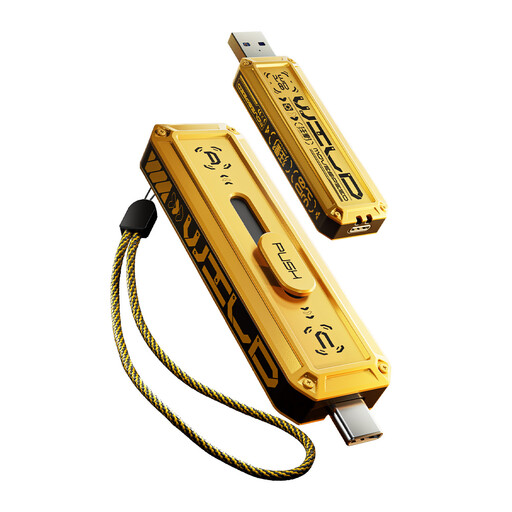 Image unavailable
A flash-drive option when you want to carry files without a separate portable drive and cable. Its title specifies a dual interface, USB 3.2 Gen 2×1 and Type-C, and zinc-alloy housing; confirm the connector arrangement and write performance for your devices and workload.
ExFAT is a practical starting point for a shared transfer drive: Apple identifies it as Windows-compatible and recommends it for Windows volumes over 32 GB. Microsoft lists a 4 GiB single-file limit for FAT32, which can prevent a larger video or archive from copying. Move existing files elsewhere before reformatting the drive.
No. USB-C identifies the connector, while the drive, source, destination, port and cable affect the transfer rate. For example, Samsung conditions its quoted T7 Shield 2 TB maximums on a USB 3.2 Gen 2-capable host and cable with UASP support.
Yes, where the devices support that USB transfer arrangement. Google advises using a data-capable cable, unlocking the Android device and selecting File Transfer; not every USB cable transfers data.
An iPhone can access supported external storage through the Files app with a compatible connector or adapter. Apple requires one data partition and a supported format, including ExFAT or FAT32; an external hard drive may also need external power.
Check that the copied files are present and close anything still using the drive, then select Eject or Safely Remove. Microsoft advises safely removing USB flash drives and external hard drives before disconnecting them to avoid data loss.