A USB-C flash drive suits occasional direct transfers from a compatible phone; a dual USB-C and USB-A drive makes more sense when the same files also need to reach a USB-A computer. For repeated large photo or video transfers, consider a portable SSD if its cable, size and power requirements work for your phone. If direct attachment does not work, transfer through a computer instead, and keep another independent copy of important files.
Who each route suits
Direct-from-phone photo movers
If you want to copy photos without using a computer, check how your phone opens attached storage before choosing a drive. Apple Support says an iPhone can access suitable external storage through Files or supported apps. Files by Google supports USB-storage access on Android 7.0 and later with user permission; support on a particular phone still needs checking.
Cross-device file hand-off users
If your phone uses USB-C but your computer has USB-A, a drive with both connectors can remove the need for a separate adapter. SanDisk describes the Ultra Dual Drive Luxe as one such USB-C and USB-A design; the phone must still support the storage workflow.
Large-library and video transfer users
For repeated large transfers, compare the stated write speed and its host requirements, not just the drive’s size. Kingston and Samsung publish maximum speed specifications for their DataTraveler Max and T7 Shield lines, but those figures do not establish the transfer speed you will get from your phone.
What to check before buying
USB-C flash drive
Choose when: you want a compact drive that plugs directly into a USB-C phone which accepts attached storage.
Trade-off: it offers no built-in USB-A connection for an older computer, and phone compatibility remains essential.
Dual-connector flash drive
Choose when: you regularly move the same files between a USB-C phone and a USB-A computer.
Trade-off: the second connector makes the hand-off easier but does not resolve phone permissions or file-system compatibility.
Portable SSD
Choose when: you make frequent large transfers or want a model with specified enclosure protection.
Trade-off: an SSD normally needs a cable, and its quoted maximum speed depends on the host and connection.
Transfer through a computer
Choose when: direct phone-to-drive access does not work or the phone cannot power the drive.
Trade-off: it requires a compatible computer and adds a step before the files reach external storage.
For consumers moving phone photos, establish that the transfer route works with the phone before deciding how much space and write performance to seek.
| Concern |
What to check |
Who this matters to |
| Phone and drive compatibility |
Check the connector, the exact phone’s USB-storage access and permissions, and the drive’s file system. Apple specifies a single data partition and one of its supported formats for iPhone external storage. |
If I need to copy directly from my phone, the drive has to appear in its file manager and let me write files. Around 31% of consumers put successful phone connection and access first. |
| Capacity for a growing library |
Measure the photos and videos you intend to copy, then allow room for future files and the difference between labelled and usable formatted capacity. |
My collection is still growing, so a drive that only holds today’s files would leave me little room for the next transfer. For around 25% of consumers, capacity is the primary concern. |
| Large-transfer speed |
Look for a stated write speed, its test conditions and the USB mode supported by the phone and cable. A maximum sequential figure is not a sustained phone-transfer result. |
When I move a large photo or video folder, I want the copying time to be practical rather than relying on a prominent read-speed figure. Transfer performance comes first for around 25% of consumers. |
| Keeping an independent copy |
Open files on the drive after copying, retain another copy in a separate location or service, and disconnect a portable backup when it is not needed. |
Moving files off my handset should not leave one portable drive as the only place they exist. Around 19% of consumers prioritise a verifiable, separate backup. |
Mistakes that can disrupt a transfer
-
Assuming USB-C means the drive will work with the phone
A matching plug does not establish that the phone can open the storage or write to its file system. Apple Support also requires an iPhone to be unlocked before using a storage accessory.
Check your phone model’s storage support and the drive’s format before buying. For iPhone external storage, Apple specifies one data partition and a supported file system; on a supported Android device, allow USB access when prompted.
-
Choosing by read speed or the USB label alone
Photo copying writes to the drive. Kingston and Samsung describe their published transfer figures as maximums subject to connection and usage conditions, so a fast-looking label cannot establish phone-to-drive transfer time.
Compare write specifications for the exact model and check the required phone, cable and USB mode. For repeated large transfers, consider whether the drive states how it manages heat.
-
Buying just enough capacity for today’s photos
Formatted usable capacity is below the labelled capacity, while new photos and videos will continue to take up space.
Check the size of the library you intend to move and choose a capacity that leaves room for subsequent transfers.
-
Using one portable drive as the only backup
A portable drive can be lost or damaged. The National Cyber Security Centre also notes that connected USB backup drives can be affected during a ransomware incident.
Check that copied photos and videos open before deleting anything from the phone. Keep another independent copy separately and disconnect the portable backup when it is not in use.
Relevant brands for reference
Kingston
The DataTraveler Max is a compact USB-C flash-drive line to consider when a direct connection and a stated write-speed specification matter.
- Kingston lists USB 3.2 Gen 2, capacities from 256 GB to 1 TB, and up to 1,000 MB/s read and 900 MB/s write for DataTraveler Max.
- Those are manufacturer maximums that vary with host hardware, software and use; Kingston’s published computer compatibility list does not confirm every phone.
SanDisk
The Ultra Dual Drive Luxe is a flash-drive option for passing files between USB-C and USB-A devices.
- SanDisk specifies USB-C and USB-A connectors and a USB 3.2 Gen 1 interface for this line.
- The two connectors address physical access, not the exact phone’s storage permissions, file-system support or the write performance of a chosen capacity.
Samsung
The T7 Shield is a portable SSD line to examine for repeated large transfers and a more protected enclosure.
- Samsung specifies up to 1,050 MB/s read and 1,000 MB/s write, thermal management, and IP65 and drop-test claims for the T7 Shield under its stated conditions.
- Maximum speeds require a compatible USB 3.2 Gen 2 host and cable with UASP enabled. Samsung’s resistance claims come from controlled testing and do not guarantee protection from all damage.
Joybuy products for these routes
These portable SSDs and a dual-connector flash drive offer different ways to move phone photos. Match any choice to your phone’s storage support, power needs and intended computer connection before transferring files.
 No image available
Samsung MU-PE1T0S 1 TB Portable SSD, Black
Consider this USB-C SSD for repeated large transfers if your phone supports and can power external storage. Samsung specifies USB 3.2 Gen 2 and, for the corresponding T7 Shield model, up to 1,000 MB/s write with a compatible host and cable and UASP enabled. Check the drive’s file system before copying; its stated IP65 resistance does not mean it can be submerged.
View on Joybuy
 No image available
DigiEra LPS2000M-3 1 TB Magnetic Portable SSD, Pink
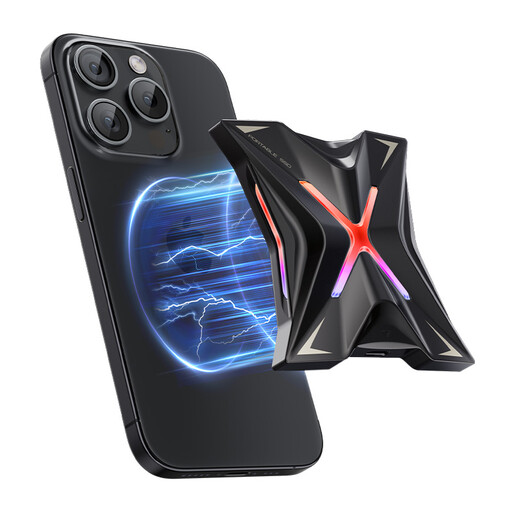
Consider the magnetic design if you want to attach an SSD to a compatible phone while moving photos. The USB 3.2 Gen 2x2 product title advertises up to 2,000 MB/s transfer, not a guaranteed phone-transfer speed. Confirm magnetic attachment for your exact phone separately from USB-storage access, file-system support and power requirements.
View on Joybuy
 No image available
Samsung Portable SSD T7 4 TB, Grey
This USB-C SSD is an option when a large photo or video library needs substantial room to grow. The product title specifies 4 TB and USB 3.2 Gen 2; check whether your phone can access and power the drive, and confirm its file system before the first transfer.
View on Joybuy
 No image available
MOVESPEED YSPSRX20M-1TTG 1 TB Magnetic Portable SSD
Consider this magnetic SSD if its attachment and storage workflow both suit your phone. Its title specifies USB 3.2 Gen 2x2 and advertises 2,060 MB/s transfer; that figure does not establish the rate for copying from a phone. Check your exact model’s magnetic fit, USB-storage access, file system and power requirements.
View on Joybuy
 No image available
MOVESPEED YSUSP05-512GSR 512 GB Dual-Connector Flash Drive
The USB-C and USB-A connectors make this an option for moving files between a compatible phone and a USB-A computer. Its title specifies USB 3.2 Gen 1 and advertises up to 570 MB/s read; read speed alone does not tell you how long a photo copy will take. Confirm the phone’s storage access and the drive’s file-system compatibility.
View on Joybuy
Questions about moving phone photos
Will any USB-C drive work directly with my phone?
No: USB-C identifies the connector, not whether the phone can use the drive as storage. Apple Support says iPhone external storage needs one data partition in a supported format and the phone must be unlocked; Files by Google supports USB-storage access on Android 7.0 and later with user permission. Check your exact phone’s storage support before buying.
Which file system should I check for sharing photos across devices?
Check a format accepted by every device in your intended transfer route before formatting the drive. Apple lists exFAT among the formats accepted for single-partition iPhone external storage and describes formatting an external disk for both Mac and Windows use. Android support can vary by device, so confirm your phone’s requirements; formatting erases existing files.
Why might a high-speed drive copy slowly from my phone?
A quoted maximum sequential speed is not a promise of the same speed from a phone. Samsung says maximum T7 Shield speeds need a USB 3.2 Gen 2 host and cable with UASP enabled, while Kingston says DataTraveler Max speeds vary with host hardware, software and use. Check the phone, cable and any hub as well as the drive’s write specification.
Can the portable drive be my only copy of the photos?
Keep the portable drive as an additional copy rather than the only one. The National Cyber Security Centre advises keeping a backup in a separate safe location and maintaining at least one offline copy. Check that transferred files open before deleting anything from the phone, and disconnect the backup drive when it is not needed.


