
24/7 Customer Support

Free returns

Same-day & Next-day Delivery

Quality Guaranteed

Unlock Your Welcome Offers: FREE Delivery | Up to 80% OFF | Free 30-day JoyPlus trial
Download the APP
Single-colour 3D printing has revolutionised prototyping and hobbyist creation, but bringing those models to life often involves the time-consuming process of painting, sanding and assembly. For creative professionals and small businesses, this extra labour can slow down innovation and increase costs. If you're ready to print complex, vibrant objects straight off the build plate, you've come to the right place.
This guide is designed to help you navigate the exciting world of the multi-colour 3D printer. We'll break down the key features to consider and introduce a few standout models that deliver on performance, reliability and of course, colour.
Before diving into specific models, let's cover a few essential considerations. Understanding these will help you identify a printer that aligns with your projects and workflow.
The demand for a high speed 3D printer is understandable, as faster print times mean quicker iterations and higher output. Modern machines can achieve impressive speeds, but it's important to consider how this affects detail. For projects like creating a 3D printer for miniatures or intricate mechanical parts, look for models that offer a good balance. Pay attention to specifications like minimum layer height (e.g., 0.05 mm) and nozzle diameter options, as these are crucial for achieving fine surface quality.
The size of your prints dictates the build volume you'll need. A standard build area is fine for smaller models, but a large format 3D printer is essential for producing large-scale prototypes, custom enclosures or batch-printing components in a single run.
Beyond size, look for smart functionality. An auto-levelling 3D printer is almost a standard feature now, saving significant time and preventing first-layer adhesion problems. More advanced smart 3D printer models also include features like AI-powered failure detection, remote monitoring via Wi-Fi and automatic filament management, making the entire printing process more reliable and hands-off.
Most consumer and prosumer multi-colour printers use Fused Deposition Modelling (FDM) technology. An FDM 3D printer works by extruding melted thermoplastic filament layer by layer. While standard materials like PLA and PETG are excellent for general use, your projects might require engineering-grade filaments like ABS, TPU or even carbon fibre composites. Check the printer's maximum nozzle and bed temperature and whether it has an enclosed, heated chamber, which is often necessary for printing high-temperature materials without warping.
Here are a few models that offer compelling features for those looking to step up their printing capabilities.
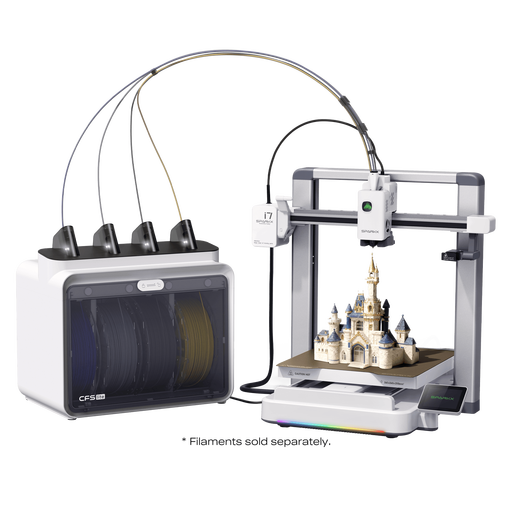
Why It Stands Out: The Creality Sparkx i7 is engineered for accessibility and convenience. Its standout feature is the AI-powered photo modelling, which, according to Creality, can turn uploaded photos into multi-colour 3D models. This significantly lowers the barrier to entry for users without 3D modelling experience. The tool-free, 5-second quick-release hotend also simplifies maintenance, making it a very user-friendly machine.
Pros:
Who is it for? This printer is an excellent choice for hobbyists, educators and designers who want to explore multi-colour printing without a steep learning curve. Its smart features and easy maintenance make it ideal for those who prioritise a smooth, straight out of the box experience.
View Details for the Creality Sparkx i7
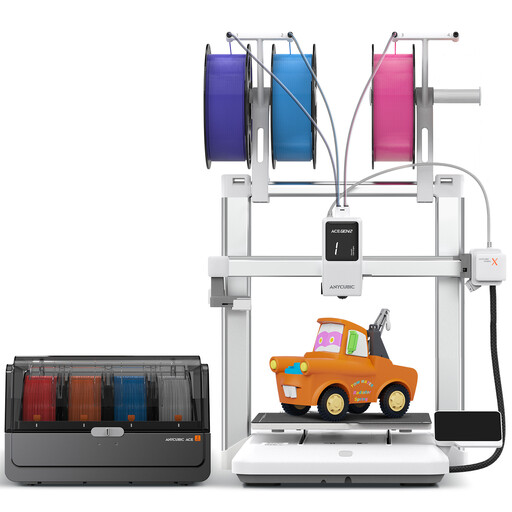
Why It Stands Out: The ANYCUBIC Kobra 4 Combo is built for speed and material versatility. With a maximum print speed of 600 mm/s and a nozzle that can reach 300°C, it's designed for efficient production of functional parts. The system comes standard with 4-colour capability but is expandable to 8 colours, offering significant creative freedom. Its integrated AI detection and dual-band Wi-Fi provide a robust, connected printing experience.
Pros:
Who is it for? This model is geared towards advanced hobbyists and small businesses who need a professional 3D printer that can produce parts quickly and with a variety of materials, including engineering-grade filaments.
View Details for the ANYCUBIC Kobra 4 Combo
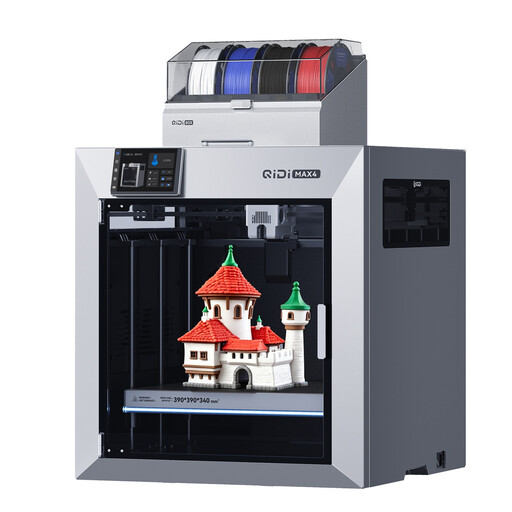
Why It Stands Out: The QIDIxJOYBUY Max4 Combo is a true large format 3D printer designed for industrial-grade applications. Its massive 390 × 390 × 340 mm build volume allows for printing large parts in one piece. The actively heated 65°C chamber and high-flow nozzle make it exceptionally capable with demanding materials like carbon fibre-reinforced nylon. When paired with the QIDI Box, it can support up to 16 different colours or materials in a single print.
Pros:
Who is it for? This printer is aimed at professionals, engineers and small-scale manufacturers who require a robust machine for creating large, functional prototypes and end-use parts from a wide array of industrial materials.
View Details for the QIDIxJOYBUY Max4 Combo
If the models above aren't quite what you're looking for, the world of multi-colour 3D printing has more to offer. Different models provide unique combinations of speed, size and smart features to suit various needs and budgets.
Explore our full range of printers to find the perfect match for your next project.
Discover More in Our Colourful 3D Printer Collection
FDM stands for Fused Deposition Modelling. It is one of the most common 3D printing technologies, especially for desktop printers. An FDM 3D printer builds an object layer by layer by heating and extruding a thermoplastic filament, like PLA or ABS, through a nozzle onto a build platform.
For many professionals, a multi-colour 3D printer is a valuable investment. It can drastically reduce post-processing time by eliminating the need for manual painting. This allows for the rapid creation of realistic, colour-coded prototypes for client presentations, functional testing of parts with different material properties and small-batch production of finished goods.
An auto-levelling 3D printer uses a sensor to measure the distance between the nozzle and multiple points on the print bed. This creates a digital map of the bed's surface, including any minor tilts or imperfections. The printer's firmware then uses this map to automatically adjust the nozzle's height as it moves across the bed, ensuring the first layer is printed at a consistent and optimal distance. This is critical for good adhesion and preventing print failures.