
24/7 Customer Support

Free returns

Same-day & Next-day Delivery

Quality Guaranteed

Unlock Your Welcome Offers: FREE Delivery | Up to 80% OFF | Free 30-day JoyPlus trial
Download the APP
A multi-device charging station can make a desk, bedside table or gaming area noticeably tidier. One unit may handle a smartphone, earbuds, smartwatch and other accessories, reducing the need for several plugs and loose cables.
However, product descriptions can make charging capacity and compatibility difficult to compare. A “5-in-1 wireless charger” may combine wireless pads with USB ports, while a “3-in-1 wireless charger” may only support specific phone, earbuds and watch combinations. Before buying, check what it can charge simultaneously, which accessories are included and whether it suits your devices.
A charger advertised with a high total wattage does not necessarily deliver that figure to every device at once. Output is normally divided between the phone, earbuds, watch and USB ports.
For example, a charging stand may provide 15W for a compatible smartphone, but only 5W for earbuds and a lower output for a smartwatch. The power adapter also matters. Some models require a separate PD or QC charger, while others include an adapter in the box.
A magnetic wireless charging stand needs suitable magnetic alignment. Compatible phones and cases may work directly, while older Qi devices could require a magnetic ring or a different placement method. A magnetic attachment is not the same as universal compatibility.
Qi2 can improve alignment for supported devices, but buyers should still check their phone model and case. Thick, metal or non-compatible cases can affect charging performance.
A “5-in-1 wireless charger” may charge three devices wirelessly and two more through USB-A ports. This can be useful, but it is different from five dedicated wireless charging areas.
Likewise, an Apple Watch charger may require a specific built-in charging module or cable arrangement. For gaming, a PS5 DualSense charging station, Nintendo Switch Joy-Con charger or Meta Quest 3 charging dock is usually more suitable than a general smartphone charging dock.
Count the devices you genuinely need to charge together. A 3-in-1 wireless charger is often sufficient for a phone, earbuds and smartwatch. A 4-in-1 charging stand may add another Qi-compatible device, while a five-device model can be more practical for households or shared workspaces.
Check the input requirement as well as the advertised output. The Hoco CQ3, for instance, lists USB-C input of 5V/3A or 9V/3A and requires a PD/QC charger. Using an underpowered adapter may reduce performance when several devices are connected.
Look for explicit compatibility rather than relying on general terms such as “universal”. Important checks include:
A product such as the Cygnett Qi2.0 2-in-1 Wireless Charging Base includes a 1.2m USB-C to USB-C cable and MagRing. Its specifications list up to 15W for the phone area and 5W for earbuds, with a 20W maximum total output.
A foldable wireless charger is easier to pack for commuting or travel, but a larger weighted base may be steadier on a desk. Consider whether the stand leaves enough room for phone cases and whether cables can reach a UK socket or USB-C adapter.
For electrical safety, follow the supplied instructions and use the recommended adapter. Look for clear safety information, recognised compliance markings and protection features such as over-current, over-voltage, short-circuit and temperature control. Keep charging equipment dry, ventilated and away from children.
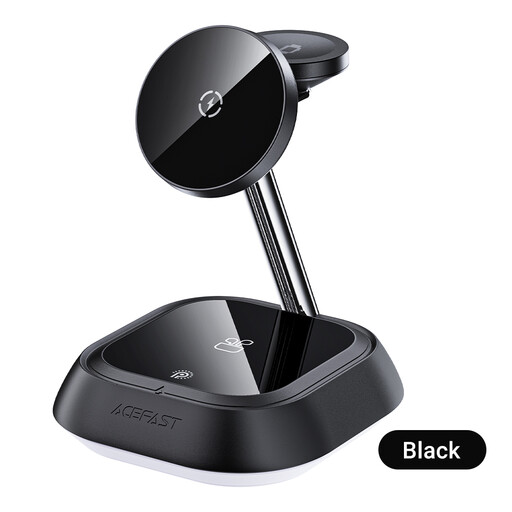
Why This Fits Their Persona: It provides a straightforward phone, TWS earbuds and watch arrangement for a home office, bedside table or everyday desk setup.
Its instructions clearly identify the three charging areas and state that a USB-C power adapter must meet the requirements for simultaneous charging.
Foldable construction, anodised aluminium design and simultaneous charging for a smartphone, smartwatch and headphones.
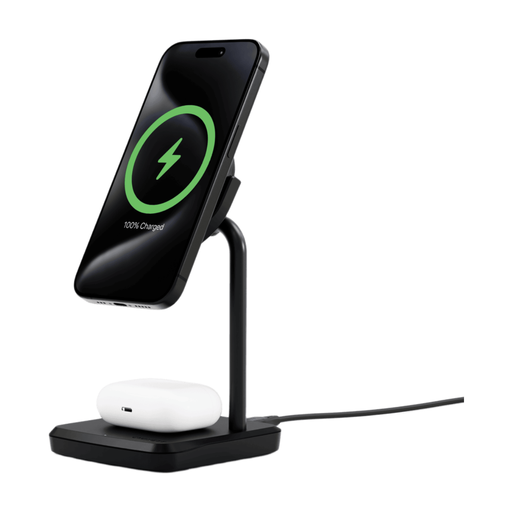
Why This Fits Their Persona: This suits users who value a tidy, stable desk or bedside charger with an adjustable viewing angle.
The listed output separates phone and earbuds charging, while the included MagRing addresses compatibility for some older Qi-enabled devices.
Qi2 support, up to 20W total output, 80° swivel head, weighted non-slip base and a 2-year warranty.
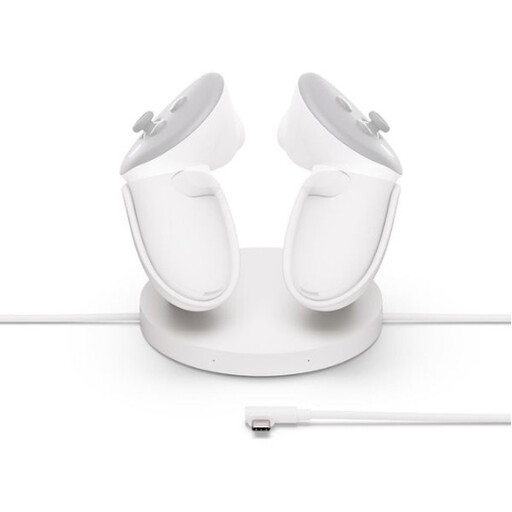
Why This Fits Their Persona: VR owners need a dedicated arrangement for a headset and controllers rather than a general wireless pad that may not support their equipment.
It specifies compatibility with Meta Quest 3 and 3S, two controller slots and a separate extended cable for headset charging.
Charges two controllers while the headset is connected and includes a 45W power adapter and extended charging cable.
We have compiled a complete, real-time list of products that fully satisfy these strict selection criteria and UK safety regulations.
It may reduce the number of powered adapters and occupied sockets, but running cost depends on charging frequency, device batteries and electricity tariffs. The main practical benefit is usually fewer cables and a single organised charging point. Check the station’s input requirements and unplug it when it is not needed for extended periods.
Sometimes, but compatibility varies. The phone area may support Qi or Qi2, while the Apple Watch area can require dedicated watch charging hardware. Check the product listing for your watch generation and phone model. A general Qi pad should not be assumed to charge an Apple Watch.
Choose according to the console or headset. A Nintendo Switch Joy-Con charger is designed around Joy-Con contacts, while a PS5 DualSense charging station uses the controller’s docking terminals. For VR, a Meta Quest 3 charging dock with headset and controller support is more appropriate. Dedicated docks can also keep controllers positioned securely and free USB ports on the console.