
24/7 Customer Support

Free returns

Same-day & Next-day Delivery

Quality Guaranteed

Unlock Your Welcome Offers: FREE Delivery | Up to 80% OFF | Free 30-day JoyPlus trial
Download the APP
A multi-device wireless charging station can make a desk, bedside table or home office considerably tidier. However, product pages often focus on headline wattage and the number of charging positions while leaving out details that affect everyday usability.
Before buying, check three common pitfalls:
A 3-in-1 wireless charger usually combines a phone charging surface with dedicated positions for earbuds and a smartwatch. For Apple users, confirm that the design includes a suitable Apple Watch charger rather than assuming every watch will charge magnetically.
For compatible phones, Qi2 charging stations use magnetic alignment to help position the device accurately. This can reduce the need to reposition a phone during charging. A magnetic wireless charger may also support MagSafe-compatible devices, but compatibility details vary, particularly with Android phones and protective cases.
Look for clearly stated output figures, such as:
Many wireless charging stands connect through USB-C but do not necessarily include a wall adapter. Check the required input before purchase and use a suitable power adapter for simultaneous charging.
A USB-C charging station can be useful for a modern desk, but it should not be confused with a USB-C docking station. A charging station primarily supplies power; a dock expands connectivity. If you need HDMI, SD cards or wired networking, review the host laptop’s USB-C capabilities, including whether it supports video output and Power Delivery.
For home-office professionals, creatives and remote workers, a multi-device charging dock may need to do more than charge phones. Consider:
A 4K HDMI docking station can be useful for an external monitor, but “4K” alone does not confirm 60Hz output. If smooth scrolling or video editing matters, check for a stated 4K at 60Hz specification and ensure the laptop can support it.
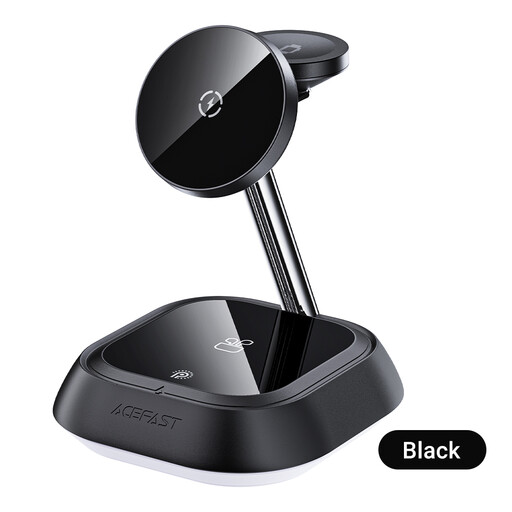
Why This Fits Their Persona: A straightforward choice for users wanting one stand for a wireless phone, TWS earbuds case and Apple Watch in a home or study setup.
Its instructions identify separate charging areas for the phone, TWS case and watch, helping buyers verify the intended three-device layout before ordering.
Dedicated phone, TWS and watch positions; USB-C power connection and magnetic watch alignment.
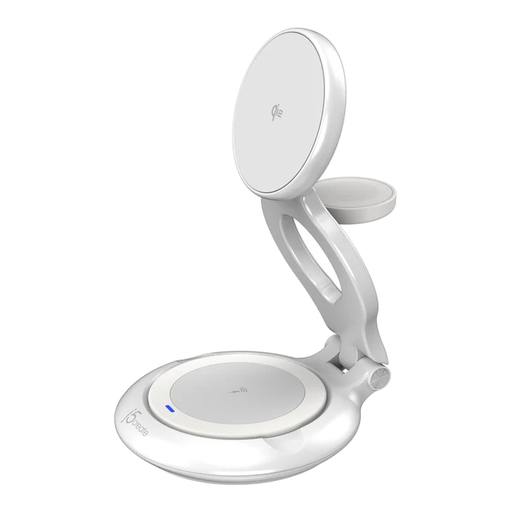
Why This Fits Their Persona: Suitable for shoppers who value a compact, standards-focused charging stand for a desk, bedside table or hybrid-working bag.
The listing specifies Qi2, a maximum 15W output, USB-C power and three-device capacity rather than relying only on a general “fast” description.
Qi2 magnetic alignment; foldable construction; WPC certification and USB-C connection.
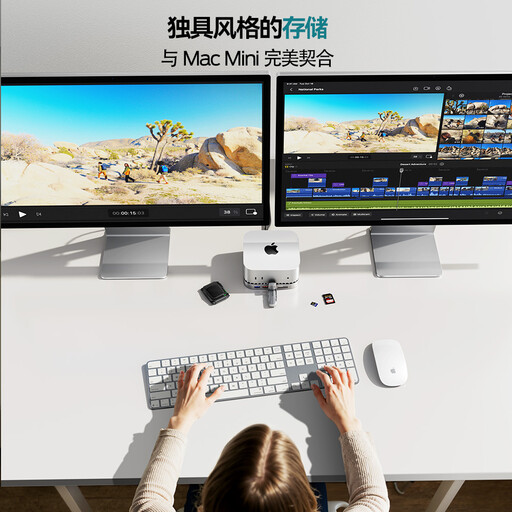
Why This Fits Their Persona: Designed for laptop users, editors and office workers who need monitor, storage, card-reader, audio and USB expansion from one host connection.
It separates charging and connectivity needs with stated port speeds, HDMI output, card slots and audio, so buyers can assess it as a dock rather than a wireless charger.
4K HDMI at 60Hz; USB-C and USB-A ports up to 10Gbps; SD/TF support up to 160MB/s.
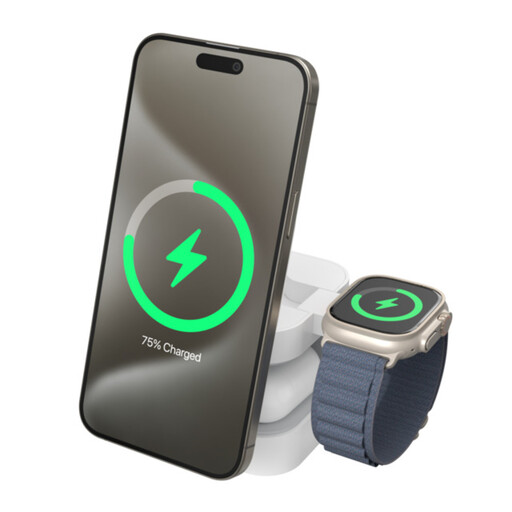
Why This Fits Their Persona: Its foldable design suits commuters and travellers who want phone, Apple Watch and AirPods charging in one portable unit.
The specifications identify separate outputs for the phone, watch and AirPods, plus Qi2 and USB-C details, making its travel use easier to assess.
Up to 15W Qi2 phone charging; dedicated Apple Watch and AirPods positions; foldable aluminium-alloy frame.
We have compiled a complete, real-time list of products that fully satisfy these strict selection criteria and UK safety regulations.
Use a stable, dry indoor surface and keep metal objects away from wireless charging areas. A phone case that is thick, highly textured or contains metal may interfere with magnetic alignment or charging efficiency.
Electricity use depends on the connected adapter, charging time and standby behaviour. To avoid unnecessary consumption, disconnect the station when it will not be used for an extended period. For a dock, also avoid connecting several high-power peripherals simultaneously unless the manufacturer’s instructions support that load.
It can be, provided the phone supports Qi or Qi2 wireless charging. Magnetic positioning may require a compatible case or magnetic ring, and the station’s product specifications should be checked before purchase.
Not always. Many models use a USB-C input and may include a cable but not a mains adapter. Check the contents listed on the product page and confirm that your adapter provides sufficient power for simultaneous charging.
A wireless charging stand is designed mainly to power compatible devices without plugging cables into each device. A USB-C docking station connects to a laptop or tablet and adds ports such as HDMI, USB, card readers, Ethernet and audio. If you need external displays or fast file transfers, choose a dock rather than a charging-only stand.