
24/7 Customer Support

Free returns

Same-day & Next-day Delivery

Quality Guaranteed

Unlock Your Welcome Offers: FREE Delivery | Up to 80% OFF | Free 30-day JoyPlus trial
Download the APP
Juggling a work laptop, a personal tablet and a smartphone has become the new normal. But constantly switching between tiny on-screen keyboards and different physical ones is inefficient and clutters your desk. A high-quality multi-device wireless keyboard solves this problem, offering a single, seamless typing experience across all your gadgets.
As the Joybuy Product Recommendation Officer, my role is to help you find practical solutions that genuinely improve your daily workflow. This guide cuts through the clutter, focusing on what truly matters when selecting a keyboard that can keep up with your connected life. We will explore key features to look for and highlight a few standout options for different needs, from marathon work sessions to competitive gaming.
Before diving into specific models, it’s helpful to understand the features that define a great multi-device keyboard. Keeping these points in mind will help you make a more informed choice.
The core function of a multi-device keyboard is its ability to switch between gadgets effortlessly. Most achieve this through two main wireless technologies:
Your comfort is paramount, especially if you type for hours each day. Consider the physical design that best suits your workspace and typing style.
The feel and sound of a keyboard come down to its switches.
Here are a few multi-device wireless keyboards that cater to different users, from the busy professional to the dedicated tech enthusiast.
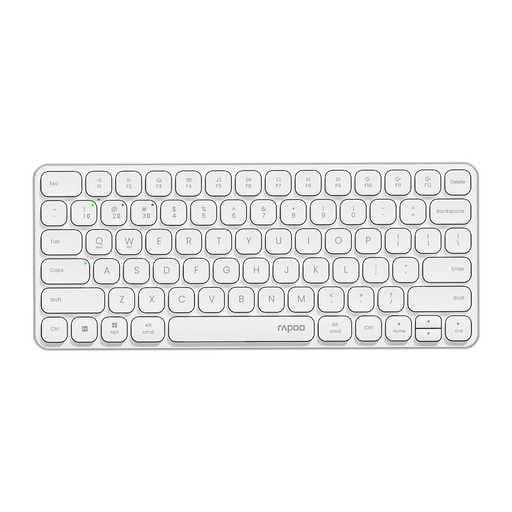
Why It Stands Out: The RAPOO E9050L is the definition of sleek efficiency. Its ultra-slim profile and quiet membrane keys make it an excellent companion for a modern, minimalist office or a shared workspace. It impressively connects to and switches between up to four devices.
The keyboard is built around a sturdy aluminium alloy frame, giving it a premium feel that belies its practical nature. With a rechargeable battery that can last up to 90 days and quick-charge functionality, it’s designed for reliable, long-term use. It’s a fantastic wireless keyboard for Mac and Windows users alike, thanks to its dual-system hotkeys.
Pros:
Who is it for? Professionals, students and anyone who needs a portable, quiet and stylish keyboard for working across a laptop, tablet and phone.
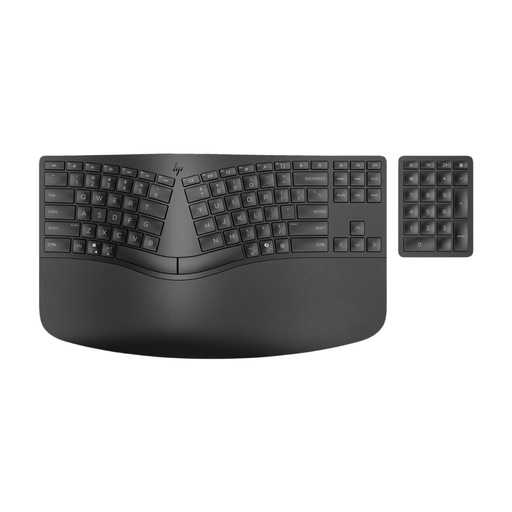
Why It Stands Out: For those who spend their entire day typing, comfort is non-negotiable. The HP 960 is a dedicated ergonomic wireless keyboard with a split keyboard design that encourages a more natural hand and wrist posture. It has received U.S. Ergonomics certification for its design.
A unique feature is its separate wireless numeric keypad, which you can position wherever it’s most comfortable or remove entirely to save space. With 20 programmable keys and multi-device pairing for up to three devices, it’s built for serious productivity and personalised workflows.
Pros:
Who is it for? Office workers, writers, programmers and anyone experiencing wrist or hand fatigue who needs a keyboard designed for all-day comfort and maximum productivity.
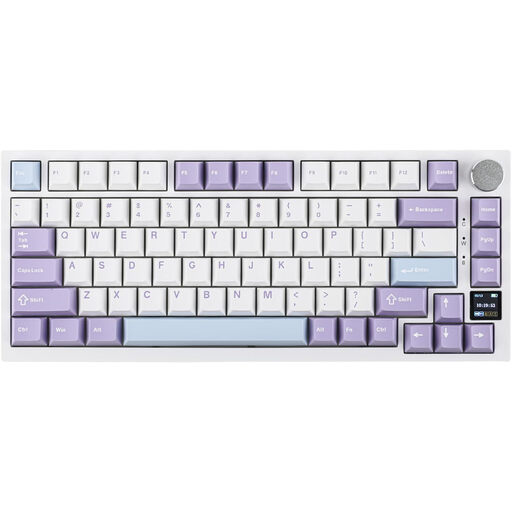
Why It Stands Out: The Ajazz AK820 Pro is a dream for tech enthusiasts and gamers. It packs high-end custom keyboard features into a ready-to-use package. As a tri-mode keyboard, it offers 2.4GHz, Bluetooth and wired connections for ultimate versatility. Its standout feature is the integrated TFT colour screen, which displays battery life, connection mode and even custom GIFs.
Built with a gasket-mounted structure and multiple layers of sound-dampening foam, it provides a cushioned, satisfying typing sound and feel. This 75% mechanical keyboard is also a hot-swappable keyboard, allowing you to easily change switches. The south-facing RGB gaming keyboard lighting and seamless Mac/Windows compatibility make it a true powerhouse.
Pros:
Who is it for? Gamers, keyboard enthusiasts and creative professionals who want a high-performance, customisable keyboard that excels in both work and play.
If these recommendations aren't quite what you're looking for, don't worry. The world of wireless keyboards is vast, with options to suit every preference and budget.
Explore our complete collection of Bluetooth keyboards to discover more layouts, switch types and designs.
Yes, that is the primary benefit of a multi-device wireless keyboard. Most models feature a dedicated button that allows you to instantly switch the connection between several paired devices, such as a desktop, a laptop and a tablet, without needing to re-pair each time.
For multi-device functionality, Bluetooth is essential as it's the standard used by tablets and smartphones. However, a keyboard that offers both 2.4GHz and Bluetooth (a tri-mode keyboard) provides the most flexibility. You can use the low-latency 2.4GHz connection for your main PC or for gaming, and switch to Bluetooth for your secondary devices.
Most multi-device keyboards have dedicated keys, often labelled with Bluetooth symbols or numbers (e.g., F1, F2, F3). After the initial pairing process, you simply press the corresponding key to switch the keyboard's active connection to that device. The switch is typically almost instantaneous.