
24/7 Customer Support

Free returns

Same-day & Next-day Delivery

Quality Guaranteed
Download the APP
Categories
Juggling a collection of chargers for your laptop, phone and tablet can quickly lead to a tangled mess of cables, both at your desk and in your travel bag. If you're tired of slow charging speeds and carrying a separate power brick for every device, it might be time to consider a modern solution. A multi-port GaN charger offers a streamlined way to power all your essential tech from a single, compact plug.
Gallium Nitride (GaN) is a semiconductor material that has revolutionised charging technology. Chargers built with GaN components are significantly smaller, lighter and more power-efficient than their traditional silicon-based counterparts. This means you can get a powerful laptop and phone charger that fits comfortably in your pocket.
As a Joybuy Product Recommendation Officer, my role is to help you navigate the options. This guide will walk you through what to look for in a GaN charger and present a few carefully selected recommendations to help you declutter your life and keep your devices powered up.
Before diving into specific products, it's helpful to understand the key features that differentiate them. Here are a few practical points to consider.
The total power output, measured in watts (W), determines how quickly and how many devices a charger can handle simultaneously. A 100W PD charger can comfortably power a high-performance laptop, while a 30W charger is better suited for phones and tablets. Look for chargers that support Power Delivery (PD), a fast-charging standard that allows the charger to communicate with your device to provide the optimal voltage and current. Some also feature Programmable Power Supply (PPS) for even more precise charging with compatible devices. When multiple devices are plugged in, the charger distributes its total wattage across the ports, so consider how you'll typically use it.
The number and type of ports are crucial. Most modern devices, including laptops, tablets and smartphones, now use USB-C for fast charging. A charger with multiple USB-C ports offers the most future-proof versatility. However, many accessories like smartwatches, headphones and older gadgets still use USB-A, so a model with a mix of both can be a practical choice. A good fast charger for multiple devices will have a port layout that matches your personal tech ecosystem.
One of the main advantages of GaN technology is its compact size. If you travel frequently, a compact wall charger is essential. Look for features like foldable prongs, which prevent scratching other items in your bag. For international trips, a USB-C travel adapter with interchangeable plugs (for EU, US and AU sockets) is invaluable. Always ensure any charger you purchase is CE certified, indicating it meets UK and European safety and electrical standards.
Based on features, versatility and user needs, here are our standout recommendations for multi-port GaN chargers.
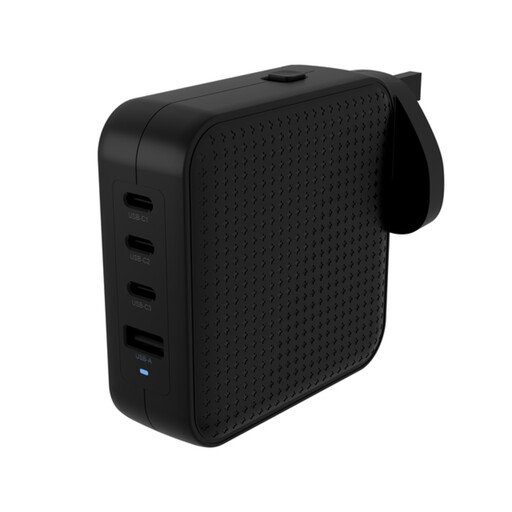
Why It Stands Out This charger is a comprehensive power solution designed for those who need maximum power and global versatility. With a total output of 100W and a smart 3x USB-C and 1x USB-A port layout, it can simultaneously fast-charge a professional laptop, a tablet and two other accessories. Its standout feature is the integrated travel kit, which includes interchangeable plugs for the UK, EU and AU, making it a true all-in-one travel companion.
Pros
Who is it for? This is an excellent choice for frequent international travellers, digital nomads and professionals who rely on a high-power laptop and multiple other devices throughout their day.
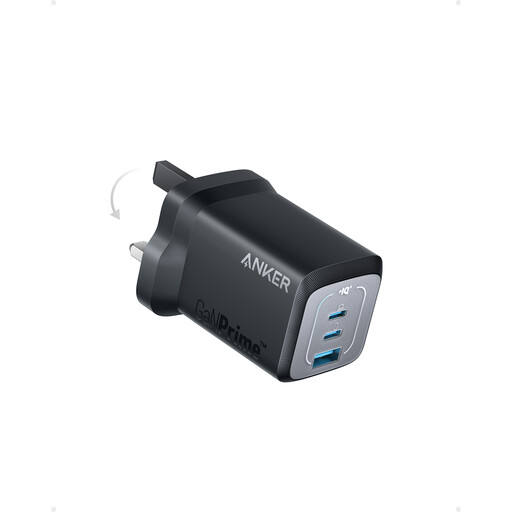
Why It Stands Out The Anker Prime 67W charger strikes a remarkable balance between power and portability. It provides a solid 67W of power—enough for most modern ultrabooks and MacBooks—in an exceptionally compact form factor. According to Anker, its design is 51% smaller than an original 67W MacBook charger. With two USB-C ports and one USB-A port, it offers flexible charging for three devices at once, making it a highly efficient daily driver.
Pros
Who is it for? Ideal for daily commuters, students and professionals who need a reliable and very portable charger for their laptop and other essential gadgets without the bulk.
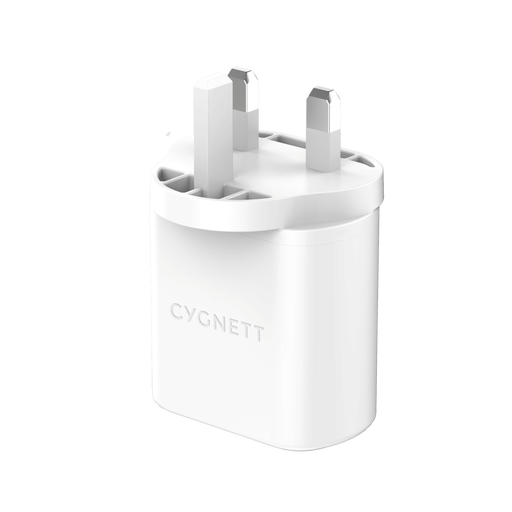
Why It Stands Out For those who don't need to charge a power-hungry laptop, the Cygnett PowerPlus 32W charger is a practical and streamlined option. It focuses on providing fast, efficient power for smaller devices. The dedicated 20W USB-C PD port is perfect for fast-charging an iPhone or modern Android phone, while the additional 12W USB-A port can handle accessories like wireless earbuds or a smartwatch. Its foldable UK plug makes it an excellent space-saver.
Pros
Who is it for? This charger is a great fit for smartphone users who want a fast, compact and reliable charger for their phone and one other small device, whether at home, in the office or on a weekend trip.
These recommendations cover a range of common needs, but the world of charging technology is vast. If you're looking for a different power level, port configuration or a specialised solution, there are many other choices available.
For a wider selection of charging solutions, from single-port adapters to high-capacity power banks, explore our full range of USB-C power supply options.
What is GaN technology and why is it better? GaN stands for Gallium Nitride, a semiconductor material used in place of traditional silicon. It can withstand higher voltages and operates more efficiently, which means it loses less energy as heat. This allows manufacturers to build chargers that are much smaller, lighter and more powerful than older models.
Is it safe to use one multi-port charger for all my devices? Yes, it is generally safe, provided you use a certified charger from a reputable brand. Modern chargers with protocols like USB Power Delivery (PD) are "smart." They communicate with the connected device to determine the exact amount of power it needs and can safely handle, preventing overcharging or damage. Always look for chargers with CE and UKCA markings, which confirm they meet local safety standards.
How much wattage do I need in a charger? This depends entirely on the devices you intend to charge. As a general guide: