Before buying network hardware, check whether calls also fail on a computer connected directly to the router by Ethernet: an in-home Wi-Fi upgrade will not fix a broadband-service fault. For a fixed desk, start with Ethernet; where cable can reach a distant room, a wired access point or Ethernet-backhauled mesh node can provide Wi-Fi there. If cabling is impractical, consider wireless mesh, with powerline as a fallback to test in the rooms where calls take place.
Who needs which connection?
The useful upgrade depends on whether calls fail at one fixed desk, Wi-Fi weakens between rooms, or running cable is not practical.
People working at a fixed desk
If a computer stays near a practical cable route, connect it by Ethernet before extending Wi-Fi elsewhere. Ofcom recommends a direct Ethernet connection when checking broadband problems; if several fixed devices need ports, a switch can expand the wired network.
Households using several rooms
When laptops and phones need Wi-Fi away from the router, a wired access point or mesh node can serve the distant area if Ethernet reaches it. Otherwise, wireless mesh placement becomes important: the nodes still need a usable connection to one another.
Households that cannot install cable
Wireless mesh avoids a permanent Ethernet run but depends on the signal between nodes. Powerline offers another possible path through electrical wiring; TP-Link cautions that its performance depends on the installation and electrical conditions.
What matters when choosing hardware?
Check the broadband service and compare a wired connection with the problem room first. If the trouble is confined to the home network, choose by the connection each work area can realistically use; Ofcom notes that Wi-Fi cannot outperform the incoming broadband service.
| Concern |
What to check |
Who this matters to |
| A stable fixed-desk connection |
Check the cable route and available router LAN ports; if several devices need Ethernet, check whether a switch is needed. |
If my desk stays put, I want to rule out the Wi-Fi link without assuming a cable will fix a service fault. Around 36% of consumers put that fixed-desk connection first. |
| Coverage without permanent cable |
Check where mesh nodes can receive a usable signal and whether the system can work with the existing router. |
When I cannot run cable to a work room, I need Wi-Fi there without placing a node in a spot that already has a poor signal. For around 29% of consumers, cable-free coverage is the primary concern. |
| Wi-Fi in a room Ethernet can reach |
Check access-point or Ethernet-backhaul support and the permitted connection layout for the chosen system. |
My remote room has a possible Ethernet route, but several devices there still need Wi-Fi. That wired-backhaul coverage is the first priority for around 21% of consumers. |
| A fallback through electrical wiring |
Check wall-socket locations and compatibility with any existing powerline standard, then test the link in the work rooms. |
If cable cannot reach the room and wireless mesh has a weak link, I need to find out whether the electrical wiring offers a usable alternative. Around 14% of consumers prioritise this powerline fallback. |
Mistakes to avoid
-
Buying mesh before checking the broadband connection
More Wi-Fi coverage cannot resolve an outage or a fault on the incoming service. Ofcom advises checking provider status and contacting the provider about service problems.
Compare a direct Ethernet connection with Wi-Fi in the problem room, and note whether interruptions also happen near the router. Check the provider’s fault status before choosing new hardware.
-
Assuming any extra mesh unit will join an existing system
BT says its Whole Home, Mini, Premium and Wi-Fi 6 Whole Home product families are not mutually compatible. NETGEAR likewise requires an Orbi satellite to be compatible with its router or system.
Match the full model and product family before buying an add-on unit, and check whether the intended wired or wireless connection mode is supported.
-
Treating a powerline speed label as the speed between rooms
Electrical interference and the home’s wiring can change the connection you get. TP-Link advises plugging its Powerline Deco directly into a wall socket rather than a power strip; its G.hn equipment is not compatible with HomePlug AV or AV2 adapters.
Check the standard if you are adding to existing adapters, use the installation arrangement specified for the device and test the link in the rooms where calls happen.
-
Leaving the old and new router setups unmanaged
Adding mesh beside an ISP router requires a deliberate network layout. eero recommends a bridge-mode approach for some setups, but bridge mode can remove advanced eero features; its guidance for BT hubs describes different arrangements because those hubs cannot use bridge mode.
Follow the chosen system’s instructions for the specific ISP hub, and check which features remain available before selecting access-point, bridge or documented double-NAT operation.
Relevant brands and product families
Brand compatibility guidance is most useful when you are extending an existing system or keeping an ISP hub; the exact model and setup still determine whether a route will work.
TP-Link
Deco mesh, access-point-capable models and powerline options cover several ways to connect distant rooms.
- TP-Link documents wired and mixed wired/wireless backhaul layouts for Deco systems.
- Its powerline guidance makes electrical conditions and device standards important checks; G.hn and HomePlug AV or AV2 equipment are not interchangeable.
eero
A mesh option for households deciding how to retain or work alongside an existing ISP router.
- eero publishes setup guidance for several UK providers, including a specific arrangement for BT hubs.
- Bridge mode can remove some advanced eero features, so the routing arrangement matters as well as coverage.
BT Whole Home Wi-Fi
Mesh product families designed to connect to a broadband hub or router with an RJ45 Ethernet port.
- BT documents Ethernet connection for specified Whole Home disc products.
- BT says Whole Home, Mini, Premium and Wi-Fi 6 Whole Home families are not mutually compatible; match the family before adding a disc.
NETGEAR Orbi
A router-and-satellite mesh family for households considering coverage in more rooms.
- NETGEAR describes Ethernet backhaul as an option for difficult-to-reach spaces.
- An additional Orbi satellite must be compatible with the existing Orbi router or system; check the model family.
Joybuy products for these routes
These choices cover multi-room mesh Wi-Fi, a powerline option for a cable-restricted room and a switch for expanding wired connections. Choose the connection route before comparing devices: a switch does not extend Wi-Fi coverage, and a mesh system cannot repair a broadband-service fault.
 Image unavailable
TP-Link Deco BE22 (3-Pack) BE3600 Wi-Fi 7 Mesh System
Consider this three-unit mesh system when several rooms need Wi-Fi coverage. Plan where the units can connect to one another, and confirm the wiring layout and router setup if you intend to use Ethernet backhaul.
View on Joybuy
 Image unavailable
NETGEAR Orbi 370 RBE373 WiFi 7 Mesh System (3-Pack, BE3600, 2.5Gbps Ethernet, White)
This three-unit mesh system is a choice to assess for Wi-Fi across several work rooms. Check satellite placement and how the system would operate with your existing ISP router; the stated Ethernet specification alone does not establish call reliability.
View on Joybuy
 Image unavailable
TP-Link Deco BE25 WiFi 7 Mesh System (3-Pack)
Consider this three-pack if weak Wi-Fi affects multiple rooms. Before planning wired nodes or keeping an ISP router in charge of routing, check the exact port, backhaul and operating-mode requirements for this model.
View on Joybuy
 Image unavailable
TP-Link TL-WPA8631P KIT AV1300 Gigabit Powerline Wi-Fi Extender
This powerline kit is a conditional option when cable cannot reach a work room and wireless mesh has a weak link. Use the wall-socket arrangement advised by TP-Link, test it on your home’s wiring and check compatibility before relying on integration with an existing mesh system.
View on Joybuy
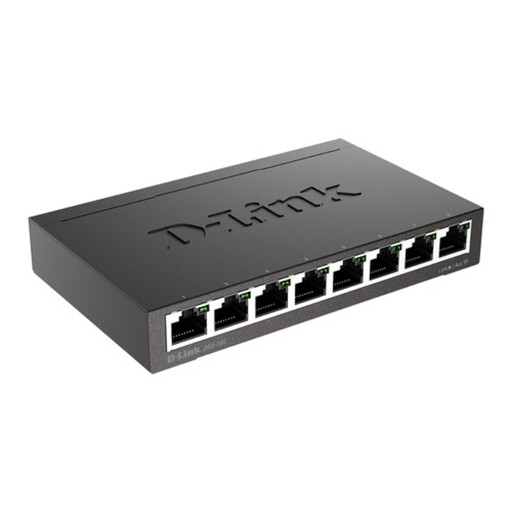 Image unavailable
D-Link DGS-108 8-Port Gigabit Unmanaged Switch
Use this switch to assess a setup with several wired desks or devices where an Ethernet connection can reach the switch. It needs a connection to the existing network and suitable cables; it does not provide Wi-Fi coverage or correct an ISP-line fault.
View on Joybuy
Questions about home-office networks
How do I tell whether poor calls are a Wi-Fi problem or a broadband fault?
Compare a direct Ethernet connection at the router with Wi-Fi in the problem room. If interruptions also affect the wired connection, check the provider’s fault status and report recurring service problems; Ofcom advises these checks before treating the issue as one of Wi-Fi coverage. If the wired connection is stable but a distant room struggles, improving the in-home network is a more relevant next step.
Can I add mesh Wi-Fi without replacing my ISP router?
Often you can, but the correct layout depends on both the hub and the mesh system. Check whether the chosen equipment supports access-point or bridge operation, or a documented provider-specific arrangement. eero says BT hubs cannot be put in bridge mode and describes other setups; BT says its Whole Home Wi-Fi products connect to hubs or routers with an RJ45 Ethernet port.
When is wired backhaul worth considering for a remote room?
Consider a wired access point or Ethernet-backhauled mesh node when cable can reach the room but laptops and phones there still need Wi-Fi. TP-Link says an Ethernet connection between its Deco nodes can be more stable than a wireless backhaul; confirm that the exact model supports your intended layout. Where cable cannot be installed, wireless mesh remains an option, subject to node placement and signal quality.
Can powerline support video calls in a room with weak Wi-Fi?
Powerline may provide a usable connection, but test it in that room rather than relying on its speed label. TP-Link notes that electrical interference and circuit conditions affect performance and advises direct wall-socket installation for its Powerline Deco. If adding adapters to an existing setup, also check that their powerline standards are compatible.


