For a PC-based street-circuit setup, start by considering matched flat 27-inch QHD monitors with the same intended refresh mode and a mounting arrangement that lets you align them. Before buying several, check your graphics card's active outputs and the mode supported by each planned connection; a QD-OLED panel or a higher stated refresh rate does not remove those checks.
Who is this setup for?
Triple-screen circuit learners
If you want the corner approach, apex and exit to sit across a left-centre-right view, plan the screens as one aligned group. AMD says Eyefinity can combine two or more displays into one large desktop; NVIDIA Surround provides bezel-correction controls to account for gaps between screens.
Rig builders planning a matched set
When several screens must fit a cockpit or monitor stand, check each exact model's dimensions, mounting pattern and connections before ordering multiples. ASUS lists 100 × 100 mm VESA mounting for its ROG Strix XG27ACS, but other models need their own checks.
Drivers prioritising panel characteristics
If panel type and a higher stated refresh rate matter alongside the wider view, you may want to assess QD-OLED after confirming the PC and mounting plan. Dell UK lists its Alienware AW2726DM as a 26.5-inch QHD QD-OLED monitor rated at 240Hz.
What matters when choosing monitors?
Choose the physical screen arrangement and intended display mode together: a monitor's stated refresh rate does not tell you whether every connection in a multi-screen rig can use it.
Matched flat QHD IPS screens
Consider when: You want similarly sized screens aligned around a driving rig; ASUS, Dell UK and MSI list 27-inch QHD IPS-class models rated at 180Hz.
Allow for: The graphics card, mount and chosen inputs still have to support the complete arrangement.
Matched QHD QD-OLED screens
Consider when: QD-OLED panel type and a higher stated refresh rate take priority; Dell UK lists the 26.5-inch AW2726DM at QHD 240Hz.
Allow for: Its different screen size needs a deliberate mounting plan, and its specifications do not establish what your PC can run across several displays.
| Concern | What to check | Who this matters to |
|---|
| Continuous, aligned view |
Check matching native resolutions, the rig's mounting geometry and whether the game can use your chosen display-group mode. |
I want corner references to carry across the side screens without awkward breaks at the bezels. Around 42% of consumers put an aligned wide view first. |
| Outputs and refresh modes |
Count usable graphics-card outputs and check the supported resolution and refresh mode for each monitor input. |
Before committing to several screens, I need to know my PC can run the planned connections. For around 33% of consumers, connection and motion requirements come first. |
| Panel and HDR choices |
Compare the exact panel models; if HDR matters, check the model's VESA DisplayHDR or DisplayHDR True Black certification tier. |
I care most about the image characteristics when driving and using the screens for other content, but an HDR label alone is not enough to decide. Image quality is the primary concern for around 25% of consumers. |
Mistakes to avoid
-
Buying the screens before checking the graphics card
AMD says the number of displays supported in an Eyefinity group depends on the graphics card. A monitor purchase alone cannot establish that the PC will run the intended combined view.
Identify the card model and physical outputs, then check its supported display configuration against the resolution and refresh mode you plan to use.
If the existing connections do not suit the plan, different cables, adapters or other PC hardware may be needed.
-
Assuming every input reaches the headline refresh rate
Dell UK lists its Alienware AW2725DM at up to QHD 180Hz on DisplayPort 1.4, but up to QHD 144Hz on its specified HDMI connection.
Check the exact model's supported modes by input before assigning a cable and graphics-card output to each screen.
-
Treating a generic HDR label as a certification tier
VESA says displays must meet its specifications to carry a DisplayHDR logo. An unspecified HDR claim does not identify a certified performance tier.
If HDR affects your choice, check the exact model and tier in VESA's certified-product list.
-
Leaving the mounting plan until the screens arrive
Even monitors with the same stated diagonal size need to fit the stand, wheel clearance and intended side-screen angles. ASUS lists a 100 × 100 mm VESA pattern for the XG27ACS; do not assume another model uses the same mounting arrangement.
Measure the rig, then check each exact model's mounting pattern, dimensions without its stand, weight and port orientation.
A separate monitor stand, mounting adapters or longer display cables may be needed for the planned layout.
Relevant brands to consider
ASUS ROG
ASUS lists the ROG Strix XG27ACS as a 27-inch, 2560 × 1440 Fast IPS monitor rated at 180Hz.
- Its listed 100 × 100 mm VESA mounting and height adjustment give rig builders concrete fit checks.
- Plan the intended input against the exact model's supported refresh modes rather than assuming every port reaches 180Hz.
Dell Alienware
Dell UK lists the AW2725DM as a 27-inch QHD Fast IPS model rated at 180Hz and the AW2726DM as a 26.5-inch QHD QD-OLED model rated at 240Hz.
- The AW2725DM's stated DisplayPort and HDMI modes help with connection planning.
- The two models differ in size, panel type and stated refresh rate; assess those differences before mixing them in one array.
MSI
MSI lists the G274QPF E2 as a 27-inch, 1440p Rapid IPS model rated at 180Hz.
- MSI lists an adjustable stand and DisplayPort 1.4a for this model.
- Check the exact retail variant's mounting details and supplied cables before ordering several.
BenQ MOBIUZ
BenQ lists the EX271Q as a 27-inch QHD monitor rated at 180Hz, with USB-C and KVM features.
- Its listed inputs and KVM feature are relevant if the screens will also be connected to another device.
- Those features do not establish whether a particular graphics card can run the intended mode across several panels.
Joybuy monitors for this setup
These monitors offer different sizes, panel descriptions and stated refresh rates for a street-circuit setup. Check the mounting arrangement and each planned input mode before choosing a matched set; the curved 32-inch option calls for a different layout from flat 27-inch screens.
 No image available
MSI MAG 274QF 27-inch WQHD 180Hz Rapid IPS monitor
Consider this 27-inch model for a matched QHD arrangement. Its stated 180Hz refresh rate is a monitor specification, so check the mode available through each planned connection before buying several.
View on Joybuy
 No image available
MAG 275QF X32 27-inch WQHD 320Hz Rapid IPS monitor
This 27-inch QHD option is worth assessing if its stated 320Hz refresh rate matters to your setup. Confirm the supported mode for each intended input, as well as your graphics card's multi-display capability.
View on Joybuy
 No image available
CRUA 32-inch 1500R curved QHD 165Hz monitor
Consider its 32-inch curved format only if it fits the intended sightlines and rig width, particularly alongside other screens. The stated specifications include 2560 × 1440 resolution and 100 × 100 mm VESA mounting; check the refresh mode supported by each planned connection.
View on Joybuy
 No image available
HKC G27H2DPro 27-inch QHD 220Hz Fast IPS monitor
Its stated 27-inch QHD format makes it relevant to a matched-screen plan. Confirm the mounting pattern, physical dimensions and input-specific refresh modes before committing to a rig; do not treat a DisplayHDR400 claim as confirmation of VESA certification.
View on Joybuy
 No image available
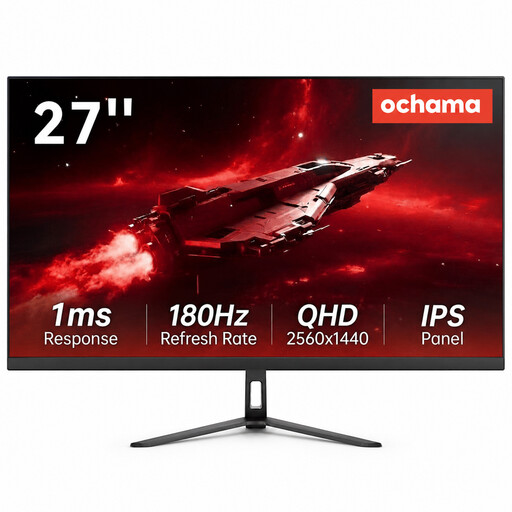
Ochama 27-inch 2K QHD IPS 180Hz monitor with keyboard
The stated 27-inch size, 180Hz refresh rate and narrow-bezel description make this one to assess for a multi-screen arrangement. Confirm its exact native pixel resolution, mounting fit and supported modes by input before buying a set.
View on Joybuy
Common questions
Can I use different monitors for a three-screen driving view?
You can use different screens as separate displays, but matched native resolution and intended refresh capability remove configuration differences when planning a combined driving view. AMD says an Eyefinity desktop depends on the number and arrangement of its displays; check your graphics card and the game's multi-monitor behaviour before buying.
Should I use DisplayPort or HDMI for high-refresh QHD screens?
Use the connection that supports your chosen monitor's intended mode, rather than choosing by connector name alone. Dell UK lists the Alienware AW2725DM at up to QHD 180Hz on DisplayPort 1.4 and up to QHD 144Hz on its specified HDMI path; check the GPU output and cable for every screen too.
Does an HDR label tell me how the monitor will perform?
A generic HDR label does not identify a VESA-certified performance tier. If HDR is important to your choice, check the exact model and its DisplayHDR or DisplayHDR True Black tier in VESA's certified-product list.


