Occasional school-project printers
If you mainly print short A4 lists or handouts, a smaller print, scan and copy machine may be more useful than a large paper tray. Check that its wireless printing works with the device holding your project files.


For occasional short reading lists, choose an A4 printer that can print, scan and copy without paying for paper-handling capacity you will rarely use. If worksheets and colour materials will become a regular task, consider a refillable ink-tank model; an automatic document feeder matters most when you routinely scan or copy several loose pages at once.
If you mainly print short A4 lists or handouts, a smaller print, scan and copy machine may be more useful than a large paper tray. Check that its wireless printing works with the device holding your project files.
If reading lists lead to recurring worksheets or colour pages, consider how often you would replace cartridges or refill a tank. Which? identifies refillable tanks as a consideration for people who print frequently.
If you regularly scan or copy loose source sheets, an automatic document feeder can save feeding each page by hand. Brother and Epson list feeders on some of their multifunction models; check the exact model rather than assuming every scanner has one.
Start with how often you expect to print after this project, then decide whether automatic two-sided printing and multi-page scanning would save you work.
| Concern | What to check | Who this matters to |
|---|---|---|
| Printing and refills | Compare cartridges with refillable bottles and check the consumables for the exact model. Treat stated page yields as test figures, not a personal page allowance. | If worksheets and reading lists will recur, I want fewer interruptions to replace ink. Around 36% of consumers put ongoing printing and refills first. |
| Getting lists printed | Check whether A4 two-sided printing is automatic and whether wireless printing works with your devices. | When a list is due before school, I want to print from the device I use without turning pages by hand. For around 29% of consumers, straightforward document handling is the primary concern. |
| Scanning and copying | For several loose originals, check for an automatic document feeder and its sheet capacity; a flatbed may suit single pages. | If my project uses several source sheets, feeding them individually would take time. Multi-page scanning and copying come first for around 21% of consumers. |
| Occasional use | Compare the features you will use after the project, including duplex printing and the type of ink supply. | If I only need a few lists, I do not want a larger machine built around work I will not do. Around 14% of consumers primarily want a printer proportionate to occasional use. |
A refillable tank is worth considering when printing will continue, but its capacity may see little use if the machine produces only a few lists.
Think about likely worksheets and other printing after this project before deciding between cartridges and a tank.
A flatbed requires you to place pages individually; an automatic document feeder handles suitable loose sheets in sequence.
If you regularly copy or scan several pages, confirm that the exact model has a feeder and check its stated capacity. Use the flatbed for originals unsuitable for feeding.
Manufacturer yields reflect test conditions. Page coverage, document mix and print settings can affect how many pages you get.
Check the test basis and replacement supplies for the exact model, especially if regular printing is part of your plan.
A disconnected printer may still retain network details.
Follow the maker’s reset instructions and remove memory cards before taking an old printer to an appropriate electrical recycling or donation point.
Brother’s DCP-T780DW is a refillable A4 print, copy and scan model to consider when document printing and multi-page scanning will be regular tasks.
Epson’s EcoTank multifunction range includes models for repeated home printing as well as models with additional paper handling.
Canon offers cartridge-based PIXMA and refillable-tank MAXIFY multifunction models that serve different printing patterns.
HP Smart Tank includes refillable print, scan and copy models, with paper-handling features varying by series.
These Joybuy models span cartridge and refillable-ink choices for A4 school-project printing. Choose by the printing and scanning you expect to do, rather than treating every model as suited to a short reading list.
 No image available
Consider this model if printing and handling several project pages will be regular tasks. Check its paper-handling features and the space it needs against your actual workload.
 No image available
Suited to households that repeatedly print lists and scan or copy several loose pages. Brother UK lists A4 print, copy and scan functions, automatic two-sided printing, a 150-sheet tray and a 20-sheet document feeder. The feeder may be unnecessary for a single short project.
 No image available
A cartridge-inkjet choice to consider for occasional project printing when you also want to copy or scan pages. Confirm its document-feeding features if you expect to process stacks of originals.
 No image available
Consider this refillable-ink model if school printing is likely to continue beyond one project. If you need to scan several loose pages at once, confirm its document-feeding features before choosing it.
 No image available
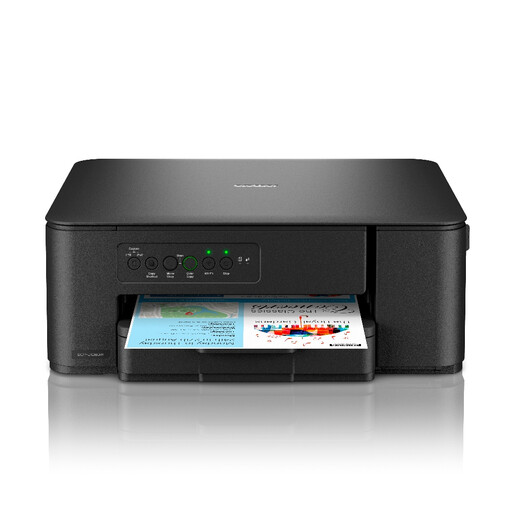
A wireless inkjet to consider for basic school-project pages. Confirm whether the model is DCP-J1260DW or DCP-J1260W and check its two-sided printing mode before making a decision.
No. Automatic duplex is useful if you often want A4 lists or handouts on both sides without turning the paper yourself. Canon lists it for the PIXMA TS4150i, Epson for the ET-2950 and Brother for the DCP-T780DW.
Choose one if you regularly scan or copy several suitable loose sheets. Brother lists a 20-sheet feeder on the DCP-T780DW and Epson a 35-sheet feeder on the ET-5170; a flatbed is sufficient for many one-page tasks.
Not solely because you have one short list to print. Consider a tank if lists, worksheets or colour materials will be printed regularly afterwards; Which? identifies tank inkjets as a stronger consideration for frequent printing. Check the exact model’s included ink and replacement supplies.
Clear its stored settings before passing it on or recycling it. Follow the maker’s factory-reset instructions, remove any memory cards and use an appropriate electrical recycling or donation route; Recycle Your Electricals says multifunction printers can be recycled.