What matters when choosing?
Start with how often you expect to print reading lists, then decide whether colour, scanning or printing without access to the flat router changes your choice.
Colour cartridge inkjet
Choose when: Reading-list batches are modest and you sometimes need colour, copies or scans.
Accept: Cartridges need replacing; check Wi-Fi Direct separately if the printer cannot join the flat network.
Mono laser
Choose when: Printing is frequent and nearly all the pages you need are black text.
Accept: Printed diagrams and colour-coded material will be monochrome, and toner or drum replacement still needs consideration.
Refillable ink tank
Choose when: You expect sustained black-and-colour printing throughout the time you will own the printer.
Accept: A large supplied-ink page-yield claim does not establish how much ink your particular documents will use.
| Concern |
What to check |
Who this matters to |
| Frequent black-text printing |
Confirm automatic duplexing on plain A4 paper and compare the paper tray with the size of your usual batches. |
Long reading lists are easier to manage when I do not have to turn every sheet or keep refilling the tray; around 40% of consumers would put uninterrupted black-text printing first. |
| Low commitment |
Estimate pages per term, identify the correct replacement consumables and compare ownership with your university's printing option. |
If I print only selected articles, I want to be sure I will use a printer enough to keep it; roughly 30% of consumers would make avoiding an unnecessary ownership commitment their primary concern. |
| Shared-flat flexibility |
Check print, copy and scan functions, Wi-Fi Direct and compatibility with the devices you will use. |
When the flat network is awkward to use, I still need a way to print, with occasional colour pages and scans too; about 30% of consumers would prioritise that flexibility. |
Joybuy products for these uses
These multifunction-printer choices span occasional colour documents, a refillable-ink option and black-text printing. Their duplex methods, connection options and space requirements differ, so match the exact model to your reading-list routine.
 No image available
Epson Expression Home XP-3200 A4 Colour Multifunction Inkjet
Consider this model when reading lists are accompanied by occasional colour pages, copies or scans. Its name specifies Wi-Fi and automatic duplex printing; check how its connection options work with your devices and allow room for paper loading.
View on Joybuy
 No image available
Epson EcoTank ET-5150 +Ink A4 Multifunction Printer
Consider this refillable-ink route if you expect to print regularly and also need copies and scans. The product name specifies A4 and Wi-Fi; check the exact duplex method and measure the space needed to operate it before choosing it for a shared desk.
View on Joybuy
 No image available
Brother MFC-J6760DW All-in-One Inkjet Printer
This is a route to consider when several people need an all-in-one inkjet for documents. Check its paper-handling features against your usual batches, and measure the desk space and clearance available in the flat before buying.
View on Joybuy
 No image available
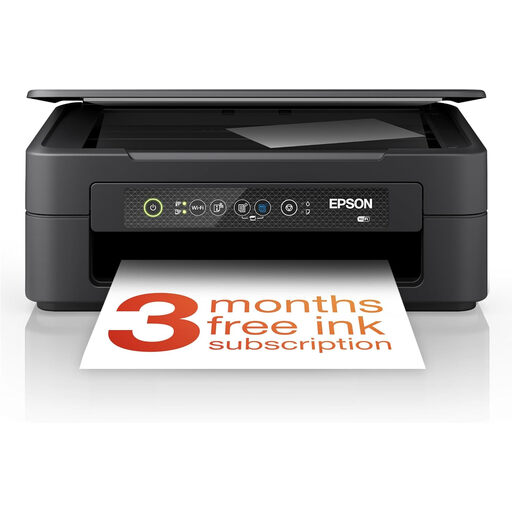
Epson Expression Home XP-2200 3-in-1 Inkjet Printer
Consider this home-oriented model for occasional documents when a 3-in-1 printer fits your needs. If you print long reading lists, confirm whether two-sided printing is automatic on the exact variant rather than assuming it from a general duplex description.
View on Joybuy
 No image available
Brother DCP-L1640W Mono Laser Printer
This mono laser model suits a reading-list routine that does not require colour output. For two-sided batches, allow for turning the pages yourself: this model's duplex method is described as manual, not automatic. Check the replacement toner needed for your expected volume.
View on Joybuy
Frequently asked questions
Is a mono laser printer suitable for reading lists?
Yes, if you print black-text reading lists frequently and do not need colour output. Brother UK's DCP-L2620DW illustrates this route with automatic duplexing and a 250-sheet tray, but check those features on the model you actually choose: the Brother DCP-L1640W listed above has manual duplexing.
What if the printer cannot join my flat's Wi-Fi?
Look for Wi-Fi Direct on the exact model and check that it works with your phone or laptop. Epson United Kingdom specifies Wi-Fi Direct for the Expression XP-5200, allowing printing without a wireless network; ordinary Wi-Fi support alone does not establish that option.
Should I buy a printer for only small batches?
Check your university's current campus-print arrangements and how many pages you expect to print before committing to a machine. The University of Kent advises students printing fewer than 20 pages to use its campus printers; use your own institution's guidance for your decision.
Do I have to take out an ink subscription?
Not necessarily: the Canon UK Store presents an option to buy the PIXMA TS6550i without its PIXMA Print Plan. Check the terms for your exact printer and offer, including whether the plan is optional and how you would obtain ordinary replacement cartridges.
What should I do with a printer when leaving the flat?
Check an appropriate electrical-equipment collection or take-back route rather than putting the printer straight into ordinary household rubbish. GOV.UK explains that UK waste electrical and electronic equipment regulations underpin recovery and recycling arrangements; your local authority or a participating retailer can explain the available handover method.


