For one school certificate at a time, choose a multifunction printer with a flatbed scanner large enough for the original, then check how it saves the scan in the format your recipient requires. A colour inkjet suits occasional printing alongside scanning; a refillable ink-tank model is worth considering for regular colour printing, while a mono laser suits frequent black-text printing but cannot produce a physical colour copy.
Who needs which printer?
Occasional certificate scanners
If you mainly need digital copies of individual school certificates and print only occasional forms, start with the scanner. An A4 flatbed lets you place a loose original on the glass rather than feed it through a document feeder. Check the certificate's dimensions and the printer's stated maximum scan area before buying.
Students printing colour coursework
If you also print graphics, handouts or other colour work, look at colour inkjet and refillable ink-tank multifunction printers. Choose between their supply models according to how regularly you expect to print, and check that the scanning workflow produces the file your recipient wants.
Students printing frequent black-text documents
If reading packs and assignments make up most of your printing, a mono laser multifunction printer may fit that workload. It can still be considered for scanning, but monochrome printing and copying will not produce a physical colour reproduction of a certificate.
What matters when choosing?
Start with how the original will be scanned and submitted. Then decide whether colour printing, shared-flat setup or a recurring black-text workload will drive your choice of printer.
| Concern |
What to check |
Who this matters to |
| Certificate capture |
Check for a flatbed large enough for the original and a scan workflow that meets the recipient's colour and file-format rules. |
When the certificate itself is my main task, I want its names, signatures and coloured details to remain readable without feeding the original through a roller. Around 42% of consumers put certificate capture first. |
| Shared-flat use and colour work |
Check whether the flat's network permits printer setup, whether colour printing is available and where the printer will fit with its lid open. |
I need to scan documents and print colour coursework from a laptop or phone without giving the printer more space than I can spare. For around 33% of consumers, that combination is the primary concern. |
| Regular black-text printing |
Compare the exact model's replacement supplies and stated yields; decide whether giving up physical colour copies is acceptable. |
If I regularly print text-heavy assignments, keeping that recurring task practical matters more to me than colour output. It comes first for around 25% of consumers. |
Mistakes to avoid
-
Assuming any scanner will handle an important original equally well
A product's scan function alone does not tell you how a certificate is handled. Canon specifies an A4-capable flatbed for the PIXMA TS5350i, whereas an automatic document feeder is intended to move loose pages through the machine.
Check the scanner type, maximum document area and colour-scan options. Try the workflow with an unimportant sheet first, and keep the paper certificate unless the recipient tells you otherwise.
-
Choosing mono printing before checking colour requirements
Brother specifies the DCP-L2620DW as a mono laser multifunction printer. A mono printer cannot produce a physical colour copy showing coloured seals or annotations.
Ask the recipient whether it needs a colour scan, a physical colour copy, a certified copy or the original. Check colour-scanning capability separately from colour-printing capability.
-
Overlooking the supply model
Cartridges, refillable tanks and toner call for different replacement supplies. Canon lists standard and XL cartridges for the PIXMA TS5350i; Epson's stated included-ink yields for the EcoTank ET-2870 are manufacturer figures, not a forecast of your own usage. If you activate HP+, HP states that its account, ongoing internet and Original HP ink conditions apply.
Identify the correct supplies for the exact printer, compare stated yields on a like-for-like basis and read any optional subscription conditions before enrolling.
-
Assuming a clear scan will be accepted
The organisation receiving a certificate decides whether it accepts an uploaded file, a colour copy, a certified copy or the paper original. Printer features cannot settle that requirement.
Check the recipient's current instructions for file format, file-size limit and legibility before scanning, and store the original safely.
Relevant brands to consider
These model examples illustrate different printer routes; their features should not be assumed to apply to every printer from the same brand.
Canon
The PIXMA TS5350i illustrates a colour home-inkjet route for occasional printing and flatbed certificate scanning.
- Canon UK specifies print, copy and scan functions, Wi-Fi, and a CIS flatbed with a maximum document area of 216 × 297 mm.
- Canon lists standard black and colour cartridges at 180 pages each under its A4 colour-document yield basis. Check replacement supplies and the availability of the exact model before choosing it.
Epson
The EcoTank ET-2870 illustrates a refillable ink-tank route when certificate scanning accompanies regular colour and black printing.
- Epson UK describes the ET-2870 as a wireless A4 print, copy and scan device with refillable tanks.
- Epson states that its supplied ink set prints up to 4,500 black and 7,500 colour pages. Those manufacturer yields depend on stated test conditions and do not determine an individual user's running costs.
Brother
The DCP-L2620DW illustrates a mono laser route for students whose recurring work is black-text printing.
- Brother UK specifies A4 print, copy and scan functions, Wi-Fi and USB, a 250-sheet tray and printing rated at up to 32 pages per minute for this model.
- Its monochrome output cannot make a physical colour copy of a certificate.
HP
The DeskJet 2820e illustrates a wireless home multifunction route for printing, copying and scanning.
- HP's DeskJet 2820e data sheet describes wireless and mobile-app workflows.
- If HP+ is activated, HP says it requires an HP account, an ongoing internet connection and exclusive use of Original HP ink cartridges for the printer's life. Check the exact model and setup choice before accepting those conditions.
Joybuy printer choices
These choices span inkjet, mono laser and colour LED or laser printers for flats where certificate scanning may sit alongside coursework printing. Before relying on any model for a certificate, confirm that its scanner fits the original and produces an acceptable file.
 No image available
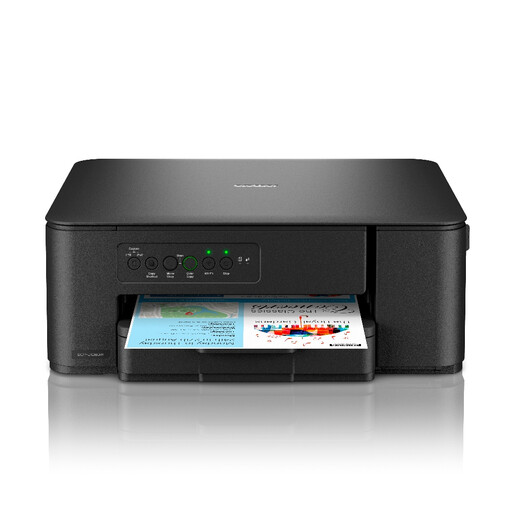
Brother DCP-J1260DW wireless inkjet printer
For occasional certificate scanning alongside wireless printing, confirm that the scanner fits your original and offers the file format you need.
Wireless inkjet printer.
View on Joybuy
 No image available
Epson Expression Home XP-3200 A4 colour multifunction inkjet printer
For colour coursework and certificate scanning, check the scanner's maximum document area and the file format required for submission.
Print, scan and copy functions; Wi-Fi and automatic duplex printing.
View on Joybuy
 No image available
Brother DCP-L1640W mono laser printer
For a workload dominated by black-text printing, check that its scanner fits your certificate and captures colour if the digital copy requires it.
Mono laser printer; physical printouts will not reproduce certificate colours.
View on Joybuy
 No image available
Brother MFC-L3740CDWE colour wireless LED printer
If colour printouts accompany certificate scanning, check this model's scanner area and allow enough room for the printer in the flat.
Colour wireless LED printer.
View on Joybuy
 No image available
Brother DCP-L3520CDWE colour laser printer
For colour coursework alongside certificate scanning, confirm the scanner's document size and colour-capture options before choosing this model.
Colour laser printer.
View on Joybuy
Common questions
What scanner type should I use for one school certificate?
An A4 flatbed is a sensible starting point for one loose certificate because the original can rest on the glass. Canon UK specifies a 216 × 297 mm maximum document area for the PIXMA TS5350i; whatever model you choose, check that your certificate fits flat without forcing the lid.
Do I need an automatic document feeder?
Not usually for a single certificate. Which? describes an automatic document feeder as a tray that moves multiple pages through a printer for scanning or copying; a flatbed is the more relevant feature when you are placing one important original on the glass.
What resolution should I use for an uploaded certificate?
Follow the receiving organisation's upload requirements first. Epson's scanning guidance suggests 96–150 dpi for email, web uploads or screen viewing and 300 dpi for printing or optical character recognition. Preview the file to ensure names, dates, stamps and signatures are legible before submitting it.
Do HP+ conditions apply to every HP multifunction printer?
No: check whether HP+ is offered and whether you choose to activate it for the exact printer. HP states that activation requires an HP account, an ongoing internet connection and exclusive use of Original HP ink cartridges for the printer's life; those conditions should not be assumed for a purchase without HP+.


