Clipping archivers
Students making digital copies of individual cuttings for coursework, portfolios or personal archives. They need to check the flatbed’s usable area and choose scan settings that suit what they plan to do with the files.


For individual newspaper clippings, start with an A4 multifunction printer that has a flatbed scanner, then compare its optical scan specification, wireless setup and ink arrangements. Make sure each clipping fits the usable scan area: Epson’s scanning guidance suggests 300 dpi for printing or optical character recognition (OCR), but 96–150 dpi for files intended only for a screen.
Students making digital copies of individual cuttings for coursework, portfolios or personal archives. They need to check the flatbed’s usable area and choose scan settings that suit what they plan to do with the files.
Students using phones, tablets or laptops in a shared flat who want printing, scanning and copying in one device. Desk space and compatibility with the devices they use matter alongside wireless connectivity.
Students who expect to scan clippings but print coursework only occasionally. They need to weigh replacement-ink arrangements against their likely printing habits rather than choosing on print speed alone.
Check the scanner bed and intended file use first; then decide whether the printer will fit your space and devices, and how you want to manage ink for occasional printing.
| Concern | What to check | Who this matters to |
|---|---|---|
| Clipping capture | Check for a flatbed, its usable scan area and optical scan resolution—not the printer’s print resolution. Match the scan setting to whether you will view, print, crop or enlarge the file. | If I’m keeping cuttings for coursework or an archive, I want each piece to fit on the glass and remain usable for its intended purpose. Around 42% of consumers put clipping capture first. |
| Space and connectivity | Check the printer’s dimensions against its intended position, plus wireless features and compatibility with the phone or computer you will use. | In a shared flat, I need one device I can place on my desk and use from my own phone or laptop. For around 33% of consumers, space and connectivity are the primary concern. |
| Ink and occasional printing | Compare compatible replacement ink, stated yield conditions and any subscription terms; check duplex printing if coursework uses many pages. | I mostly need digital copies, but I still want to print assignments without taking on ink arrangements that do not suit my usage. Ink and printing practicality come first for around 25% of consumers. |
Print and optical scan resolution describe different functions. Canon, for example, lists a 1,200 × 2,400 dpi optical flatbed specification separately for its PIXMA TS5350i series.
Compare the scanner type, optical resolution and maximum document size when choosing a printer for cuttings.
Scanning does not consume ink, while occasional printing may not suit the terms of a monthly plan. A stated inbox-ink yield also does not tell you what later replacements will cost.
Check compatible replacement ink and, if considering a subscription, its page allowance, cancellation terms and any trial conditions.
Canon’s PIXMA TS5350i series specifications remain useful for comparison, but Canon UK Store marks the specific TS5350i listing as permanently unavailable.
Check the availability and scanner specification of the exact model you intend to order.
An unwanted printer needs an electrical-equipment disposal route rather than ordinary household rubbish.
Ask the seller about applicable same-type take-back arrangements or use a local authorised electrical-recycling facility. GOV.UK says retailers covered by its in-store take-back requirement must provide that service free, though home collection may carry a transport charge.
Epson’s UK home multifunction range includes the compact A4 Expression XP-5200 for buyers considering wireless use and individual-colour ink replacement.
Canon’s PIXMA TS5350i series provides a documented flatbed specification to use when comparing scanners for A4 cuttings.
Brother’s DCP-J1200W is a mobile-managed print, scan and copy example for students comparing wireless operation and included ink.
These multifunction printers are choices to consider for scanning alongside occasional printing. For loose newspaper clippings, check the exact model’s scanner arrangement and usable scan area before deciding.
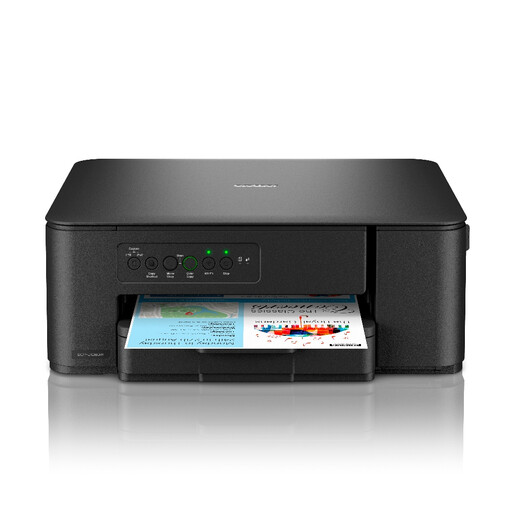 No image available
For individual clippings, this model has a stated CIS flatbed and 1,200 × 2,400 dpi optical scan resolution, according to its Joybuy listing. Check that its usable scan area accommodates the cuttings you want to keep.
 No image available
Consider this all-in-one model if printing and scanning need to share one device. Before relying on it for loose clippings, confirm that it has a suitable flatbed and usable scan area, and check the space needed for placement.
 No image available
This multifunction option is relevant if you need scanning and printing from one device. For clipping digitisation, confirm its scanner type, optical resolution and usable scan area before choosing it.
 No image available
An A4 multifunction option to consider when scanning and occasional printing must share one device. Confirm its scanner type, optical resolution and usable scan area for cuttings, as well as its physical dimensions for your space.
Choose the setting for what you will do with the file. Epson suggests 96–150 dpi for screen-only viewing, email or web upload, and 300 dpi for printing or OCR; if you plan to enlarge a scan later, its guidance calls for a correspondingly higher setting. Increasing resolution cannot restore detail absent from the clipping.
Not necessarily: for individual loose clippings, check the flatbed’s usable area rather than choosing on feeder capacity alone. As a size reference, Canon specifies a 216 × 297 mm maximum document area for the PIXMA TS5350i series; check the dimensions of the exact model you intend to buy.
Compare compatible replacement ink and its stated yield, then decide separately whether a subscription’s terms suit your printing habits. Scanning itself does not use ink, and neither included-ink yields nor a subscription offer establishes what your own ongoing printing will require.
Ask the seller which electrical-equipment take-back route applies, or use an authorised local recycling facility. GOV.UK says retailers covered by the in-store take-back requirement must accept waste equipment of the same type as the item bought and provide that in-store service free; home collection may carry a transport charge.