Buy the accessory that removes the first obstacle in your household's multiplayer setup: enough usable controllers for local play, suitable voice and network connections for online play, or storage for a shared game library. Check the exact console generation, game play mode and accessory connection or storage standard before choosing; an accessory that works with one setup may not serve another.
Who needs which accessories?
Regular local multiplayer households
If you host couch or tabletop sessions, start with the games' supported player counts and play modes. Then consider whether you have enough compatible controllers and a workable way to charge them between sessions.
Online multiplayer and party-chat players
Voice chat calls for a headset connection supported by your console or controller. A wired network plan also depends on where the console sits relative to the router and whether its dock or console needs an adapter.
Shared-console households with a setup barrier
If game storage or the standard controller layout is the main obstacle, tackle that before adding general-purpose accessories. Storage formats and configurable input options depend on the platform and, in some cases, its generation.
What matters when choosing accessories?
Start with the activity you want to make possible, then check the game, console and accessory together. An extra controller cannot add a local mode to a game, and additional storage does not always let you launch games directly from it.
| Concern |
What to check |
Who this matters to |
| Controllers and charging |
Check the game's local player count and play mode, then match the controller and charging method to its exact console generation. |
If I regularly bring people together for local play, I need enough controllers that work with the game and are ready for the next session; around 36% of consumers would put controller availability first. |
| Voice chat and connection |
Check the headset's console or controller connection method and whether your router-to-console layout permits Ethernet. |
When we play online, I need a supported way to talk with the group and a connection arrangement that works in our room; voice and network needs would come first for around 29% of consumers. |
| Game storage |
Match the storage format to the console generation and check whether games can launch from it or must be transferred first. |
If our shared digital library is difficult to keep installed, I want more usable space without choosing the wrong card or drive; around 21% of consumers would prioritise storage. |
| Configurable controls |
Check the player's input requirements, platform compatibility and the game's control options. |
If a standard controller layout makes joining a session difficult, I need inputs that can be arranged for the player; configurable control would be the primary concern for around 14% of consumers. |
Mistakes that can disrupt your setup
-
Assuming an extra controller creates local multiplayer
A controller can connect successfully while the game still lacks the player count or play mode you intended. Nintendo's guidance notes that Switch Lite has no TV mode, even though compatible wireless controllers can be used with games that support tabletop play.
Check the individual game's player and play-mode information before deciding how many controllers to buy.
-
Treating storage cards and drives as interchangeable
Nintendo UK specifies microSD Express cards for Switch 2. PlayStation says PS5 games held on USB extended storage must be moved to console or compatible M.2 SSD storage before they can be played.
Match the storage format to the console, and decide whether you need to launch games from the expansion or store them for later transfer.
-
Assuming Bluetooth support means console support
A headset's phone connection does not establish how it connects to a games console. Xbox Support states that Xbox One does not support a Bluetooth headset connection to the console.
Confirm the headset's supported console, controller and connection method rather than relying on its wireless label.
-
Overlooking exceptions for older Switch accessories
Nintendo UK says original Switch Joy-Con controllers can connect wirelessly to Switch 2 but cannot be charged on the Switch 2 console.
Check the exact accessory's Switch 2 compatibility, including how it will be charged, before reusing or buying it.
Platform brands for compatibility checks
PlayStation
Relevant when choosing PS5 controllers, DualSense charging arrangements or storage for a shared game library.
- PlayStation states that up to four controllers can be used with a PS5 at the same time, and that a compatible M.2 SSD can launch PS5 games.
- PlayStation says PS5 games stored on USB extended storage must be moved back to console or compatible M.2 SSD storage to play.
Xbox
Relevant when checking headset connection methods, wired networking and configurable input options for an Xbox setup.
- Xbox Support describes wired networking as its fastest and most reliable Xbox network connection route; its Accessories app provides configuration options for Xbox Adaptive controllers.
- Headset connections depend on the console and accessory: Xbox Support says Xbox One cannot connect a Bluetooth headset directly to the console.
Nintendo
Relevant when matching Switch-family controllers, charging accessories, wired-network equipment and storage to a particular console generation.
- Nintendo UK directs players to a game's supported play modes when planning a controller setup and specifies microSD Express cards for Switch 2.
- Compatibility across generations has exceptions: Nintendo UK says original Switch Joy-Con controllers can connect wirelessly to Switch 2 but cannot charge on the Switch 2 console.
Joybuy charging and storage products
These products address controller charging for Switch 2 Joy-Con or PS5 DualSense households and storage for Switch 2 game libraries. Choose according to the console and accessory models already in your home.
 No image available
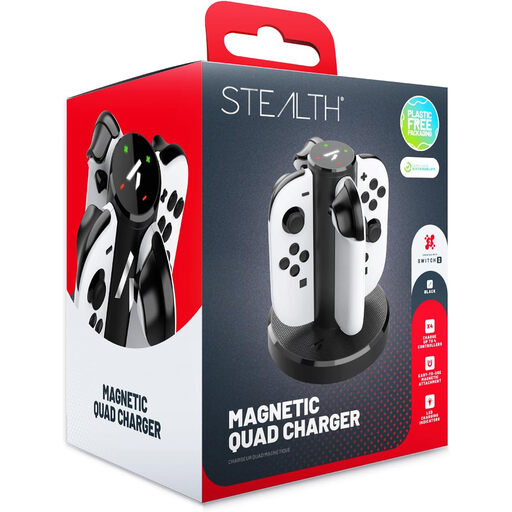
Stealth Quad Charging Dock for Switch 2 Joy-Con
For a household that rotates Switch 2 Joy-Con controllers through local sessions, this dock offers a controller-specific charging option.
Confirm your exact controller type, the power connection and what is supplied with the dock before buying.
View on Joybuy
 No image available
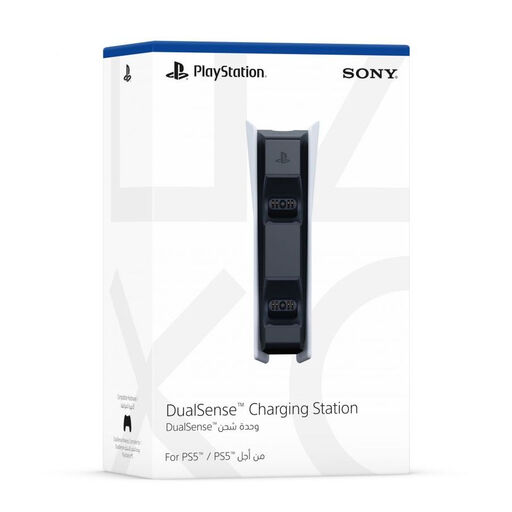
Sony PlayStation 5 DualSense Charging Station
For repeat local sessions using PS5 DualSense controllers, this station provides a dedicated place to charge controllers between games.
Check the power connection and supplied accessories, including whether controllers need to be purchased separately.
View on Joybuy
 No image available
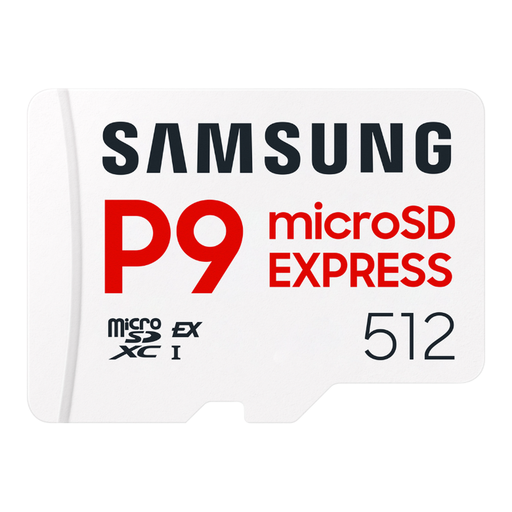
Samsung P9 Express microSD, 512GB
For a Switch 2 household managing installed games, this 512GB card is a storage option to assess against the console's requirements.
Nintendo UK specifies microSD Express for Switch 2; confirm the exact card format and your intended storage use before buying.
View on Joybuy
 No image available
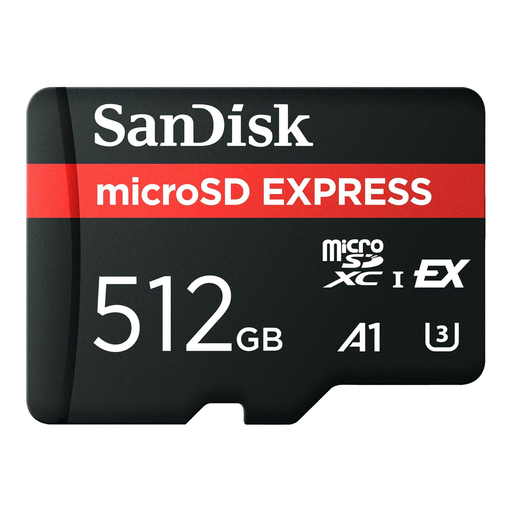
SanDisk Express microSD Card, 512GB
For a Switch 2 household that needs additional game storage, this 512GB card is another format-specific option.
Check the card's exact microSD Express compatibility against Nintendo's Switch 2 requirement. If transfer speed affects your choice, compare figures stated on the same basis.
View on Joybuy
Frequently asked questions
How do I know whether an extra controller will help with local multiplayer?
Check the game's supported player count and play modes as well as controller compatibility. Nintendo UK says play modes are listed on software packaging, official game-detail pages and Nintendo eShop listings; a compatible controller alone does not establish that the game supports your intended local setup.
Can I play PS5 games directly from a USB external drive?
No: PlayStation says PS5 games on USB extended storage must be moved to PS5 console storage or compatible M.2 SSD storage before play. A compatible M.2 SSD can launch PS5 games, so decide whether you need playable expansion or storage for later transfer.
Does a Nintendo Switch need a LAN adapter for a wired connection?
Not if its dock has a built-in LAN port, according to Nintendo UK. A standard Switch using a USB LAN adapter must be docked, while Switch Lite requires a licensed accessory for that arrangement; check your console and dock before buying an adapter.
What should I check about online cancellation and electrical recycling?
For an eligible UK online purchase, GOV.UK says to tell the retailer within 14 days of receiving the item if you want to cancel; a change-of-mind cancellation is distinct from remedies for faulty goods. GOV.UK also says retailers must accept an old electrical product free on a like-for-like basis when you buy a new one.


