Start by identifying whether the problem is the home connection or something at the gaming device. If lag or drop-outs are the issue, try a practical wired connection and check Wi-Fi against the broadband service before buying network equipment; if the connection is stable, choose a headset, controller or storage according to the limitation you actually face. Check the exact platform and connection requirements before buying.
Who this is for
Shared-home players dealing with lag or drop-outs
When other people are online at the same time, you need to work out whether Wi-Fi coverage, activity within the home or the broadband service is limiting your connection. Ofcom identifies these as distinct factors, so a gaming accessory is not necessarily the answer.
Players who need private audio or voice chat
Your game connection is generally usable, but listening privately or speaking to teammates is the sticking point. Check microphone use and platform compatibility for the exact headset model.
Players sharing controllers or running out of game space
An additional compatible controller or more room for games may matter more than a network change. PlayStation, Xbox and Nintendo set different requirements for playing games from added storage, so match the purchase to your console generation.
What to check before buying
Identify the limitation before choosing equipment: a headset will not repair a poor connection, while a network upgrade will not provide another controller or more game storage.
| Concern | What to check | Who this matters to |
|---|
| Connection stability |
Where practical, try Ethernet to distinguish a Wi-Fi problem from a wider connection problem. Check router placement and whether several devices use the connection at once; Ofcom notes that Wi-Fi cannot outperform the broadband service. |
If matches falter when others are online, I want to find the cause before replacing equipment. Around 36% of consumers would put connection stability first. |
| Voice chat and private listening |
Check the exact headset variant’s platform list, connection method and microphone support for your intended chat setup. |
I can play online, but I need to speak to teammates without disturbing others in the home. Voice chat or private listening would come first for around 29% of consumers. |
| Controller access |
Match the controller’s stated console generation or operating system and its wired or wireless connection method to your device. |
When a shared setup needs another gamepad, I need one that works with the system we use. Around 21% of consumers would prioritise controller access. |
| Game storage |
Check whether the added storage is for keeping games or playing them directly. PlayStation, Xbox and Nintendo specify different formats and direct-play rules by console generation. |
I want space to keep more games ready without buying storage that cannot serve my console’s intended use. Storage would be the primary need for around 14% of consumers. |
Purchasing mistakes to avoid
-
Replacing the router before locating the connection problem
A new Wi-Fi product cannot make the wireless connection outperform the broadband service, as Ofcom explains. It may leave a service-level problem unchanged.
Try Ethernet on a stationary gaming device where practical, and check whether the problem occurs throughout the home or only over Wi-Fi before considering a router or mesh system.
-
Assuming every headset or controller works with every platform
Connection methods, receivers and console generations affect whether the intended controls or chat functions are available. A product family name is not a compatibility list.
Check the exact variant against your PC or console and the function you need. For example, 8BitDo lists the Pro 3 for Switch 1/2, Windows, Apple, SteamOS and Android; that list does not establish PlayStation or Xbox support.
-
Choosing added storage by capacity alone
Storage suitable for keeping games is not necessarily suitable for playing current-generation games directly. PlayStation says PS5 games cannot be played directly from USB extended storage; Xbox requires its internal SSD or a Storage Expansion Card for direct play of optimised Xbox Series X|S games.
Decide whether you need archive space or direct play, then check your exact console’s storage requirements. Nintendo specifies microSD Express for Switch 2 storage expansion.
Brands to consider for specific equipment needs
TP-Link
Relevant when the identified problem is in-home Wi-Fi coverage or access to wired network connections.
- TP-Link markets router models with LAN ports, game-traffic prioritisation and EasyMesh support; check features on the specific model.
- A router cannot improve the underlying broadband service. Confirm your provider setup and the required ports before changing equipment.
SteelSeries
Relevant when choosing a gaming headset for private listening or voice chat.
- SteelSeries directs buyers to the compatibility information for each headset model.
- Check the exact variant and intended chat connection; compatibility for one headset does not establish support across the range.
8BitDo
Relevant to buyers considering an additional controller for one of its stated platforms.
- 8BitDo lists the Pro 3 for Switch 1/2, Windows, Apple, SteamOS and Android.
- Do not infer PlayStation or Xbox compatibility from that list; confirm the controller model and connection mode you intend to use.
Seagate
Relevant to Xbox Series X|S owners looking for added storage from which optimised games can be played directly.
- Seagate identifies a Storage Expansion Card designed for the Xbox Series X|S expansion slot, the storage route specified by Xbox for this use.
- Match the card to the console and intended use rather than assuming an ordinary USB drive meets the same direct-play requirement.
SanDisk
Relevant when choosing removable storage for a Nintendo Switch-family console.
- SanDisk distinguishes microSD Express cards for Switch 2 from conventional Switch-family microSD options.
- Choose by console generation and required card format before comparing capacity; Nintendo specifies microSD Express for Switch 2 storage expansion.
Joybuy product choices
These products address different shared-home gaming needs: Switch 2 storage, private game audio, controller access and in-home Wi-Fi coverage. Choose the type of equipment only after identifying which part of your setup needs attention.
 No image available
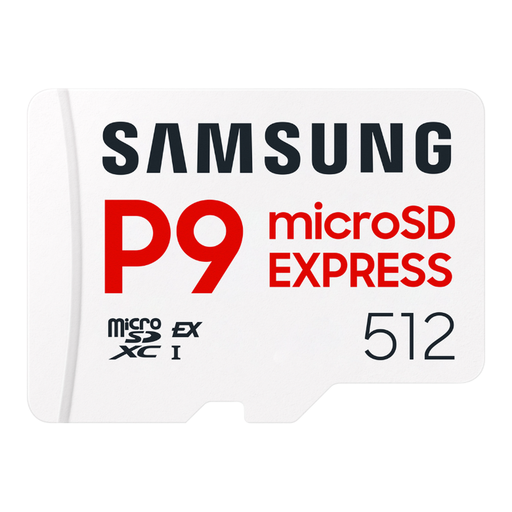
Samsung P9 Express 512GB microSD card
Consider this when removable game storage is the priority, particularly for a Switch 2 setup. The named card is 512GB and microSD Express; confirm the required format for your device before buying.
Joybuy
 No image available
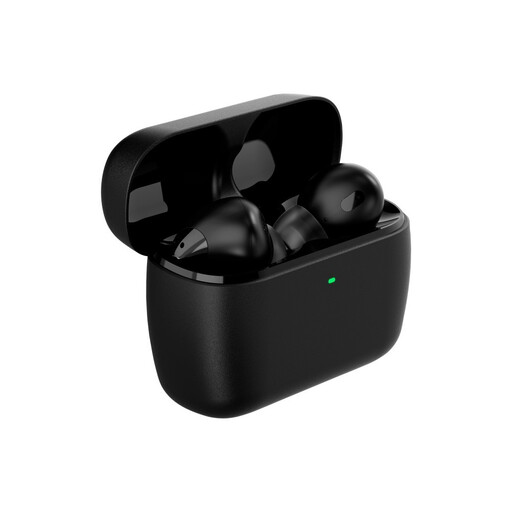
HyperX Cloud MIX Buds 2 gaming earbuds with microphone
The in-ear format is an option when private game audio is the main need. The product name includes a microphone, but check how voice chat and the intended connection work with your exact device before buying.
Joybuy
 No image available
Microsoft Xbox Elite Wireless Controller Series 2 (Xbox One, Xbox Series X/S, PC)
Consider an additional controller when access to a gamepad is the obstacle in a shared setup. This product name identifies the Elite Wireless Controller Series 2 and lists Xbox One, Xbox Series X/S and PC; check your intended device rather than assuming support for other consoles.
Joybuy
 No image available
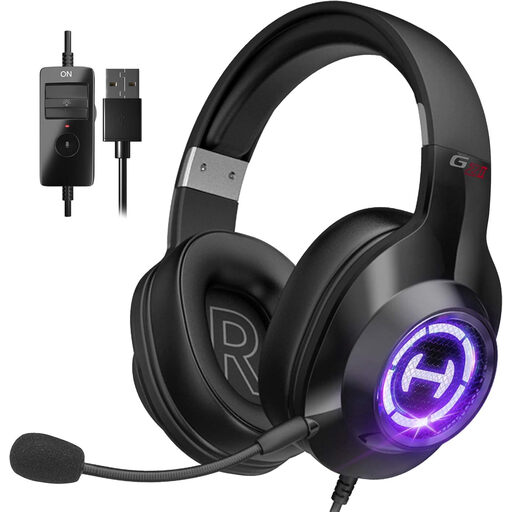
Edifier G2II black USB wired gaming headset (PC, PS4, Mac)
This wired headset is a choice when you need private audio and a microphone at a PC, PS4 or Mac setup. Its product name specifies USB connectivity and 50mm drivers; check the intended system and chat connection. The product information excludes Xbox use.
Joybuy
 No image available
NETGEAR Orbi 370 RBE373 Wi-Fi 7 mesh system, three-pack, white
Consider mesh equipment if the problem is Wi-Fi coverage across rooms rather than the broadband service. This named three-pack is specified as dual-band BE3600 with 2.5Gbps Ethernet; confirm how it connects to your existing modem or gateway before buying.
Joybuy
Common questions
Should I replace my router as soon as online games start lagging?
Not necessarily: establish whether the problem is Wi-Fi within the home or the broadband service first. Ofcom notes that Wi-Fi cannot outperform the underlying service; where practical, try Ethernet and check router placement before considering a router or mesh system for an identified coverage problem.
Can I play PS5 games directly from a USB external drive?
No. PlayStation says PS5 games can be moved to USB extended storage but must be copied back to console storage to play; PS4 games can be played directly from compatible USB extended storage on PS5.
Can an ordinary USB drive play optimised Xbox Series X|S games?
No. Xbox says optimised Xbox Series X|S games must be installed on the console’s internal SSD or a Storage Expansion Card to play. Compatible external storage can still be useful for keeping games and for other supported titles.
Will a conventional Switch microSD card expand Switch 2 storage?
No. Nintendo specifies microSD Express cards for Switch 2 storage expansion, so check the console generation and card format before buying.


