Fixed-booth narration recordists
Recording one seated or standing speaker in a repeatable position, with a wired connection taking priority over freedom of movement.


For a narrator who stays near the recording device in a small booth, start with a wired lavalier whose connector and power requirements match that device. Choose a phone-connected model only for a compatible mobile input, or a wireless system when the speaker needs to move without a cable or the recorder must sit farther away. Whichever route you take, test the microphone with the narrator’s clothing to catch rubbing and cable noise.
Recording one seated or standing speaker in a repeatable position, with a wired connection taking priority over freedom of movement.
Clipping or concealing a small lavalier on a guide, curator or actor while keeping it close enough for spoken commentary.
Recording a presenter who needs to move without a cable, or placing the recorder away from the speaker. Wireless use also calls for checks at the museum site.
Decide where the commentary will be recorded before choosing a lavalier: a phone or tablet, a dedicated recorder or camera, and a wireless receiver can require different microphone connections.
| Concern | What to check | Who this matters to |
|---|---|---|
| Recording-chain compatibility | Match the plug and power requirements to the exact input. Check whether a phone needs a compatible TRRS connection or adapter, or a recorder or bodypack needs a different termination. | If I record straight to a phone or a particular recorder, the microphone has to work with that input before its other features matter. Around 42% of consumers would put connection compatibility first. |
| Discreet speech capture | Check the capsule, mounting clip and cable route; make a test recording with the narrator’s actual clothing. | I want the microphone to stay unobtrusive without fabric brushing the capsule during narration. For around 33% of consumers, secure placement and clear speech would be the primary concern. |
| Movement and wireless use | Decide whether a cable reaches comfortably. If not, check the wireless system’s operating band, power needs and performance at the recording site. | If the presenter moves between rooms or the recorder must stay away from the booth, I need a workable cable-free setup. Wireless mobility would come first for around 25% of consumers. |
A phone-oriented lavalier and one made for a recorder or bodypack may have different connections, even when both use a 3.5 mm plug.
Identify the recording device and its microphone input, then choose the matching lavalier variant and any appropriate adapter.
A mismatched connection may mean adding an adapter or interface, or changing the microphone.
A wireless system adds transmitter and receiver power management and a radio link that may face interference. A fixed speaker who can reach the recorder may not need it.
Use the movement and recorder-position requirements to decide. For wireless use in the UK, check the system’s operating band against current Ofcom guidance and assess interference at the museum.
Fabric rubbing against the capsule or cable can introduce noise into otherwise usable speech.
Record a short passage in the intended outfit, then secure the microphone and cable where the narrator’s movements do not cause rubbing.
Audio-Technica marks the AT899 as discontinued on its UK product page; its suitability on paper does not establish that the required variant is available to buy.
If considering an AT899, confirm the exact termination, current supply and warranty terms before choosing it for the recording chain.
The Lavalier II is a low-profile, omnidirectional lavalier for a compatible recording or wireless input.
The MKE 2 is a subminiature professional lavalier offered in configurations for specific recording systems.
The MVL provides a phone- and tablet-oriented wired option for a compatible portable-device input.
The AT899 line includes subminiature lavaliers with different termination and powering configurations.
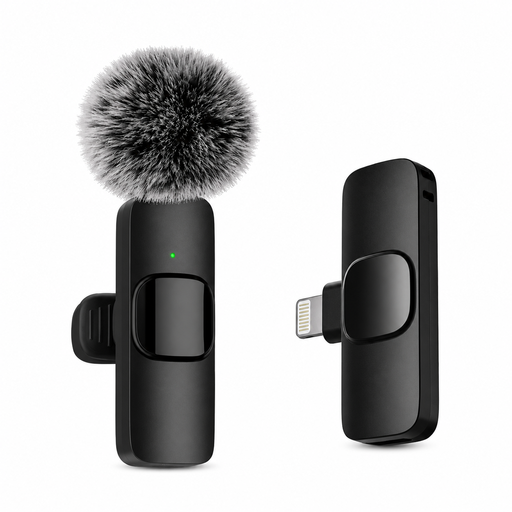
This lavalier is presented for recording with an iOS device. Check its connection and mounting method against your booth setup before choosing it.
 No image available
For commentary recorded on an iOS device, consider this model only after confirming how it connects to and records with your exact device.
Check how the microphone attaches to clothing and test that mounting with the narrator’s outfit. Confirm the connection method before relying on cable-free operation.
Not if the narrator can stay comfortably connected to the recording device by cable. Wireless becomes relevant when the speaker needs to move freely or the recorder must be farther away; it also brings power and radio-interference checks.
No. A 3.5 mm lavalier may use a TRS or TRRS connection, and the phone’s input must match. Shure specifies the MVL’s TRRS plug for compatible portable devices and advises using an appropriate CTIA-compliant adapter where needed.
Start with a secure position near the upper chest, then test it with the narrator’s actual clothing and movements. Shure advises preventing fabric from rubbing the capsule or cable; securing the cable can help limit movement noise.
Not necessarily: the applicable requirements depend on the operating band and how the system is used. Check the system against Ofcom’s current wireless-microphone guidance before use. Ofcom also notes that shared licence-exempt bands can experience interference.
No. An omnidirectional pickup pattern does not remove the need to position the microphone well or assess the booth itself. Make a test recording in the actual space before settling on the placement.