Narrators in an imperfect room
If a computer, household activity or other intermittent sounds are audible where you record, close microphone placement and the ability to monitor your voice matter more than choosing by a sensitivity figure alone.


For museum commentary recorded in a home room with audible background noise, consider a dynamic microphone used close to the narrator; Shure describes voice-focused controls on its USB/XLR MV7+, but processing does not replace reducing persistent noise. In a quieter, controlled room, a condenser such as the USB/XLR RØDE NT1 5th Generation offers another route, while the USB-only Audio-Technica AT2020USB-X suits direct computer recording when an XLR connection is not part of the plan. Check placement, monitoring and the equipment needed for your chosen connection before buying.
If a computer, household activity or other intermittent sounds are audible where you record, close microphone placement and the ability to monitor your voice matter more than choosing by a sensitivity figure alone.
If you can keep the recording space reasonably quiet, a cardioid condenser is an option for spoken narration. Plan for the microphone’s correct speaking side, pop protection and a stable, isolated mount.
If you want to record into a computer without adding an audio interface immediately, look at a USB microphone with a headphone connection for monitoring. Decide separately whether you will need XLR later.
Start with the noise and placement you can control in your recording room, then choose a connection and monitoring arrangement that fits how you will record.
| Concern | What to check | Who this matters to |
|---|---|---|
| Room noise and speech consistency | Check whether close placement suits your narration and whether monitoring and level controls work with your recording setup. Shure describes voice isolation and Auto Level for the MV7+; these do not remove the need to address persistent noise. | If background sound intrudes on my commentary, I need to hear problems as I record and keep my speaking position consistent; roughly 42% of consumers put room noise first. |
| Vocal capture in a quiet room | Check speaking-side orientation, pop protection and mounting. RØDE rates the NT1 5th Generation at 4 dBA self-noise, which describes the microphone rather than noise in the room. | With a quiet space available, I want to concentrate on condenser-style vocal capture without overlooking placement or vibration; around 33% of consumers make vocal detail their primary concern. |
| Computer connection and monitoring | Check whether the microphone offers direct USB recording, a headphone output and, if needed later, XLR. An XLR-only model requires an audio interface for computer recording. | I want to start recording into my computer and hear myself clearly, while deciding whether an interface belongs in my future setup; about 25% of consumers prioritise this workflow. |
An XLR-only microphone needs another device in the recording chain. Shure explains that, for its MV7X, the connected audio interface communicates with the computer rather than the microphone itself.
If you do not already have an interface, choose a microphone with verified USB operation or plan for an interface and suitable cable before selecting an XLR-only model.
Shure describes voice isolation, level control and denoising on the MV7+, but those functions are not a reason to ignore a persistent noise source or poor microphone placement.
Reduce noise where practical, position the microphone for close narration and record a short passage at your intended speaking level before a full session.
The RØDE NT1 5th Generation is side-address. RØDE identifies its gold dot as the front that should face the speaker.
Check the speaking side of your chosen model and place its pop filter in front of that side, rather than assuming the end of the microphone is active.
For an in-store purchase in England, Citizens Advice says changing your mind does not automatically entitle you to a refund. A change-of-mind return is a different question from a remedy for faulty or misdescribed goods.
Before purchasing, check the seller’s terms for your sales channel, including product-condition and return-postage requirements, and keep the product details while you test compatibility.
These brands illustrate different microphone setups for the same spoken-commentary task; the features below refer to the named models, not every microphone each brand makes.
The MV7+ represents a close-spoken dynamic route with both USB-C and XLR connections.
The NT1 5th Generation represents a studio condenser route with USB-C recording and an XLR connection for an interface or mixer.
The AT2020USB-X represents direct USB computer recording for one narrator.
These FIFINE dynamic USB/XLR microphones suit shoppers planning to speak close to the microphone and record commentary into a computer. Choose between the K688CT kit’s boom arm and the AM8’s desktop stand according to where the microphone needs to sit.
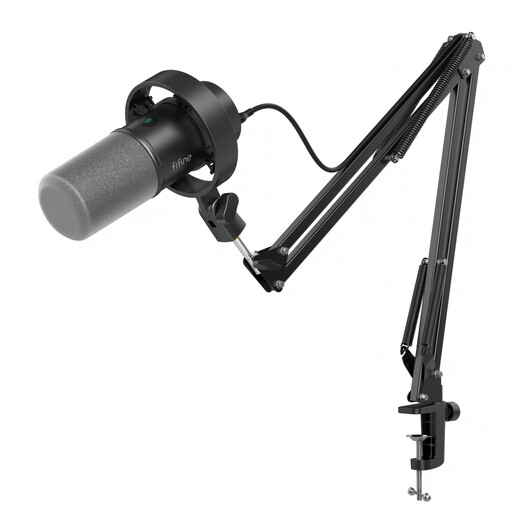 Image unavailable
The boom arm offers a way to position this microphone for close spoken commentary at a desk.
 Image unavailable
The desktop stand suits a desk-based commentary setup if you can place the microphone close enough for your speaking position.
No, if you choose a USB microphone and connect it to a compatible computer. Audio-Technica specifies USB-C recording for the AT2020USB-X, while RØDE offers USB-C or XLR on the NT1 5th Generation. For an XLR-only microphone, you need an interface to get its signal into the computer; Shure makes this distinction for the MV7X.
Face the microphone’s intended speaking side towards your mouth and make a short test recording before the full commentary. The RØDE NT1 5th Generation is side-address: RØDE says its gold dot marks the front. Check your own model’s orientation rather than applying that marking to other microphones.
Do not assume a change of mind guarantees a return. Citizens Advice says an in-store buyer in England has no automatic refund right merely for changing their mind; check the seller’s applicable terms for your purchase, including any conditions on use or return postage. Questions about faulty or misdescribed goods are separate from change-of-mind returns.