For a group watching musical films in a living room with some light, prioritise a projector whose brightness and placement suit that room. A portable smart projector is a more practical route when you can darken the space and need occasional, quick setup; if you want a larger, detail-focused image, check the projector’s resolution and planned position as well. Whichever route you choose, assess the sound separately rather than assuming built-in speakers will suit every group.
Who is this for?
Living-room group hosts
If lamps or daylight will remain during the film, consider room lighting and where the projector can stand before concentrating on finer image details. Epson’s UK buying guidance distinguishes living rooms with some ambient light from controlled-light portable setups.
Cinema-first musical fans
If you can darken the room, a large, detailed image may matter more to you than being able to pack the projector away quickly. Measure the intended screen position so the image you want is achievable from the available space.
Occasional portable-screening hosts
If you bring out the projector only for gatherings, a portable setup with streaming and integrated audio may reduce the equipment you need to arrange. You should still check the room lighting and decide whether to connect separate speakers.
What should you prioritise?
Brighter home-cinema projector
Choose it when: Group screenings regularly take place in a living room that cannot be fully darkened.
Allow for: A planned projector position and a separate decision about group audio; a larger fixed-location model is less convenient to put away between screenings.
Portable smart projector
Choose it when: Screenings are occasional, you can control the light and quick setup matters.
Allow for: The lighting limits of the exact model and a check that its integrated sound works for your group.
| Concern |
What to check |
Who this matters to |
| Room lighting |
Note how much light you can block and check the brightness unit before comparing figures. Epson’s UK guide places 2,500–3,500 lumens in its range for living rooms with some ambient light. |
If I cannot darken the room for every guest, I need an image suited to the light that remains; around 31% of consumers would put room lighting first. |
| Group sound |
Check the built-in audio specification and whether your intended speakers can connect through the exact model’s available outputs. |
I want dialogue and songs to reach people across the room, not just those nearest the projector. Around 25% of consumers would make shared audio their primary concern. |
| Placement and setup |
Measure the lens-to-screen distance, then check the model’s throw ratio and available optical adjustments for your intended image size. |
If the projector must be brought out for each gathering or kept clear of seats, finding a workable position comes first; about 25% of consumers would prioritise setup and placement. |
| Image detail |
Distinguish native resolution from supported input resolution, particularly when a listing says it supports or decodes 4K. |
With the lights controlled, I care most about seeing detail across a large image; roughly 19% of consumers would put image detail first. |
Mistakes to avoid
-
Comparing brightness numbers without their units
A figure expressed in RGB Laser Lumens, for example, should not be treated as directly equivalent to an ANSI-lumen figure. The amount of light in the room also changes what you need from a projector.
Record your viewing conditions and compare brightness claims on a like-for-like measurement basis where possible.
-
Reading “4K supported” as native 4K
A projector can accept or decode a 4K signal while displaying it at a lower native resolution. A large image makes that distinction worth checking before you buy for fine film detail.
Look for the exact model’s native display resolution as well as its supported input resolution.
-
Planning the picture but not the sound
Integrated speakers and external-audio connections vary between projectors. Neither a speaker specification nor the presence of Bluetooth alone establishes how sound will work for everyone in your room.
Decide whether you intend to use built-in or separate sound, then check the connection types and compatibility of both devices.
-
Using keystone correction as the entire placement plan
Image adjustment does not establish that a projector can produce your chosen screen size from the available position.
Measure from lens to screen and check the exact model’s throw ratio, zoom and adjustment range before choosing a table position or mount.
A different position may also call for a stand, mount or longer cable.
Relevant projector brands
BenQ
The TK860i illustrates a brighter 4K home-cinema route for group viewing where placement adjustment and an external-audio plan matter.
- BenQ specifies the TK860i at 3,300 ANSI lumens with 4K UHD resolution, 1.3x zoom, vertical lens shift, three HDMI inputs, eARC and an audio output.
- It is a larger, fixed-location-style option. Assess its two 5 W speakers against your room and audience rather than assuming they will be sufficient.
Epson
The EF-72 illustrates a portable smart-projector route for occasional screenings with controlled room lighting.
- Epson specifies the EF-72 with 1,000 lumens, 4K PRO-UHD, Google TV, Sound by Bose, Dolby Audio and Bluetooth.
- Epson’s UK guide places 500–1,500 lumens in its portable, controlled-light range and 2,500–3,500 lumens in its living-room range with some ambient light. Check your room rather than assuming portability resolves a lighting problem.
ViewSonic
The LX700-4KE RGB illustrates a high-output laser route where a larger room and installation adjustments shape the choice.
- ViewSonic specifies 4K HDR, 1.6x optical zoom, vertical lens shift and horizontal and vertical keystone adjustment for the LX700-4KE RGB.
- Its stated 5,200 RGB Laser Lumens use a different brightness unit from ANSI lumens. Check the measurement basis before comparing numerical output with another model.
Portable projector options on Joybuy
These portable projectors suit consumers considering an occasional, flexible musical-film setup. Check each model against your room lighting, intended image size and audio plan; the wider choice between a portable setup and a brighter fixed-location projector still depends on those conditions.
 No image available
Magcubic HY350Max portable projector, native 1080p
Consider it for a portable screening where you can control the room lighting. The product name states 900 ANSI lumens, native 1080p, Android 14, Wi-Fi 6, Bluetooth 5.4, 180° rotation and auto keystone; “8K supported” describes supported content, not native resolution. Confirm the intended image size and your group-audio arrangement before buying.
View on Joybuy
 No image available
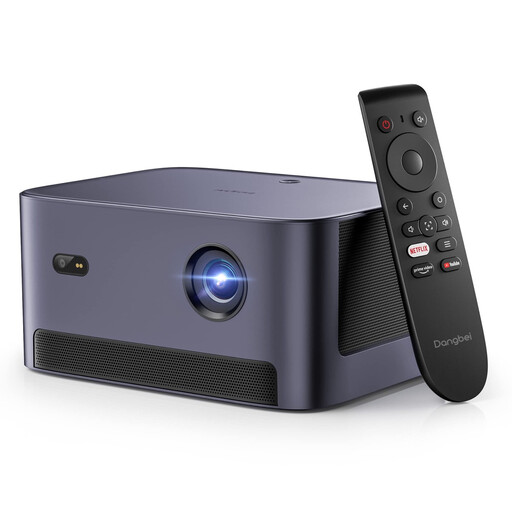
Dangbei Neo DLP mini smart projector, 1080p
Consider it when a compact streaming setup matters and you can assess the room light before choosing a screen position. Its product name lists 540 ISO lumens, official Netflix, autofocus, keystone correction, Dolby Audio and a display of up to 120 inches. Check the distance needed for your chosen image size and whether you will use separate audio; do not compare its ISO-lumen figure directly with an ANSI-lumen figure.
View on Joybuy
 No image available
XBJ 360° Portable Projector, European Version
Consider this rotating design if you need to set up a screen in different positions for occasional viewings. The product name lists Full HD 1080p, 500 lumens, a display of up to 120 inches, auto keystone, Wi-Fi, Bluetooth and HDMI. Check the brightness measurement basis, the distance needed for your image size and your audio arrangement.
View on Joybuy
 No image available
TCL C1 portable smart projector, grey
Consider it for an occasional screening in a room where you can manage the light. Its product name lists 1080p FHD and 4K support: check the native resolution rather than treating supported input as native 4K. Confirm brightness, placement and the sound arrangement against your group’s needs.
View on Joybuy
 No image available
Yaber T2 Plus GTV portable projector
Consider it if you need to bring the projector out for gatherings rather than keep one installed. Its product name lists native 1080p, Sound by JBL, a built-in battery, Wi-Fi 6 and Bluetooth. Check battery runtime against the length of your film, as well as brightness, placement and whether the sound will suit the group.
View on Joybuy
Questions about group film nights
How bright should a projector be for a group musical-film night?
Choose for the room lighting and intended image size, not the number of guests alone. Epson’s UK buying guide places 500–1,500 lumens in its portable indoor controlled-light range and 2,500–3,500 lumens in its range for living rooms with some ambient light; check the exact projector’s brightness unit before comparing models.
Can built-in projector speakers serve a large group?
They may suit some setups, but the speaker specification alone cannot settle whether dialogue and music will work across your room. Decide where guests will sit, then check the exact projector’s audio connections if you plan to use a soundbar, active speakers or an AV receiver.
Does “4K supported” mean a projector displays native 4K?
No. A projector can accept or decode a 4K signal while using a lower native display resolution. Check both figures for the exact model if image detail is a priority for your planned screen size.


