Choose a controller that works with your exact console or device, then check whether the mystery games you intend to play accept gamepad input. In a shared bedroom, plan your headphone connection as carefully as the controller connection: a 3.5 mm jack can offer a wired route on supported devices, but the game and device audio settings still matter. Wireless freedom also brings charging needs, while features such as advanced feedback depend on the game and platform.
Who this suits
Late-night mystery players
If someone nearby is sleeping or studying, private listening and manageable volume may matter more than extra controller buttons. Microsoft, Sony and Nintendo list controller-mounted headset connections on particular models, but sound output still depends on the connected device and its settings.
Players using one console
Start with the exact console generation, not just the controller brand. Nintendo states that its Switch 2 Pro Controller works with Switch 2, not the original Switch; other controller families also have their own published device lists.
PC mystery-game players
Check the individual game before buying a controller for Windows play. Valve’s Steam support guidance says gamepad-only input styles work only with games that support gamepad input.
What to check before buying
Match the controller to your device and game first. Then decide how you will listen privately, before weighing comfort, charging and use across devices.
| Concern | What to check | Who this matters to |
|---|
| Device and game compatibility |
Check the exact console or device against the controller’s compatibility list, then check each game for gamepad support. |
If my controller connects but the game needs mouse input, it will not solve my playing problem. Around 36% of consumers put device and game compatibility first. |
| Private audio |
Check whether your headset connects through the controller, the console or another supported audio route. |
I need to hear dialogue without sending game sound across the bedroom. Private listening is the main concern for around 29% of consumers. |
| Comfort and charging |
Consider grip and layout, the charging method and whether wired play is possible when power runs low. |
For a long clue-reading session, I want controls that feel manageable and a charging routine that fits how I play. Around 21% of consumers prioritise that long-session experience. |
| Use across devices |
Check each device and connection mode separately, including how controller settings work on Windows. |
I move between a PC and another device, so I need to know which connections work on each. That flexibility comes first for around 14% of consumers. |
Buying pitfalls
-
Choosing by console family rather than generation
Similar names do not mean interchangeable controllers: Nintendo says the Switch 2 Pro Controller cannot be used with the original Switch.
Read the model name and compatibility statement for your exact Switch, Switch OLED, Switch Lite or Switch 2 before ordering.
-
Assuming every PC mystery game accepts a controller
A successful USB or wireless connection does not establish that a game has usable gamepad controls. Valve’s Steam guidance limits gamepad-only input styles to games with gamepad support.
Check controller support for each PC game you intend to play.
-
Expecting identical settings over every connection
Microsoft says most Xbox Accessories app features are not supported over Bluetooth on Windows.
If controller configuration matters to you, check whether your setup requires USB or an Xbox Wireless Adapter.
-
Putting an old controller in household rubbish
GOV.UK advises against putting unwanted electrical products and batteries in household rubbish.
Use an appropriate electrical-waste or battery collection route when the controller or its batteries reach the end of their useful life.
Relevant controller brands
Xbox
Microsoft’s Xbox Wireless Controller is an official route for Xbox consoles, with Windows, Android and iOS also on its published compatibility list.
- Microsoft lists a 3.5 mm stereo headset jack and device switching for the Xbox Wireless Controller.
- For Windows configuration, Microsoft says most Xbox Accessories app features are unavailable over Bluetooth; check whether USB or an Xbox Wireless Adapter is needed.
PlayStation
Sony’s DualSense Wireless Controller is a PS5-focused option whose published device list also includes PC, Mac and mobile devices.
- Sony lists a built-in microphone and a 3.5 mm headset jack.
- Check game and platform support before choosing it for adaptive triggers or haptic feedback; those features should not be assumed to work in every mystery game.
Nintendo
Nintendo offers separate Pro Controllers for the original Switch family and Switch 2. Choose by console generation.
- Nintendo lists USB-C charging and an approximately 40-hour estimated battery life for the original Switch Pro Controller; actual life varies with use.
- Nintendo says the Switch 2 Pro Controller has an audio jack but cannot be used with the original Switch.
8BitDo
The Ultimate 2C Wireless Controller provides a published Windows and Android route rather than universal console compatibility.
- 8BitDo lists 2.4 GHz or wired connection for Windows and Bluetooth connection for Android.
- Check another model if you need a controller for PlayStation, Xbox or Nintendo Switch; those consoles are outside this model’s stated compatibility.
Controller choices on Joybuy
These controllers cover different console and PC setups. Choose for your actual device and planned audio route rather than treating the list as interchangeable options for every mystery game.
 Image unavailable
Microsoft Xbox Elite Wireless Controller Series 2 (Xbox One, Xbox Series X/S, PC)
Consider this wireless model for an Xbox or PC setup where you want to check controller configuration and a wired-headset route. Confirm support for your device and game; on Windows, Microsoft says most Xbox Accessories app features do not work over Bluetooth.
View on Joybuy
 Image unavailable
Nintendo Switch 2 Pro Controller — Black
For Switch 2 play, its Nintendo-listed audio jack offers a controller-mounted headset route to check for private listening. Nintendo says this model cannot be used with the original Switch, Switch OLED or Switch Lite.
View on Joybuy
 Image unavailable
Xbox Wireless Controller — Carbon Black
This wireless controller is worth considering for a device on Microsoft’s published Xbox Wireless Controller compatibility list. Microsoft lists a 3.5 mm headset jack for the model; check your device’s audio setup and whether AA battery power suits you.
View on Joybuy
 Image unavailable
Machenike G3 V2 Tri-mode Controller — White
Consider this tri-mode controller if you want to assess several connection options for PC play. Confirm that the exact device and connection mode work together, and plan how you will connect headphones for private listening.
View on Joybuy
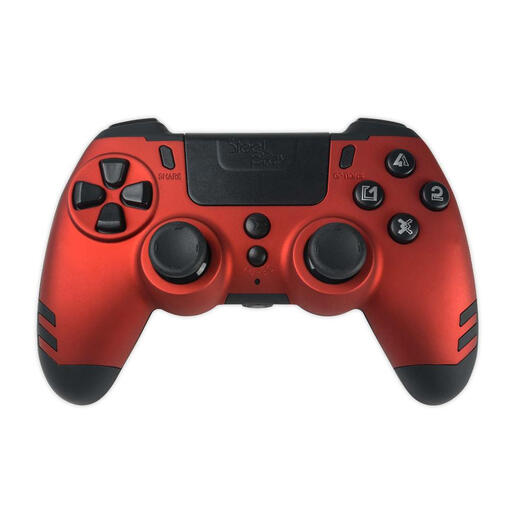 Image unavailable
Lexip SteelPlay Slim Pack Wireless Controller — Ruby Red (PS4, PC)
For a PS4 or PC setup, check this wireless controller against your exact device and games before buying. If quiet play matters, also confirm a compatible headphone connection through the controller or your gaming device.
View on Joybuy
Common questions
Will any controller work with every PC mystery game?
No. Valve’s Steam support guidance says gamepad-only input styles work only in games with gamepad support. Check the exact game’s controller support; connecting a controller by USB or Bluetooth does not establish that its controls will suit a mouse-led game.
How can I keep game sound private in a shared bedroom?
Use headphones through an audio connection supported by your controller or gaming device, then set an appropriate volume. Microsoft and Sony list 3.5 mm headset jacks on the Xbox Wireless Controller and DualSense, while Nintendo lists an audio jack on the Switch 2 Pro Controller; check the setup for your exact device rather than assuming every Pro Controller has the same connection.
Can a Switch 2 Pro Controller work with an original Switch?
No. Nintendo UK states that the Switch 2 Pro Controller is only for Nintendo Switch 2. Check the console generation before choosing between Nintendo’s Pro Controller models.
Do I need a cable to pair an original Switch Pro Controller?
Not always. Nintendo says it can be paired through the dock with a USB cable or wirelessly from the console’s controller pairing screen using the SYNC Button.
What should I do with an old controller or battery?
Use an appropriate electrical-waste or battery collection route rather than household rubbish. GOV.UK advises that unwanted electrical products and batteries should not go into household rubbish.


