Buying priorities
Start with where the media server will run, then check playback compatibility, usable capacity and the protection needed for files that matter.
| Priority |
What to check |
Your needs |
| Access while the PC is off |
Decide whether the library needs a host computer, or whether a NAS must be reachable over the home network. Check media-server apps on each intended TV, console, phone and tablet. |
I want household devices to reach the library without relying on my main computer being switched on. A NAS or another always-on server is the more suitable arrangement. |
| Playback compatibility |
List common containers, codecs, bitrate, resolution and subtitle use. If the NAS will run the server, check its exact processor architecture and transcoding support for those files and clients. |
I need the files I use most to play on the screens and devices around my home. Plex Support notes that Direct Play depends on compatible file formats and client capabilities. |
| Capacity and recovery |
Calculate current files, expected growth and backup copies separately. For multi-bay systems, check usable capacity after the chosen RAID layout, drive sizes and redundancy allowance. |
I need room to grow without treating a mirrored array as my only safeguard. Keep an independent backup destination, with an off-site copy for important files where appropriate. |
| Remote access and accounts |
Keep local access as the default where possible. Check update support, unique accounts, strong passwords, MFA or 2SV, and whether remote access can avoid direct port forwarding. |
I may want access away from home, but I do not want to expose NAS administration services unnecessarily. The National Cyber Security Centre recommends using an extra verification step for protected accounts. |
Joybuy product options
These Joybuy options cover a four-bay NAS for household network storage and portable external drives for computer-centred library expansion or an additional copy.
 No image available
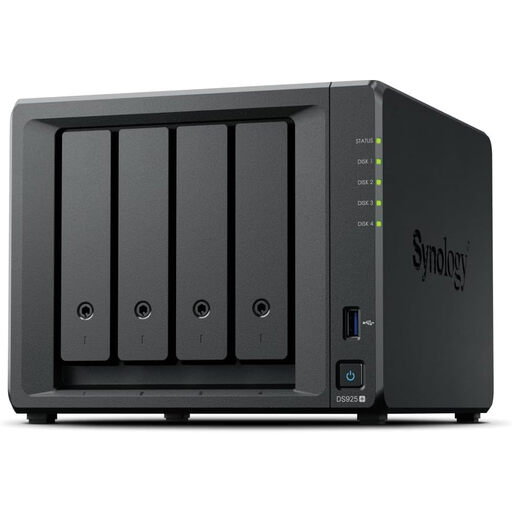
Synology DiskStation DS925+ 4-Bay NAS
A network-storage option for a growing household library that needs access without the main computer running.
Four bays, dual 2.5GbE ports, stated expansion to nine bays and up to 180 TB capacity.
The listing specifies Synology-branded drives only; check drive purchases, intended media-server compatibility, client formats and subtitles. Keep a separate backup destination for important files.
Joybuy
 No image available
Western Digital Elements Portable 4 TB External Drive
A computer-attached option for expanding a single-computer media library or keeping an additional local copy.
Stated 4 TB capacity with USB 3.2 Gen 1 connectivity and an included cable.
It needs a host computer and does not independently serve household devices when that computer is off. Windows 10+ recognition is stated; check port compatibility and whether reformatting is suitable for your operating system.
Joybuy
 No image available
Western Digital My Passport Portable 2 TB Drive
A portable option for a computer-centred library and scheduled local backup copies.
Stated 2 TB capacity, USB 3.2 Gen 1 connectivity and Acronis-based automatic backup scheduling.
The drive requires a connected computer rather than acting as a household media server. It is stated as pre-formatted for Windows; macOS use requires a downloadable driver, and local backups do not create an off-site copy.
Joybuy
 No image available
Samsung MU-PE1T0S 1 TB USB Type-C Drive
A compact external drive for a smaller locally attached library or selected backup files.
Stated 1 TB capacity, USB Type-C 3.2 Gen 2 connection, up to 1,050 MB/s read and 1,000 MB/s write.
The listing names compatibility with Macs, PCs, Android devices and game consoles, but it does not provide independent household access when the connected computer is off. Check whether 1 TB allows for growth and separate backups.
Joybuy
Frequently asked questions
Is RAID the same thing as backup?
No. RAID can help a multi-drive system continue after certain drive failures, but it does not create an independent copy. Synology Knowledge Center advises backing up to a different destination, and important files benefit from a separate backup with an off-site copy.
How much storage capacity should I buy?
Calculate the current library, expected additions and backup copies separately. In a redundant multi-drive array, usable capacity is lower than the raw total, so check the chosen RAID layout and drive sizes before assuming all installed space will be available.
Will every TV, phone or console play every file from a NAS?
No. Plex Support states that Direct Play depends on a compatible container, codecs, bitrate and resolution on the specific client device, and subtitles can require transcoding. Check the files and subtitles used most often on every important playback device before choosing a NAS to run the server.
When do I need a more powerful NAS instead of a basic file-storage NAS?
More processing power matters when the NAS itself must run a media server and convert incompatible video, subtitle streams or remote streams. If it only stores files while the server runs elsewhere, concentrate first on usable capacity; otherwise, verify the exact model’s processor architecture and transcoding capability for your intended workload.
How should I set up remote access to a NAS safely?
Avoid making direct internet exposure the default. QNAP UK recommends disabling unnecessary UPnP, DMZ and port-forwarding settings; use separate accounts, strong passwords, MFA or 2SV where available, and keep firmware and applications updated before enabling remote access.


