Independent interviewers building an archive
Central storage and recovery matter more to you than network speed. A mirrored pair of drives can address one drive failing, while a separate copy protects recordings against other incidents.


For an individual interviewer or small team, a two-bay NAS with compatible drives in RAID 1 is a starting point when the usable archive will fit on one drive. Mirroring helps with a single-drive failure, but recordings also need a separately protected backup that you can restore. Consider faster networking for frequent team transfers only if the rest of the network can use it, and plan access controls around the sensitivity of the recordings.
Central storage and recovery matter more to you than network speed. A mirrored pair of drives can address one drive failing, while a separate copy protects recordings against other incidents.
You need to decide who can access the archive and how colleagues will restore files or transfer recordings. Network speed becomes more relevant when several people regularly use the storage.
Access to recordings, retention and recovery need deliberate controls. The Information Commissioner's Office says security measures for personal data should reflect the circumstances and risks of its use.
Decide how you will restrict access and restore recordings before choosing capacity or paying attention to faster network features.
| Concern | What to check | Who this matters to |
|---|---|---|
| Access and security | Check user permissions and software updates; assess whether encryption is appropriate for the recordings. | If my interviews identify people, I want to limit who can open them. Around 31% of consumers put access and security first. |
| Recovery | Check RAID support and how you will keep and test a separately protected backup. | When an interview cannot be repeated, I need a way to retrieve it after deletion or equipment failure. Recovery is the main priority for roughly 31% of consumers. |
| Shared access | Check NAS port speed against the switch and client devices; consider how often several people transfer files. | If colleagues regularly move recordings to and from the archive, slow transfers interrupt our work. About 19% of consumers prioritise shared access and transfer speed. |
| Archive capacity | Estimate recording growth using usable mirrored capacity, then check exact drive compatibility and backup capacity. | As my archive grows, I need room for retained recordings and a recovery copy. Capacity is the first concern for roughly 19% of consumers. |
A mirrored volume can remain available after one drive fails, but it does not recover every deleted file or protect against an incident affecting the NAS and connected copies. The National Cyber Security Centre reports ransomware incidents involving connected backup storage.
Keep a separately protected or disconnected copy and periodically test that you can restore recordings from it.
QNAP specifies that the TS-264 is supplied without HDDs. A two-bay RAID 1 archive also needs two suitable drives and has less usable capacity than the drives' combined raw capacity.
Check package contents, the enclosure's supported-drive list and the capacity of the mirrored volume before choosing a configuration.
A separate backup destination is another part of the storage setup.
A 2.5GbE port on an enclosure cannot make a slower connection at the switch or workstation run at that speed.
Check the connection from each recording workstation to the NAS before deciding whether faster networking suits your workflow.
Using the faster connection may also require compatible network equipment or client adapters.
Where recordings contain personal data, the Information Commissioner's Office says UK GDPR security measures must be appropriate to the circumstances and risk. Buying storage hardware does not establish how accounts, access or retention will be managed.
Set permissions, decide how long recordings are needed, assess encryption where appropriate and test the restoration process.
DiskStation includes two-bay NAS options for a central archive used by an individual or small team.
The TS-264 is a two-bay option for buyers considering shared storage and faster local networking.
The two-bay F2-424 offers several storage configurations for a home-office or small-team archive.
IronWolf is a NAS HDD line to consider for the drives inside a compatible recording archive.
WD Red Plus is a NAS HDD line intended for RAID-optimised systems.
These enclosures offer different bay counts for an interview-recording archive; the HDD is a drive component, not a complete NAS. Choose an enclosure and compatible drives together, then plan a separate backup.
 No image available
Consider this four-bay enclosure if your shared recording archive calls for more than a two-bay setup.
Check the exact supported drives, package contents and network interfaces before planning the installation. Keep a separate recovery copy regardless of the drive arrangement.
 No image available
This two-bay enclosure suits a plan for a central archive with two separately selected drives.
Diskless means you will need drives; check their exact compatibility and the usable capacity your chosen configuration will provide. Check network and security options against your workflow.
 No image available
Consider this four-bay enclosure when planning a shared archive for a team.
Confirm whether drives are included and which exact models are compatible. Assess its network and security options for the way your team will access recordings.
 No image available
This five-bay option is more relevant when a growing shared media archive calls for a larger drive configuration than a basic two-bay recording archive.
Drives are required separately. Check supported models, usable capacity for your chosen drive arrangement and whether your network can use the enclosure's intended connection.
 No image available
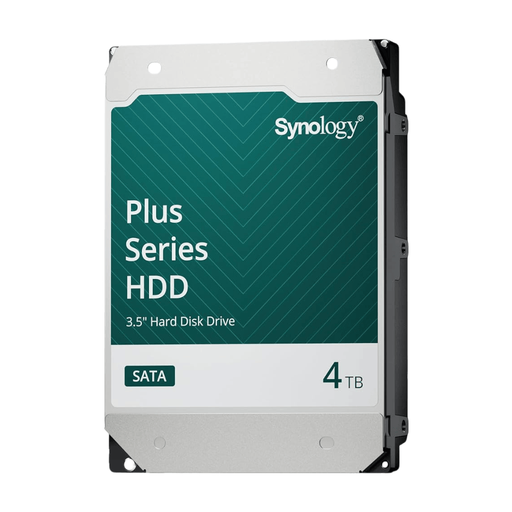
This is a 4TB drive component for an archive, not an enclosure that can share recordings by itself.
Check that the intended NAS supports the exact drive model and work out usable capacity for your chosen storage configuration. Maintain a separately protected backup.
No. RAID 1 can provide redundancy if one drive fails, but it does not replace an independent backup. The National Cyber Security Centre has reported ransomware incidents affecting original files and connected backup storage, so keep a protected or disconnected copy and test restoration.
For an always-on recording archive, compare drives specified for NAS use and check the exact model against the enclosure's supported-drive information. Western Digital specifies WD Red Plus for RAID-optimised NAS systems, while Seagate describes IronWolf as a CMR NAS drive line; neither product-line description confirms compatibility with every enclosure.
The Information Commissioner's Office guidance does not prescribe a particular NAS model or one encryption setting for every recording archive. Where interviews contain personal data, choose technical and organisational measures appropriate to the circumstances and risk, and assess whether encryption is appropriate alongside account security, access permissions and recovery.
Keep them only for as long as needed for the purpose for which they are held, taking account of applicable exceptions and safeguards. The Information Commissioner's Office explains that personal data should not remain identifiable for longer than necessary; set and review a retention and deletion plan for the recordings.