Choose a keyboard that gives you straightforward access to the keys your test plan uses, including Tab, Shift+Tab, Enter, Spacebar and the arrow keys. A wired full-size model suits a fixed desk; a programmable model makes sense if you also need custom shortcuts, while multi-device wireless is worth considering when you regularly switch test machines. Check the exact layout and connection requirements before buying: keyboard features cannot establish whether a website itself is accessible.
Who needs this setup?
Dedicated accessibility testers
At a fixed desk, you need a familiar physical layout for repeated checks of keyboard operation and visible focus. WebAIM and the W3C describe those as properties to test in the interface; a conventional wired keyboard can keep your input setup straightforward.
Testers switching between devices
If you repeat a journey on more than one computer, switching a keyboard between compatible hosts may be more useful than keeping it permanently connected to one. Check the connection requirements for every device you intend to test.
Shortcut and remapping workflow users
You may want configurable keys for supporting development tasks while retaining a full-size layout for ordinary navigation checks. Remapping helps organise your workflow; it does not demonstrate that an interface works with standard keyboard input.
What matters when choosing?
Start with the physical keys needed for your checks, then decide whether a fixed USB connection, custom mappings or switching between devices matters most at your desk.
| Concern | What to check | Who this matters to |
|---|
| Navigation keys |
Check the placement of Tab, Shift, Enter, Spacebar and dedicated arrow keys; confirm the intended regional layout. |
I want to repeat keyboard-only checks without hunting for an unfamiliar key arrangement. Around 31% of consumers put direct access to standard navigation keys first. |
| Fixed-desk setup |
Check the USB connection against your computer’s ports and allow room for the keyboard and cable. |
A keyboard that stays connected at my desk lets me begin a test without pairing it again. For roughly 25% of consumers, a straightforward fixed-desk connection is the primary concern. |
| Custom shortcuts |
Confirm remapping on the exact model and whether its configuration tool works with your computer. |
I use customised shortcuts for supporting tasks, but still need to test the interface with standard interactions. Around 25% of consumers prioritise a configurable workflow. |
| Device switching |
Check the supported connection modes and compatibility with each intended host. |
Moving between test devices matters more to me than keeping one keyboard attached to a single computer. Multi-device switching comes first for around 19% of consumers. |
Mistakes to avoid
-
Choosing a compact layout without checking the test keys
An unfamiliar arrow-key arrangement or keys behind an Fn layer can slow repeated manual checks. WebAIM’s keyboard-testing reference includes Tab and Shift+Tab among the interactions testers need to perform.
Inspect photographs and the exact layout before ordering, especially if your test plan relies on dedicated arrow keys.
-
Taking programmable keys as proof of accessibility
The W3C’s keyboard and visible-focus guidance concerns how the website or application behaves, not the features of the tester’s keyboard.
Use remapping for your own supporting tasks, then check the interface manually with standard keyboard interactions and watch where focus moves.
-
Overlooking wireless connection requirements
A keyboard that switches between devices is useful only when each intended host supports its connection method; pairing, a receiver or charging can also affect your test setup.
Check compatibility for every host, and consider a wired connection if you need a keyboard permanently attached to one test machine.
Brands to consider
Logitech
Logitech offers both a conventional wired desk keyboard and a model aimed at switching between computers.
- Logitech describes the K120 as a full-size USB keyboard with an integrated number pad, and says MX Keys for Business can switch between up to three computers.
- Check the regional layout and host connection requirements of the model you choose. Neither feature establishes that a website is keyboard accessible.
Keychron
Keychron has UK-ISO options for buyers considering full-size mechanical keyboards with different connection and configuration choices.
- Keychron UK describes the C2 Pro 8K as a wired, full-size QMK-remappable model and the Q6 Max as a full-size model with 2.4 GHz, Bluetooth and wired Type-C options.
- Choose the exact layout, switch and connection variant you need, and check its current availability before ordering.
Das Keyboard
Das Keyboard is relevant if you want a full-size mechanical board and are considering a UK 105-key option.
- Das Keyboard lists a UK 105-key layout option and USB connection for the 4 Ultimate.
- The 4 Ultimate has blank keycaps, which may make it harder to locate keys if you rely on visible legends during testing.
Joybuy keyboard choices
These choices cover wired keyboards for a fixed desk and wireless keyboards to consider when switching devices. Check the physical key layout of the selected model against your test plan.
 No image available
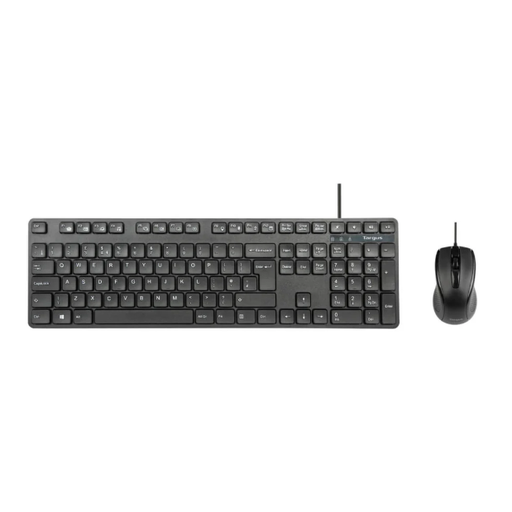
Targus Full-Size USB Keyboard and Wired Mouse Combo
Consider this wired keyboard bundle for a fixed home-office desk.
The name specifies a full-size USB keyboard and an optical wired mouse; the mouse is not needed for keyboard-only testing. Check the keyboard’s key placement and regional layout before choosing it.
View on Joybuy
 No image available
MSI GK-701 UK-Layout Keyboard and Mouse Set, Black
Consider this USB set if you want a keyboard for a fixed desk and also need a mouse.
The product name specifies a UK layout and CoPilot key. Check the placement of the standard navigation keys; the included mouse is not required for keyboard-only checks.
View on Joybuy
 No image available
Targus EcoSmart Full-Size Wireless Keyboard (UK)
Consider this UK-variant wireless keyboard if your testing setup calls for moving between devices.
Check its connection methods against each intended host, along with its power requirements and the placement of the keys in your test plan.
View on Joybuy
 No image available
Hyper HyperSpace Next Bluetooth Keyboard (UK), White
Consider this wireless keyboard if Bluetooth fits the devices in your test setup.
The named variant is UK-layout and white. Confirm Bluetooth compatibility, charging arrangements and the physical navigation-key layout before ordering.
View on Joybuy
Frequently asked questions
Which keys should I use to test keyboard navigation?
For common web checks, use Tab and Shift+Tab to move between interactive elements, Enter and Spacebar to activate relevant controls, and arrow keys where a control calls for them. WebAIM notes these keyboard interactions; the expected behaviour depends on the control you are testing.
Will a programmable keyboard make my website accessible?
No. A programmable keyboard can support your own workflow, but accessibility depends on the interface: the W3C’s guidance addresses keyboard operability and visible focus. Test the site’s actual behaviour with standard keyboard interactions.
What if I need to return a keyboard bought online in the UK?
For an eligible distance purchase, GOV.UK says you can cancel within 14 days of receiving the item and then have another 14 days to return it. Exceptions may apply to change-of-mind cancellations; separate remedies apply to goods that are faulty or not as described. Check the seller’s return instructions and keep your order details.
What should I do with an old keyboard in the UK?
Use an appropriate electrical recycling or retailer take-back route available in your area. GOV.UK explains that UK waste electrical and electronic equipment rules encourage recovery, reuse and recycling.


