
24/7 全天候客户支持

免费退货

当日/次日达

品质保障

开启新人专享福利: 全场免邮 | 低至 2 折 | 免费试用 30 天 JoyPlus 会员
下载 Joybuy
For offices, schools, businesses and home users, buying printer paper in bulk should reduce costs and interruptions. However, a low price per box does not always represent good value. Paper that is poorly matched to your printer, too transparent for double-sided documents or inconsistently described can create waste, jams and unnecessary reordering.
This guide explains what to check before purchasing 2,500 sheets of A4 paper, with a focus on Navigator A4 paper and comparable multifunction options.
A higher gsm rating can feel more substantial, but it is not automatically the right choice for every printer or document. 75gsm printer paper is often suitable for routine letters, invoices, worksheets and internal documents because it balances handling with paper consumption. Heavier paper may be preferable for presentations, but it can increase storage weight and may require printer-specific settings.
Before ordering, check the printer manual for supported paper weights and formats. For everyday office use, paper marked as suitable for laser printers, inkjet printers, copiers and multifunction devices offers broader compatibility.
Whiteness and brightness are related but different measurements. Brightness commonly indicates how much light the paper reflects, while whiteness describes the paper’s visual tone. These figures can help when comparing white office paper, but they do not replace checking opacity, surface finish and printer compatibility.
For double-sided reports or worksheets, opacity is particularly important. Thin paper with limited opacity can allow text and images from the reverse side to show through, making documents harder to read.
A box of five reams normally contains 500 sheets per ream, giving 2,500 sheets in total. Yet product titles and descriptions can occasionally contain conflicting format or weight information. A listing may mention A3 in the title while the specification describes A4, for example.
Always check the complete product page, including sheet size, grammage, pack quantity, dimensions and product code. This simple step helps prevent ordering the wrong paper for a copier tray or departmental printer.
A4 paper measures 210 × 297mm, making it the standard size for most UK office documents, school materials and household printing. A box containing five 500-sheet reams is practical for regular use, but consider storage space and lifting requirements. A 2,500-sheet box can weigh around 12kg or more, depending on the paper specification and packaging.
If your organisation prints continuously, buying in larger quantities may reduce delivery frequency. For occasional home printing, however, storing several boxes in a damp garage or shed can damage the paper.
Grammage is measured in gsm, or grams per square metre. Navigator’s 75gsm option is designed for everyday printing and has listed 93% opacity, which can support clearer double-sided documents than lower-opacity alternatives.
A matte, smooth surface helps sheets feed consistently through printers and copiers. Still, no paper can eliminate every jam: humidity, overloaded trays, worn rollers and incorrect paper settings can also affect performance. Keep reams sealed until needed and store them flat in a dry indoor area.
For organisations with sustainability policies, look beyond general wording such as “eco” or “green”. The Navigator 75gsm product is listed with EU Ecolabel certification and Permanent Paper ISO 9706. These are identifiable standards that can be recorded during procurement.
Certification does not mean that printing has no environmental impact. Sensible duplex printing, document review before printing and responsible recycling remain important parts of a sustainable office paper policy.
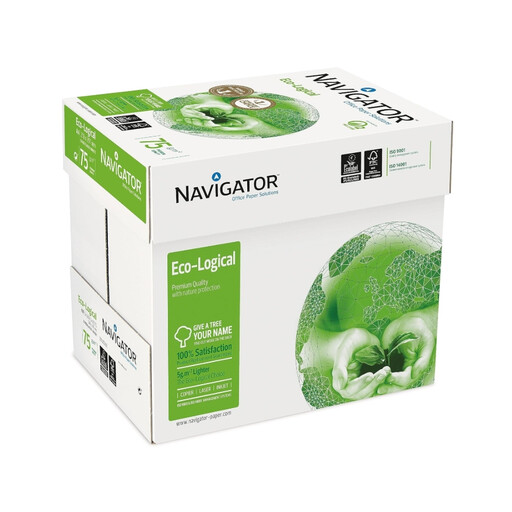
Why This Fits Their Persona: A practical choice for homes, small offices and schools seeking 2,500 sheets of standard white paper for regular documents without moving to a heavier stock.
The listing clearly states A4 format, 75gsm weight, 500 sheets per ream and 2,500 sheets per box, helping buyers compare like for like.
Listed with 93% opacity, 169 CIE whiteness, a matte finish, EU Ecolabel certification and compatibility with laser, inkjet and copier equipment.
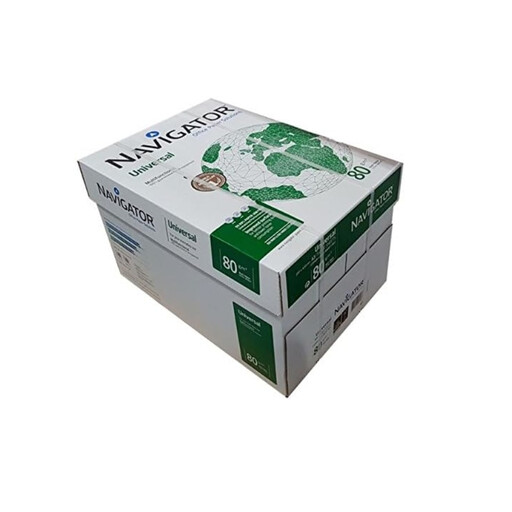
Why This Fits Their Persona: Suitable for buyers who prefer a smoother, heavier-feeling sheet for reports, graphics or presentation documents, subject to confirming the required format before ordering.
The product information identifies a specification conflict: the title says A3, while the supplied description states A4 and 80gsm. Check the product page carefully before purchase.
The supplied specifications list 80gsm weight, an ultra-smooth finish, 2,500 sheets and compatibility with printers and copiers.
Why This Fits Their Persona: A logical fit for departments, schools and public-sector teams handling frequent everyday printing and needing a clearly specified sustainable office paper.
Its stated multi-device compatibility reduces the need to stock separate paper for laser printers, inkjet printers, copiers and multifunction machines.
Available in five reams, with a listed pallet option of 240 reams or 48 boxes for organisations planning larger-scale storage and purchasing.
Store unopened reams in their original wrapping until required. Paper absorbs moisture, which can contribute to curling, feeding problems and uneven print results. Keep it away from radiators, windows and damp floors.
For lower running costs:
A paper that feeds reliably can help reduce wasted sheets, but claimed jam-free performance should be treated as a product specification rather than a guarantee for every printer, environment or maintenance condition.
The listed Navigator A4 75gsm product is specified for laser printers, inkjet printers, copiers and multifunction devices. Check your printer’s manual, particularly if it has special paper requirements or a manual-feed tray.
This depends on printing volume. A small home office may use a box over several months, while a school, business or public-sector department may consume it much faster. Track monthly usage before choosing between one box, multiple boxes or pallet quantities.