What to check before buying
Start with the connection that could free a socket, then assess the workspace your editing tools need and whether the screen will fit your desk.
| Concern |
What to check |
Who this matters to |
| One-cable compatibility |
Check the laptop’s USB-C or Thunderbolt video output, charging requirement and the cable needed for both functions. For a second display in a chain, check Thunderbolt support. |
I want to leave my laptop charger unplugged at a crowded desk, but need the monitor cable to carry video as well as enough charging power. Around 36% of consumers would put this need first. |
| Copy and preview space |
Compare 4K and QHD at the screen size you want, then try your usual editor and preview side by side. ENERGY STAR associates higher resolution with more room for words and multitasking. |
Keeping the draft and newsletter preview visible together matters more to me than switching constantly between windows; around 29% of consumers would make workspace their primary concern. |
| Colour-sensitive assets |
If image approval is part of the job, check the exact model’s stated calibration and colour-space coverage. ASUS lists these features for the ProArt PA279CRV. |
When I review branded graphics, I need to assess their colour as well as the surrounding copy. For roughly 21% of consumers, that would be the leading requirement. |
| Desk fit and adjustment |
Measure the available desk space and check the stand footprint and adjustment options. ENERGY STAR also advises considering desk size and intended use. |
A screen that fits my desk and can be positioned comfortably matters more to me than another display feature; about 14% of consumers would prioritise desk fit and adjustment. |
Joybuy monitors for this setup
These monitor choices cover different newsletter desks: 4K USB-C screens for working across windows, a flexible smaller display and a Full HD option. A USB-C connection alone is not a promise that a particular laptop can use one cable for both video and charging.
 No image available
BenQ MA270UP 27-inch Nano Glossy 4K USB-C monitor
Consider this Mac-focused monitor if you edit copy and previews on a compatible laptop. Its named configuration includes a 27-inch 4K UHD IPS display and a height-adjustable stand; confirm your laptop’s USB-C video support and charging requirement before planning a one-cable setup.
Joybuy
 No image available
Dahua 32-inch curved 4K OLED monitor, 165Hz
Consider the larger curved screen if it fits your desk and you want space for newsletter windows. The product name specifies 3840 × 2160 resolution, a USB hub and 65W Type-C; check that your laptop supports the required video connection and can meet its charging needs at 65W.
Joybuy
 No image available
MSI MD272UPSW 27-inch 4K Smart Monitor
Its 27-inch 4K IPS screen is relevant if you want to view newsletter copy beside a preview. The named configuration includes Google TV and USB-C 65W; check your laptop’s USB-C video capability and charging requirement before relying on the monitor instead of its charger.
Joybuy
 No image available
ASUS ZenScreen MB249C IPS USB-C monitor
Consider this model when a flexible desk arrangement matters more than the workspace of a 27-inch 4K screen. Before depending on one cable, check that your laptop supports USB-C DisplayPort Alt Mode and that the monitor’s charging output meets its needs.
Joybuy
 No image available
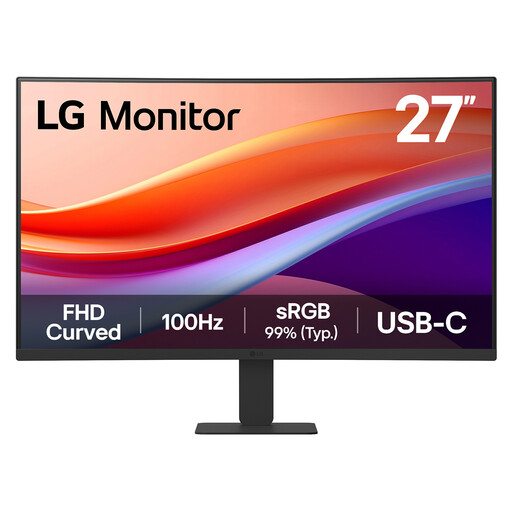
LG 27U421A 27-inch curved Full HD USB-C monitor
This model is worth considering if your newsletter work needs fewer simultaneous panes. Its named configuration has a Full HD VA display, USB-C, HDMI and tilt adjustment; check the USB-C charging output and your laptop’s video and charging support before counting on it to free a socket.
Joybuy
Questions about the setup
Can a USB-C monitor replace my laptop charger at the desk?
It can if the laptop supports compatible video output and accepts the power available from the monitor. Dell specifies up to 90W USB-C Power Delivery for the P2725QE, while LG specifies 90W charging for the 27U730A-B; check your laptop and cable rather than relying on the connector shape alone.
Do I need Thunderbolt for one newsletter-editing monitor?
Not necessarily: a compatible USB-C display connection can serve a single monitor. Check the monitor’s input and your laptop’s output; if you plan to chain multiple displays through one connection, confirm the Thunderbolt support required for that setup.
Is 4K or QHD more useful for newsletter editing?
At the same 27-inch size, 4K provides more pixels for copy, previews and assets, while QHD is an alternative if that extra workspace is not your priority. ENERGY STAR notes that higher resolution can help fit more words and support multitasking; consider how your usual apps look at your preferred display scaling.
What should I check about a warranty or a faulty monitor?
Check the exact model’s manufacturer warranty and the retailer’s process for reporting faults, and keep your proof of purchase. Manufacturer cover is separate from remedies for faulty or misdescribed goods bought from a trader; Coventry City Council Trading Standards provides consumer-rights guidance on faulty goods. Check change-of-mind return terms separately.
What should I do with an old monitor?
Use an appropriate electrical-equipment collection or take-back route rather than putting it in ordinary household waste. GOV.UK identifies monitors as falling within the wider rules for waste electrical and electronic equipment; check the arrangements available through your retailer or local collection service.


