
24/7 Customer Support

Free returns

Same-day & Next-day Delivery

Quality Guaranteed

Unlock Your Welcome Offers: FREE Delivery | Up to 80% OFF | Free 30-day JoyPlus trial
Download the APP
As a Joybuy Product Recommendation Officer, my role is to help you navigate the crowded market of gaming accessories. When it comes to Nintendo Switch controllers, the sheer number of options can be overwhelming. Whether your original Joy-Cons are showing their age, you’re gearing up for multiplayer or you simply want a more comfortable gaming experience, choosing the right controller is crucial.
However, the market is filled with pitfalls that can lead to disappointment and wasted money. Before you add anything to your basket, let’s look at the common traps UK buyers fall into and how you can sidestep them.
To ensure you get a controller that lasts and performs well, focus on these key technical specifications.
Your first decision is how you want to connect to your console. There is no single right answer; it depends entirely on your play style.
This is a technical point, but it’s the most important factor in avoiding stick drift.
The official Nintendo Switch joy-con and Pro Controller come with a full suite of features. However, many third party Switch controller models omit some of these to keep costs down. Before buying, check if the controller includes:
Instead of a generic list, we've matched some controller options to specific types of players. This way, you can find a model that truly fits your needs.
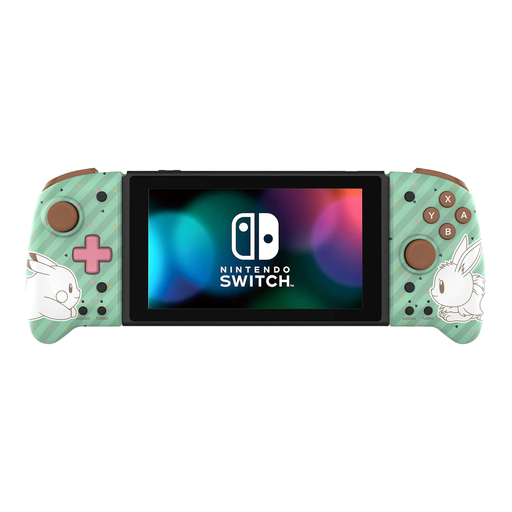
Why This Fits Their Persona: This player spends most of their time in handheld mode and finds the standard Joy-Cons too small for long sessions of games like RPGs or action titles. The Split Pad Pro transforms the Switch into a much more comfortable portable console.
It directly solves the "Ergonomic Illusion" trap by providing a genuine, full-size ergonomic Switch controller grip, larger buttons and proper analogue sticks, all from an officially licensed brand.
Vastly improved comfort for handheld play. Includes assignable rear triggers and a turbo function. Officially licensed by Nintendo.
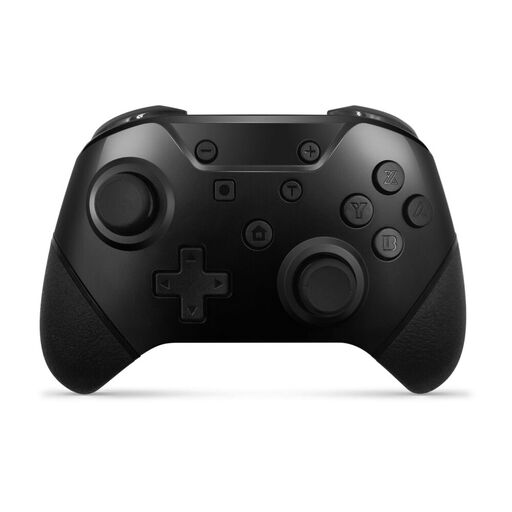
Why This Fits Their Persona: This person loves hosting game nights with friends and family but doesn't want to spend a fortune on official controllers. They need reliable, affordable pads for multiplayer games like Mario Kart and Super Smash Bros.
This pack avoids the trap of buying a single cheap Switch controller that fails. It offers exceptional value by providing two functional wireless controllers with motion controls, vibration and even programmable paddles.
Excellent value with two controllers included. Features remappable rear buttons and a turbo function, which are often found on more expensive pads.
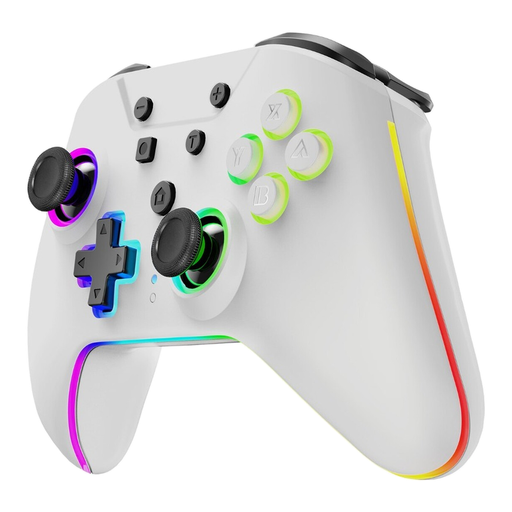
Why This Fits Their Persona: This player is tired of controllers failing due to stick drift. They are willing to invest in a controller that is built to last and maintains its precision over years of use. Performance and durability are their top priorities.
This controller is the ultimate answer to the "Drift Trap." Its Hall Effect sensing sticks use magnetic fields instead of physical contacts, which virtually eliminates the wear and tear that causes drift.
Superior durability and accuracy thanks to anti-drift Hall Effect sticks. Also features customisable RGB lighting and programmable rear buttons.
We have compiled a complete, real-time list of products that fully satisfy these strict selection criteria and UK safety regulations.
It certainly can be. Many third-party controllers from brands like Hori, Turtle Beach and Armor3 offer excellent value. They often provide features like enhanced ergonomics, programmable buttons or unique designs for a lower price than official options. The key is to check the specifications carefully. Ensure the controller has the features you need, such as motion controls or rumble, as these are sometimes omitted on budget models.
This depends on the controller. Some upcoming third-party models, like the HORI HORIPAD Turbo, are being designed with backward compatibility for the original Switch and Switch OLED. However, official Nintendo Switch 2 controller models, such as the new Joy-Con 2, may have exclusive features that are not compatible with the older hardware. Always read the product description to confirm console compatibility before purchasing.
The lifespan varies significantly based on usage and model. With heavy use, some players report analogue stick drift on official Joy-Cons within one to two years. The official Pro Controller is generally considered more robust. The longevity of third-party controllers depends on their build quality. For the longest possible lifespan, consider a controller with Hall Effect analogue sticks, as they are specifically designed to prevent the wear that causes drift.